
The 10 Best AI Email Assistants in 2026: What Each Is Actually Best At
The best AI email assistant depends on what is wasting your time. Choose Superhuman for a fast premium client, Shortwave for deep Gmail AI, Fyxer for voice-matched drafts, SaneBox for background filtering, and MorningZero or Spark when one person needs AI across several accounts. No tool wins every job.
That last point is what most rankings blur. An assistant that writes a polished reply may do nothing about five separate inboxes. A filter that quietly removes noise may never answer a question about a contract. A team inbox can be excellent software and still be the wrong purchase for one consultant.
We compared ten products on the job each is built to do, the providers it supports, whether its AI works across multiple accounts, and its current list price. Product facts and prices were checked against first-party pages on 22 August 2026.
The short answer: which AI email assistant fits which job?
| Product | Best for | Works across all connected accounts at once? | Providers | Current entry price | Honest gap |
|---|---|---|---|---|---|
| MorningZero | One person triaging several client, work and personal inboxes | Yes: search, triage, rules and calendar span the connected set | Gmail, Workspace, Outlook, Microsoft 365, and named hosted IMAP providers | $19/month for 5 mailboxes | No iOS app; no team assignment; no custom/self-hosted IMAP |
| Superhuman | A polished, keyboard-fast premium client | Yes for cross-account search through Superhuman Mail MCP; other settings remain per account | Gmail and Microsoft 365 | $30/member monthly, or $25 on annual billing | Expensive if speed is not the bottleneck; no IMAP |
| Shortwave | AI search, organization and drafting inside Gmail | Multiple Google accounts are supported; it remains Gmail-first | Gmail and Google Workspace | $30/seat/month | Gmail-only; AI usage and filter counts are plan-limited |
| Fyxer | Drafting in your voice plus meeting follow-up | Professional covers multiple inboxes and calendars | Gmail and Outlook | $30/user/month for one inbox; $50 for multiple | Stronger on drafting and meetings than cross-provider inbox breadth |
| SaneBox | Filtering low-priority mail without changing clients | Handles several accounts on higher plans, but works as a background service | Major providers plus IMAP, Exchange and ActiveSync | $9.49/month for 1 account; 4 accounts cost $42.99 monthly | Does not replace the client or provide a full drafting workspace |
| Copilot in Outlook | Native AI for Microsoft 365 users | Primary-mailbox scope; not shared, archive or delegate mailboxes | Exchange Online / eligible Outlook accounts | Standard Copilot Chat with eligible M365; full M365 Copilot is $30/user/month annually | Microsoft documents primary-mailbox and Exchange Online limits |
| Gemini in Gmail | Native writing, summaries and search in Gmail | Works inside the signed-in Google account | Gmail and Google Workspace | Some personal US features are free; included in Workspace subscriptions | Not a cross-provider command center |
| Spark | A cross-provider client with AI search and actions | Yes: its assistant searches the unified inbox across connected accounts | Gmail, Outlook, iCloud, Yahoo and standard IMAP | Limited preview on Free; Plus $10/user/month | Plan pages describe shared monthly AI quotas; Pro removes the history cap |
| Missive | Teams that need shared inbox work plus model choice | Yes: assistant searches connected Gmail, Outlook and IMAP accounts | Gmail, Outlook and IMAP | AI starts on Productive at $30/user/month, plus model usage | Collaboration machinery and per-user pricing are unnecessary for many solo users |
| Inbox Zero | Open-source control and self-hosting | Plus includes 2 email accounts per user; team controls sit higher | Gmail, Workspace and Outlook | Hosted Starter $20/user/month; source is available for self-hosting | Self-hosting moves cost and maintenance to you |
Prices above are monthly list prices unless stated otherwise. SaneBox defaults its pricing page to two-year billing, so we switched it to Monthly before recording $9.49, $15.99 and $42.99. Spark, Google and Microsoft expose some AI at lower or included tiers but reserve broader history or features for paid plans.
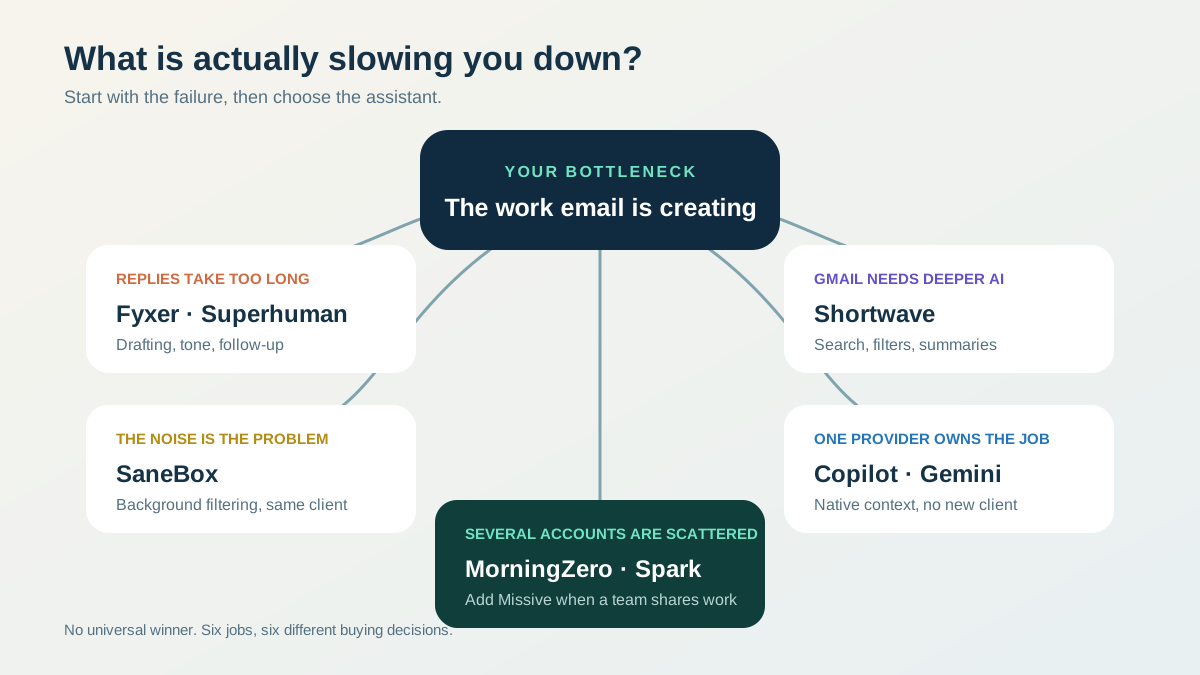
Start with the failure in your current workflow. “Has AI” is not a useful buying criterion; drafting, filtering, native-suite help, team collaboration and cross-account triage are different jobs. Original decision map for this comparison.
How we chose the ten products
The comparison set came from two places: the products that currently rank for the query and tools with a distinct job that a real buyer might choose instead.
We classified the first ten organic Google results for best ai email assistant on 22 August 2026, using US English desktop results with personalization off. Google showed an AI Overview, People Also Ask, videos, reviews and related searches.
| Rank | Result | Page type |
|---|---|---|
| 1 | Zapier: The 10 Best AI Email Assistants | Editorial listicle |
| 2 | Reddit: Best AI assistant for email organization? | Forum |
| 3 | Microsoft: AI Email Assistant for Outlook | First-party product page |
| 4 | Gmelius: 15 Best AI Email Assistants | Vendor listicle |
| 5 | Lark: Best AI Email Assistant | Vendor explainer |
| 6 | Inbox Zero: Best AI Email Assistants | Vendor listicle |
| 7 | NewMail AI: What Is the Best AI Email Assistant? | Vendor explainer |
| 8 | Mailbutler vs MailMaestro | Comparison video |
| 9 | This AI Email Assistant Actually Replies for You | Product video |
| 10 | Elephas: Top 8 Best AI Email Assistants | Editorial listicle |
NewMail later removed the exact URL that occupied rank 7 in this 22 August snapshot. The row remains unlinked because Wayback has no successful capture of that page.
That makes the measured result set six written listicles or explainers, one forum, one first-party product page and two videos. The search intent is clearly comparative, even though SE Ranking labels the keyword informational.
We did not create fake “testing” scores. The products were not all installed in the same inbox, and claiming otherwise would turn documentation research into invented experience. The evidence here is reproducible: current first-party feature pages, current pricing pages, and the published SERP audit above.
1. MorningZero: best for one person with several providers and accounts
MorningZero starts from a narrower customer than most tools: one person carrying several mail identities. Think of a fractional CFO with one Workspace account per client, an agency owner with company Gmail and two client Microsoft 365 accounts, or a consultant mixing personal mail with Fastmail.
Its differentiator is scope. Triage, Search, Ask Zero, Sweeps, plain-English rules and calendar read across the connected set. Accounts stay at their providers and each message keeps its source identity. This is a layer, not a migration or new email address.
Solo costs $19/month for 5 mailboxes. Stack costs $29 for 15 and adds priority support. Billed annually they are $180 and $276, about $15 and $23 a month. Extra mailboxes are $3/month each with no hard cap; at 20 or more, the pricing page suggests asking about a negotiated rate. Both plans include the same core AI and workflow features with no fixed message or AI-credit quota.
The limits are plain. There is no iOS app, no team assignment or internal commenting, no direct Proton connection, and no support for custom or self-hosted IMAP today. Gmail, Workspace, Outlook.com and Microsoft 365 use provider consent flows. Fastmail, iCloud, Yahoo, AOL, GMX, Web.de, Zoho, Yandex and Mail.com use app-specific passwords.
Choose it when scattered accounts are the problem. If one inbox is already enough, a native assistant or faster client may be simpler.
2. Superhuman: best premium client for speed and polish
Superhuman is the clearest choice when the client itself feels slow. Its product is built around rapid keyboard operation, reminders, calendar and a deliberately polished interaction model. The current plan page also lists Write with AI, Instant Reply, Auto Summarize, Auto Labels and personalization.
Starter is $30/member/month on monthly billing or $25/month billed annually. Business is $40 monthly or $33 annually and adds the more advanced AI layer, including Auto Drafts, Ask AI, custom AI labels, voice and tone matching, and CRM integrations.
The honest concession is simple: if speed and finish are the deciding variables, MorningZero is not a better Superhuman. Superhuman has had years to tune that experience.
The reverse is also true. Superhuman now documents cross-account search through its Mail MCP server, while its Email Assistant settings remain configured per account. It covers Gmail and Microsoft 365 rather than hosted IMAP. For the account-and-price comparison, read Superhuman vs MorningZero.
3. Shortwave: best AI-native Gmail client
Shortwave has the broadest documented AI toolset in this Gmail-first group: AI search, attachment analysis, summaries, predictive autocomplete, web browsing, calendar work, filters and inbox organization. Its pricing page also publishes its limits instead of hiding them.
Business costs $30/seat/month and allows roughly 150–300 Standard-intelligence AI requests per day, searches over as many as 50 threads at once and three AI filters. Premier costs $45 and increases those limits. Max costs $120.
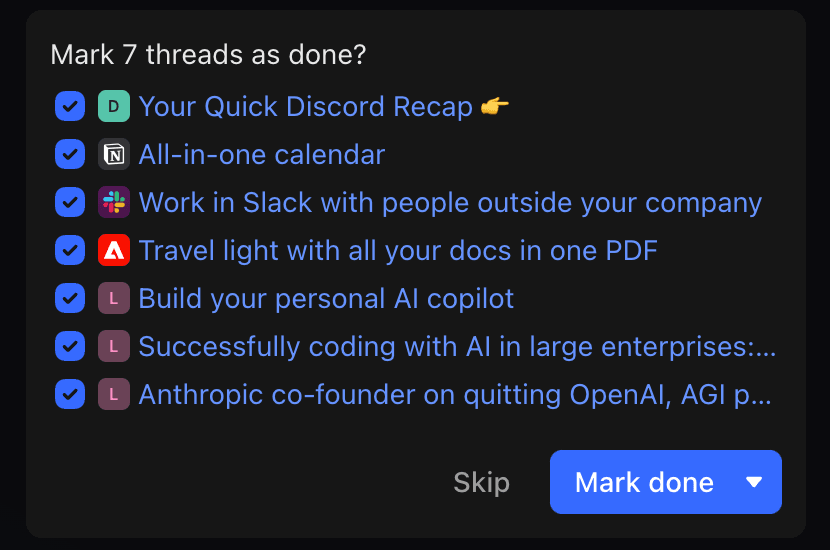
Shortwave’s assistant proposes a bulk inbox action, then waits for confirmation. Official screenshot: Shortwave AI Assistant guide, checked 22 August 2026.
Shortwave is excellent if Gmail is the center of the job and you want the AI embedded deeply in the client. It is not the answer for Outlook, iCloud, Fastmail or a mixed-provider setup. Its own multi-account documentation has historically relied on Google-account connections rather than a cross-provider inbox.
4. Fyxer: best for voice-matched drafting and meeting follow-up
Fyxer behaves more like an executive-assistant layer than a new mail client. It organizes the inbox, drafts replies from past conversations and adds meeting notes, scheduling and chat. It works inside Gmail and Outlook.
Starter is $30/user/month and covers one inbox and calendar. Professional is $50/user/month and covers multiple inboxes and calendars, adds Fyxer Chat, scheduling across teams and time zones, HubSpot, file uploads and onboarding. Annual billing is 25% lower at $22.50 and $37.50 per month equivalent.
Fyxer says it cannot send on your behalf; it drafts and leaves the final action to you. That is a useful boundary for anyone who wants help without autonomous outbound email.
Choose Fyxer when the repeated cost is writing and meeting follow-up. Choose a wider unified inbox when the first problem is finding and triaging mail across providers.
5. SaneBox: best background filter that keeps your current client
SaneBox does not ask you to adopt a new inbox. It connects to the mailbox, learns which messages matter and moves lower-priority mail into Sane folders. It also offers a daily digest, follow-up reminders, snooze and BlackHole for unwanted senders.
Its provider coverage is broad: Gmail, Microsoft 365, iCloud, Yahoo, Fastmail, IMAP, Exchange and ActiveSync. That makes it useful when you like your current client and only want the noise reduced.
Monthly billing currently costs $9.49 for Snack with one account and two features, $15.99 for Lunch with two accounts and six features, and $42.99 for Dinner with four accounts and all features. A seven-day trial is listed. The lower equivalents on the default pricing view require paying two years at once.
SaneBox is not a drafting client or a conversational layer over all your mail. That is the point. Buy it when filtering is the whole problem.
6. Microsoft Copilot in Outlook: best native choice for Microsoft 365
Copilot in Outlook summarizes threads, drafts messages, coaches tone and clarity, prioritizes the inbox, creates rules in natural language and can take triage actions. For an organization already standardized on Microsoft 365, that native access is hard to beat.
Microsoft now exposes a standard Copilot Chat experience in Outlook at no additional cost with eligible Microsoft 365 subscriptions. The full Microsoft 365 Copilot plan is $30/user/month paid yearly and adds broader work context and higher-priority capabilities across Outlook, Teams, Word, Excel and PowerPoint.
Microsoft documents material scope limits. Copilot scenarios work on the user’s primary mailbox, not archive, group, shared or delegate mailboxes, and not mailboxes outside Exchange Online. That makes it a strong native assistant, not a universal layer across every address a fractional executive carries.
For a deeper breakdown of Copilot against Outlook-specific add-ins like MailMaestro and Mailbutler, and the email-native agent Carly AI, see Best AI Email Assistant for Outlook.
7. Gemini in Gmail: best native choice for Google Workspace
Gemini in Gmail writes and refines drafts, summarizes threads, suggests replies, searches mail in natural language and can pull details from Workspace files. It is included across Google Workspace subscription plans, with feature availability varying by edition. Google also offers Help me write, thread overviews and suggested replies at no charge for personal Gmail users in the US.
The main advantage is friction. If one Gmail or Workspace account contains the job, Gemini is already where the mail lives. No extra provider authorization or client migration is required.
The limitation is the same one that appears across native tools: account scope. Google can make one Google account smarter without turning several Google, Microsoft and IMAP identities into one cross-provider workflow. If that is the actual problem, start with the unified-inbox definition, not another writing assistant — and eleven email productivity tools tested across several mailboxes records which of them say, in their own documentation, that they cannot merge your accounts at all.
8. Spark: best cross-provider client with a free starting point
Spark is the strongest direct alternative when provider breadth and platform coverage matter. Its AI Assistant searches across the unified inbox, attachments, calendar and meeting notes, links answers back to source messages, drafts and rewrites mail, and can take batch actions.
Spark documents support for Gmail, Workspace, Outlook, Office 365, iCloud, Yahoo and standard IMAP, including custom domains. It runs on Mac, Windows, Android and iOS.
Free includes a limited AI Assistant preview with one month of searchable history. Plus costs $10/user/month or $99/year and raises history to one year. Pro costs $20/month or $199/year and removes the history cap while adding stronger collaboration. Spark’s current pages differ on whether Pro removes the usage cap: the billing guide calls the Pro assistant unlimited, while the pricing FAQ still describes a shared monthly AI quota. Treat the pricing page and in-app allowance as the final check before buying.
Spark is a real concession for MorningZero: it has iOS, broad IMAP and a free starting point. Choose MorningZero when unmetered triage, plain-English rules and one-person multi-account prioritization matter more than those advantages.
9. Missive: best AI assistant for a team inbox
Missive reads threads, searches connected Gmail, Outlook and IMAP accounts, checks calendars, looks up contacts and drafts replies. It can use OpenAI, Anthropic or Google models, either through Missive credits or the customer’s own API key.
The AI Assistant requires Productive at $30/user/month or Business at $45. Missive adds a 25% markup when it supplies the model credits; bring-your-own-key is billed directly by the provider. Its team layer includes shared inboxes, comments, assignments, rules, analytics and organization-wide instructions.
That makes Missive better than MorningZero for a support or operations team managing one queue together. It also makes Missive heavier and more expensive for a solo consultant who has five identities but no colleagues assigning threads.
A shared inbox and a unified personal inbox are different products. This guide to managing multiple email accounts explains where that boundary belongs.
10. Inbox Zero: best open-source and self-hosted option
Inbox Zero is an open-source assistant that works beside Gmail, Workspace and Outlook. It organizes incoming mail, drafts replies, manages rules in plain English, blocks cold email, cleans up subscriptions, prepares meeting briefs and supports Slack or Telegram control. The public repository exposes the code, and the project publishes self-hosting instructions.
The hosted Starter plan is $20/user/month. Plus is $35 and includes two email accounts per user plus Slack, app integrations and a larger knowledge base. Business is $50 and adds team analytics and higher-touch support. All hosted plans list a seven-day trial with a card required.
Self-hosting is not the same as free operation. You own deployment, OAuth setup, database, updates and model costs. That trade is worthwhile for a technical buyer who values code access and control more than a managed service.
The naming also matters: Inbox Zero is a product, not just the inbox-zero method. This article uses its full product name when discussing it.
Which assistant actually works across several accounts?
A product can support multiple accounts in three very different ways:
- Switching: several accounts are connected, but the user still chooses one context at a time.
- One message list: the inbox looks combined, while search, rules or AI stay scoped.
- One workflow: search, triage, rules and answers operate across the connected set and still show the source account.
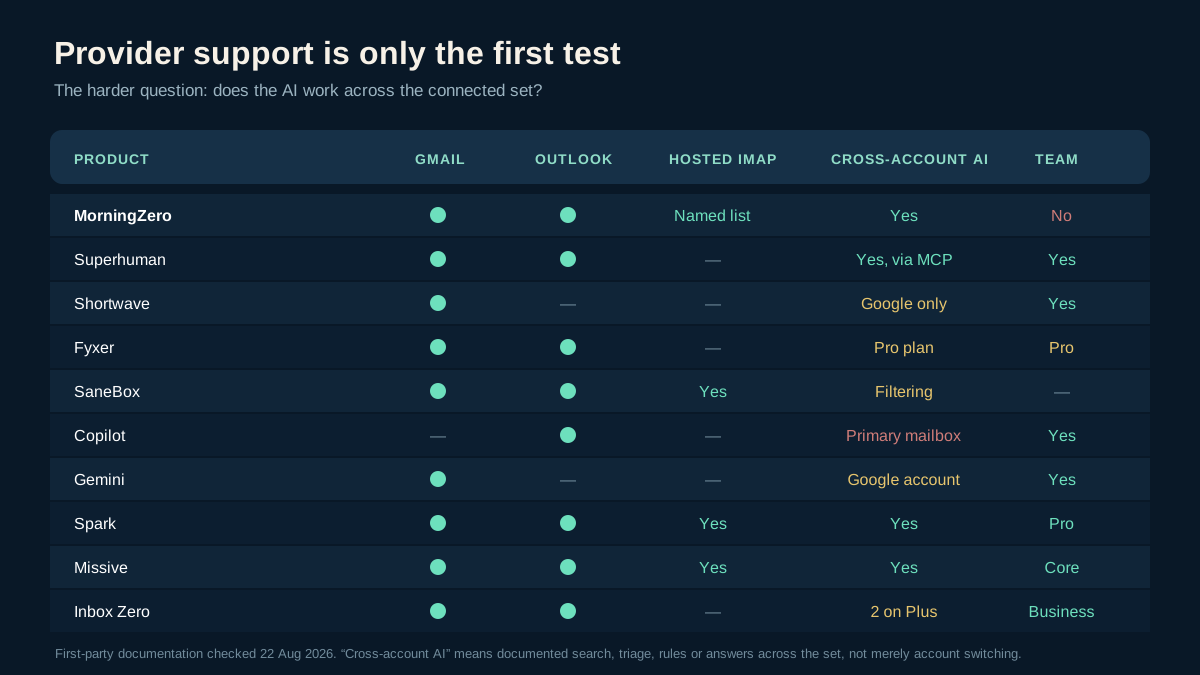
Provider support is only the first test. The second is whether the AI can search, prioritize or act across the connected set. Original matrix based on the first-party sources linked in this article, checked 22 August 2026.
For one person with several clients, the third model removes the most repetition. MorningZero, Spark and Missive document cross-account search or workflow. Spark is the stronger consumer client and supports iOS. Missive is the stronger collaboration product. MorningZero is narrower: one person, several mailboxes, one unmetered triage layer.
Superhuman, Shortwave, Copilot and Gemini can be better tools when one provider or client already contains the work. Provider-native context is an advantage, not a defect. The mistake is buying one-account intelligence to solve a many-account problem.
None of this is the same question as whether a tool acts on its own. Every product named on this page still drafts and waits for you to send — What Is an AI Email Agent? covers the handful of tools, mostly built for business automation rather than personal inboxes, that will actually send without asking.
The useful way to choose
Pick the bottleneck before the product.
- Writing replies takes too long: start with Fyxer, Superhuman or the native assistant in Gmail or Outlook.
- Gmail search and organization feel weak: Shortwave is the most focused answer.
- Noise arrives faster than you can process it: SaneBox solves that without replacing your client.
- Several people own one queue: Missive is built for that job.
- You want code access and self-hosting: Inbox Zero is the clear candidate.
- You need iOS and broad provider support: Spark has the stronger platform story.
- You carry three to fifteen personal, work and client accounts: compare MorningZero, Spark and Missive on cross-account scope, not on generic AI checkmarks.
MorningZero is not the universal winner. It is built for the reader whose mail is scattered across roles and providers. If that describes your week, the 14-day trial, which needs no card, is enough to test one account first, then add the others only if the combined reply queue is genuinely clearer.
First-party sources checked 22 August 2026
- MorningZero homepage, pricing, and downloads
- Superhuman Mail plans, account support, and Mail MCP
- Shortwave pricing and AI Assistant guide
- Fyxer pricing and product page
- SaneBox pricing and provider overview
- Copilot in Outlook FAQ and Microsoft 365 Copilot pricing
- Gemini in Gmail, Workspace feature availability, and Workspace pricing
- Spark AI Assistant and Spark pricing
- Missive AI overview, AI setup, and billing plans
- Inbox Zero product page, documentation, and open-source repository
Frequently asked
Which AI is better for emails?
The best choice depends on the bottleneck. Superhuman is strongest for a fast premium client, Shortwave for deep Gmail AI, Fyxer for drafts and meeting follow-up, SaneBox for background filtering, and MorningZero or Spark when one person needs AI across several accounts and providers.
Is there a free AI email assistant?
Yes, with limits. Spark Free includes a limited AI Assistant preview and one month of searchable history. Microsoft Copilot Chat is available at no additional cost with eligible Microsoft 365 subscriptions. Some Gemini in Gmail features are free for personal US accounts. Inbox Zero is open source and can be self-hosted, but running it still requires infrastructure and AI-provider setup.
Can ChatGPT organize my emails?
ChatGPT does not organize an inbox by itself. A connected email product can use OpenAI models to search, classify, draft or act on mail after you authorize access. Missive supports OpenAI alongside Anthropic and Google, while other assistants use their own chosen model stack. The email permissions, rules and confirmation controls come from the product, not ChatGPT alone.
Which AI email assistant works with both Gmail and Outlook?
MorningZero, Fyxer, SaneBox, Spark, Missive and Inbox Zero all document support for both Google and Microsoft mail. Provider breadth differs after that: Spark and SaneBox also support broad IMAP, while MorningZero supports a named list of hosted IMAP providers but not custom or self-hosted IMAP.
What is the best AI email assistant for several accounts?
For one person managing several client, work and personal accounts, compare whether search, triage and rules span the full connected set rather than merely letting you switch accounts. MorningZero, Spark and Missive document cross-account search or workflow; Missive is the better fit when several people also need assignments and internal collaboration.
Do AI email assistants send messages automatically?
Some can take inbox actions or generate drafts, but sending controls vary by product. MorningZero and Fyxer explicitly stop at a draft that the user reviews. Before connecting any assistant, check whether sending, archiving, deleting and rule execution require confirmation and whether those controls apply per mailbox. For the fuller assistant-vs-agent distinction, including the few tools that will send without asking, see What Is an AI Email Agent? below.