
Email for freelancers: personal, project and client addresses on one cheap setup
You're one person. You don't need seats, assignments or a shared queue. You need your three or four addresses in one list, the invoice reply on top, and a price that fits a solo business.
Facts and prices checked 26 September 2026
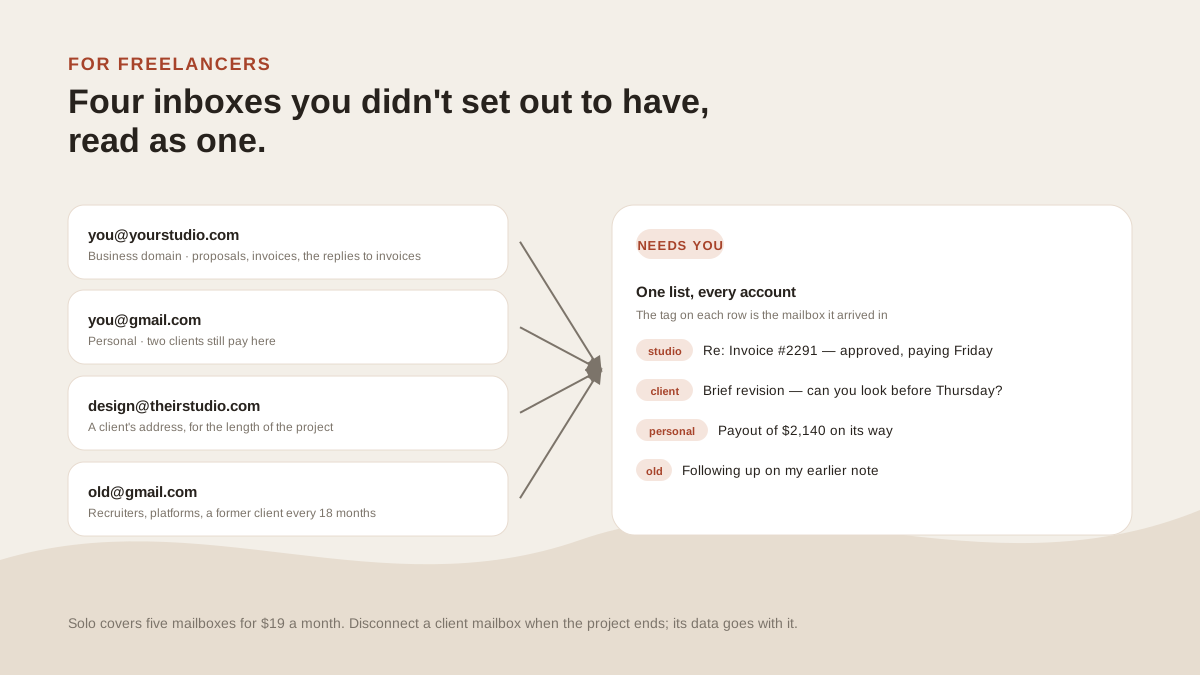
Nobody set up your email. It accumulated: a business domain when you registered the company, a client's address for one long job, a project alias, and the Gmail you had before any of it. No shared inbox, no assistant, no IT. Just those four and you.
How the addresses pile up
The business domain, you@yourstudio.com, gets proposals, contracts, invoices, and the replies to invoices.
The personal address still gets paid work, because two clients never updated their records.
A project or client address turns up mid-job. Sometimes an alias like projectx@yourstudio.com, sometimes a seat on the client's own domain for the length of the engagement.
And the old Gmail collects recruiters, platform notices, a payment processor's alerts, and a former client every eighteen months.
None of these is wrong. Together they're four places the reply that pays you might land.
The cheapest setup that works
There are two answers, and the first costs nothing.
If you read mail on a phone and the four addresses are all Gmail, the Gmail app's All inboxes view is free and good. If they're mixed providers, Spark Free holds unlimited accounts at $0. Spark vs MorningZero says where that stops.
The paid answer is Solo: $19 a month, or $15 billed yearly, for up to five mailboxes. Every AI feature on, no credits. You're not paying for seats, assignments or a queue you'd never open.
The trial takes up to five mailboxes for fourteen days with no card. Connect the business domain and the old Gmail first; that's usually where the buried replies live.
Aliases versus mailboxes
A project address on your own domain is usually an alias. Before we'll send from one, we send a single probe message through it and check that the provider delivered it under that address unchanged. Gmail will quietly swap in the main address otherwise, and nothing would tell you.
Once the alias passes, it's in the picker, the reply goes out as projectx@yourstudio.com, and it doesn't count as a mailbox.
A client's address on the client's domain is a separate mailbox. It takes one of the five slots while it's connected and frees it when you disconnect.
The reply you can't miss
Every message is read as it lands and sorted into Needs you or Other. A client answering your invoice is a person replying to something you sent, and the triage layer puts it in Needs you whichever address it landed in.
It gets the reply arrow, which stays until you actually reply; reading doesn't clear it. Mail you only need to see, like a payout notice, sits in Needs you with an eye instead.
One rule covers the rest: "Anything about invoices or payments, mark important." It runs on every address you've connected, and the editor shows which old threads it would have lifted before you save it.
Vendor noise
Freelance mail attracts the trials you signed up for on one job. Three project tools, two design platforms, a payment processor's newsletter.
Sweeps groups senders you never open across every address, shows volume and how many you opened, and unsubscribes from all of them in one pass. In the mail MorningZero sorted in August, ten senders were 43 percent of the noise.
When the job ends
Disconnect the client mailbox. Everything from it here goes in one delete, and the app password or token we held goes with it.
If it was a Google Workspace seat, we also revoke the grant at Google. On Microsoft 365 the client's admin removes the app from their side, which is the step their security review asks about anyway.
What it won’t do
The limits, before you find them yourself.
It won't send invoices, track time or chase payment. It reads mail.
It has no team features. If a second person needs to see your inbox, that's a different product.
It isn't free. Spark Free holds unlimited accounts at $0. If that's doing the job, keep it.
No iPhone app yet. On a phone it's Android or the web app; on an iPhone, Gmail's own All inboxes view is a fair substitute.
Questions
Asked often enough to answer here.
What's the cheapest way to run three or four addresses in one place?
Free: Spark, or the Gmail app's All inboxes on a phone. Paid: MorningZero Solo at $19 a month, $15 billed yearly, for up to five mailboxes with triage on every message. The trial takes up to five for fourteen days with no card.
Do I need a separate mailbox for each project?
Usually not. A project address is often an alias on your business domain. Once an alias has passed our probe send, you can reply from it without it counting as a mailbox. A client's own address on their domain is a separate mailbox.
Can I reply from the client's address?
Yes, if it's a mailbox you can sign into. Replies go out from the account the message arrived in, and the row shows which one.
What happens to a client mailbox when the job ends?
Disconnect it. Its messages, labels, rules, drafts and learned preferences are purged here in one go, and the app password or token we held is destroyed with them.
Nothing sends itself
Connect the business domain and the old Gmail.
Those two are usually where the buried replies live. Fourteen days, no card, and room for the other two.