
Connect Fastmail with an app password
It's the smoothest connect of any app-password provider. You generate a password, paste it once, and you're done.
Facts and prices checked 26 September 2026
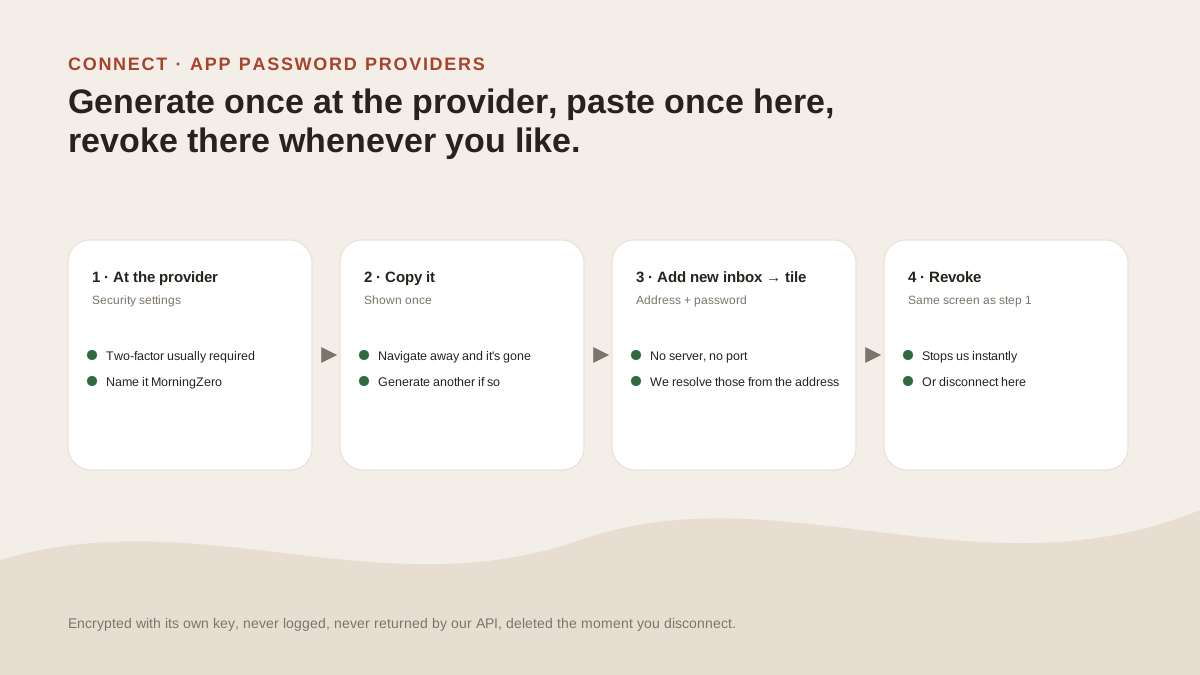
If you're connecting several app-password providers, start with Fastmail. Its server is the best-behaved in the set, and the whole thing takes a minute.
There's one thing to check before you begin: your plan.
Check your plan first
You need a Fastmail plan that includes IMAP. Fastmail's help is explicit that Basic-plan accounts can't use third-party mail clients or create app passwords.
Standard and above can.
Steps
- Log in to Fastmail on the web, and open Settings, then Privacy & Security.
- Find Connected apps & API tokens. Click Manage app passwords and access, then New app password.
- Name it
MorningZeroand choose mail-only access (IMAP and SMTP). We only read and send mail, so there's no need to grant contacts and calendars access. - The next page shows the password once, so copy it before you move on.
- In MorningZero, choose Add new inbox, then the Fastmail tile. Enter your address and paste the password.
- Press Connect.
You won't be asked for a server or port. We already know Fastmail's.
Why it runs so smoothly
Fastmail's server supports CONDSTORE and QRESYNC, and those make each check cheap. We can simply ask the server what changed, with no need to re-read the folder.
New mail is polled every five minutes. Changes you make here, like archiving, read state and folders, reach Fastmail straight away.
Labels carry over in both directions too. Fastmail stores custom IMAP keywords, so labels you apply here are written to Fastmail as keywords prefixed MZ_, and Fastmail's own labels appear here.
The one gap is calendar. The Calendar tab is unavailable for Fastmail accounts, because Fastmail calendars use CalDAV, which we don't yet support.
Pausing, removing and reconnecting
At Fastmail, go to Settings, Privacy & Security, Connected apps & API tokens, and find the MorningZero entry. Disable pauses it; Remove is permanent. We lose access the moment you do either.
After that, MorningZero shows that the address has stopped syncing — the app password was changed or revoked, with an Update password button. When you want it back, generate a new one and paste it in.
You can also disconnect the mailbox in MorningZero, which deletes its data here and discards the stored password.
Sources
- Click path, scopes, shown-once behaviour, revocation and the Basic-plan limit: Fastmail Help, "App passwords", read 20 September 2026.
Questions
Asked often enough to answer here.
Where do I create a Fastmail app password?
Go to Settings, Privacy & Security, Connected apps & API tokens, Manage app passwords and access, New app password. We read this from Fastmail's help on 20 September 2026.
What scope should I choose?
Mail only (IMAP and SMTP). We never touch contacts or calendars on Fastmail, so there's no reason to grant them.
Why can't I create an app password on Fastmail Basic?
Basic doesn't include IMAP, SMTP, CalDAV or CardDAV, so third-party clients and app passwords are unavailable on it. Standard and above include them.
Can I connect a Fastmail custom domain?
Yes. Pick Fastmail as the provider and enter your address on your own domain.
Nothing sends itself
Connect Fastmail next to your Gmail.
Fastmail is usually the one that just works. Add it beside a Gmail on the trial, which covers up to five mailboxes with no card.