
Email for agency owners: several client identities, one person's view
You are you@studio.com, you@clienta.com and you@clientb.com, depending on who's asking. One person, several identities. This page is about that person's mail, not about your team's shared inbox.
Facts and prices checked 26 September 2026
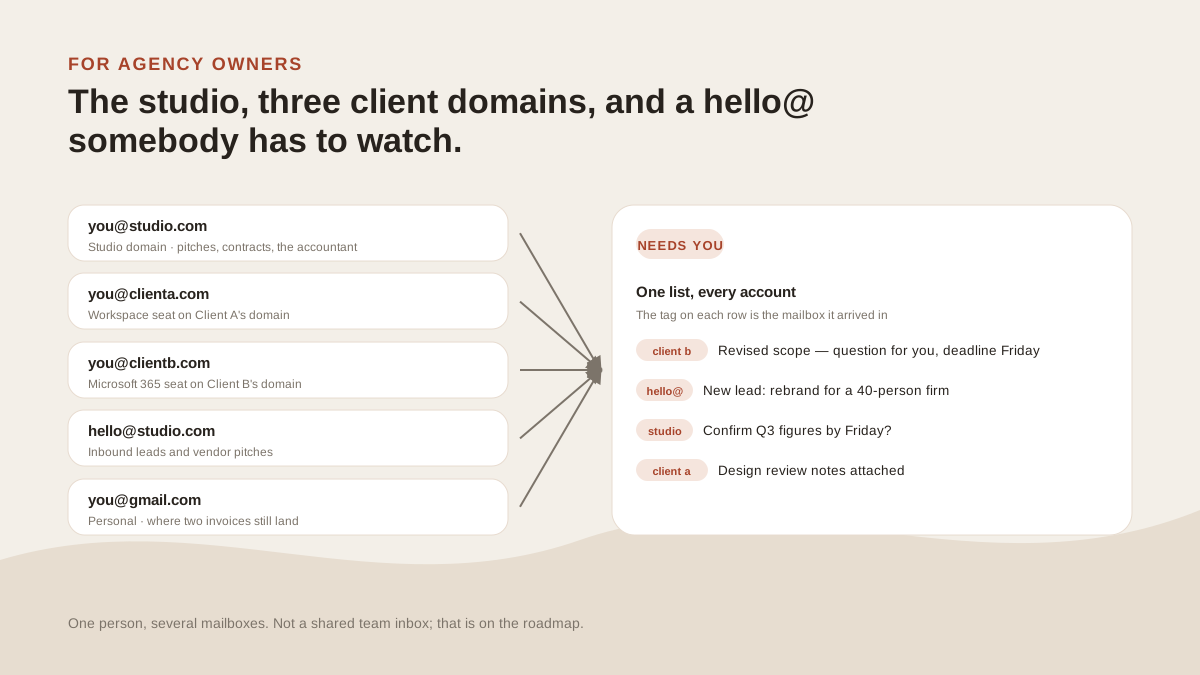
Client A gave you you@clienta.com so you'd show up in their mail as one of them. Client B did the same on Microsoft 365. The studio has you@studio.com and a hello@ somebody set up in 2023.
By Tuesday you're answering as four different people, and each of them has a separate tab.
Identities, and what stays separate
Each client seat connects through the client's own consent screen and arrives in your list tagged with its account. A reply to Client B's revised scope goes out as you@clientb.com, because that's where it arrived.
The mailbox picker in compose lists every connected account and every alias on each that has passed the probe send. Your signature follows the mailbox.
Your identities stay separate. Only the reading is combined.
What this is not
Two people can't work one hello@ here. There are no assignments, no internal comments, no "who's got this". If your team handles inbound together, that's Missive or Front, and they do it well.
Team tooling is on our roadmap. It's not in the product today, and we'd rather you know before you connect anything.
What this page is about is the owner's own mail: the seats, the studio address, the hello@ if you're the one who reads it.
The owner's view
One list, four or five tags, Needs you on top.
Client B's scope question is there, with the reason on the row: a direct question, from a sender you reply to often. The lead that came into hello@ at 11pm is there too, because a first message from a real person asking a question is something the triage layer keeps visible.
The forty notifications from three clients' project tools are in Other. When one client's tool keeps getting flagged, mute it from the row and pick "whole domain". It stops from the next message on.
Rules across client domains
"Label anything from @clienta.com as Client A." "Anything from a client domain mentioning a deadline, mark important."
A rule like that runs over every seat or is pinned to one, and the editor shows what it would have caught before you commit.
Client IT
Some client tenants require an administrator to approve third-party apps. The Outlook guide has the paragraph to forward, and the security page has what their IT will check: Microsoft's verified-publisher mark, Google's CASA assessment, a revocable token rather than a password.
If a client says no, that seat stays in their Outlook. The rest come here.
The price at six mailboxes
Solo covers five for $19 a month, $15 billed yearly. The sixth is $3 a month. Past eight, Stack at $29 covers fifteen.
A client seat occupies a slot while it's connected and frees it when the engagement ends. A disconnected seat is gone from here in a single delete, along with the tokens we held. On Google Workspace we revoke the grant as well; on Microsoft 365 the client's admin removes the app from their tenant.
What it won’t do
The limits, before you find them yourself.
No assignments, no internal comments, no shared support queue. Two people can't work one hello@ here. That's Missive or Front.
No team logins. One person, several mailboxes.
It won't send on anyone's behalf.
No iPhone app. The Android app and the web app are the phone options.
Questions
Asked often enough to answer here.
Is MorningZero a shared inbox for agencies?
No. It's one person's view across several mailboxes, some on client domains. Several people triaging one address together, with assignments and comments, is Missive or Front. Team tooling is on our roadmap.
Can I send as my identity on a client's domain?
Yes. A seat on the client's Workspace or Microsoft 365 connects through their consent screen, and replies go out as you-at-their-domain. An alias on any connected mailbox can send too, once it has passed our probe send.
What does six mailboxes cost?
Solo covers five for $19 a month ($15 yearly); the sixth is $3. Stack at $29 covers fifteen.
What about hello@studio.com?
If you're the only person who reads it, connect it and it becomes one tag in your list. If two or more people work it, it needs a shared-inbox tool, and connecting it here won't give them one.
Nothing sends itself
Connect the studio domain and one client seat.
Send one reply from each and see whether it feels like one inbox. Fourteen days, no card, room for the other seats.