
Zoho IMAP settings: connect Zoho Mail with an app password
Zoho runs a separate server for each region, and a correct password still fails on the wrong one. Once you've got the region right, turned IMAP on and made an app password, the rest takes two minutes.
Facts and prices checked 28 September 2026
In our support mail, Zoho is the provider where a correct password fails most often. Nearly every time, either IMAP is switched off or the right password went to the wrong region's server.
The region one catches people out, so that's where we'll start.
Warning: .com, .in, .eu and the rest are different servers
Zoho keeps each region's accounts on that region's own servers. An account made in India lives only on the Indian servers, and the US server has never heard of it.
You'll run into this in three places.
- Your address. If it ends in
@zoho.inor@zohomail.in, we pick India for you, and we do the same for.eu,.com.au,.jp,.uk,zohocloud.caand.sa. - Your own domain.
you@yourcompany.comgives us no hint. If you leave Data centre on "Detect from my email address", we use the US server. An Indian or European account then fails with "Sign-in failed. Check the address and app password", even though the password is right. - The app password. You create it on your own region's Zoho Accounts site. Our video's captions say accounts.zoho.com, but the account in the recording is in India, so the page we actually used was accounts.zoho.in.
To check your region, open Zoho Mail in a browser and look at the address bar: mail.zoho.in is India, mail.zoho.eu is Europe and mail.zoho.com is the US. Your Accounts site ends the same way.
| Region | Address ends in | Zoho Accounts site | IMAP server |
|---|---|---|---|
| United States | zoho.com, zohomail.com | accounts.zoho.com | imap.zoho.com |
| India | zoho.in, zohomail.in | accounts.zoho.in | imap.zoho.in |
| Europe | zoho.eu, zohomail.eu | accounts.zoho.eu | imap.zoho.eu |
| Australia | zoho.com.au | accounts.zoho.com.au | imap.zoho.com.au |
| Japan | zoho.jp | accounts.zoho.jp | imap.zoho.jp |
| United Kingdom | zoho.uk | accounts.zoho.uk | imap.zoho.uk |
| Canada | zohocloud.ca | accounts.zohocloud.ca | imap.zohocloud.ca |
| Saudi Arabia | zoho.sa | accounts.zoho.sa | imap.zoho.sa |
Before you start
You'll need a paid Zoho Mail plan, because Zoho's help says IMAP isn't available to newly signed-up free accounts.
IMAP also has to be switched on. In Zoho Mail on the web, go to Settings, Mail Accounts, your address, and under IMAP tick IMAP Access, then save. You won't see this in our screenshots, since the test account already had it on.
How to set up Zoho Mail IMAP in MorningZero
Start in MorningZero
-
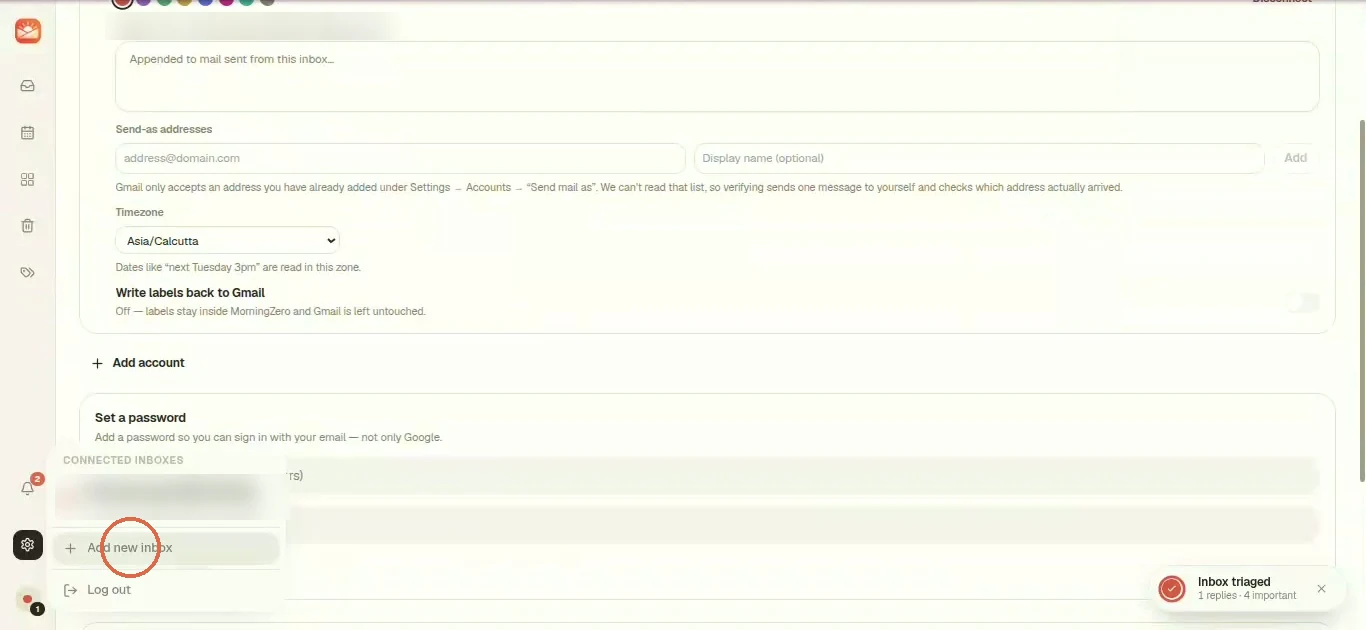
Open the inbox switcher at the bottom left and, under Connected inboxes, click + Add new inbox. Settings, Add account gets you to the same place.
-
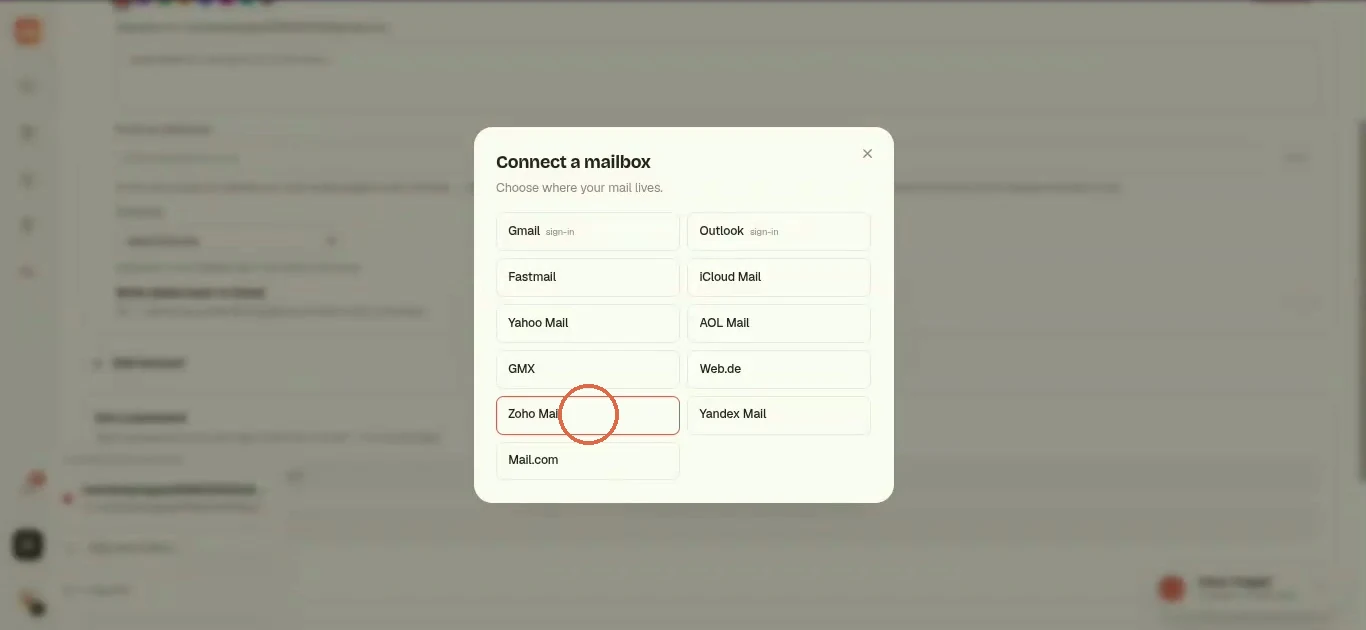
You'll get a picker titled Connect a mailbox with every provider in it. Pick Zoho Mail.
-
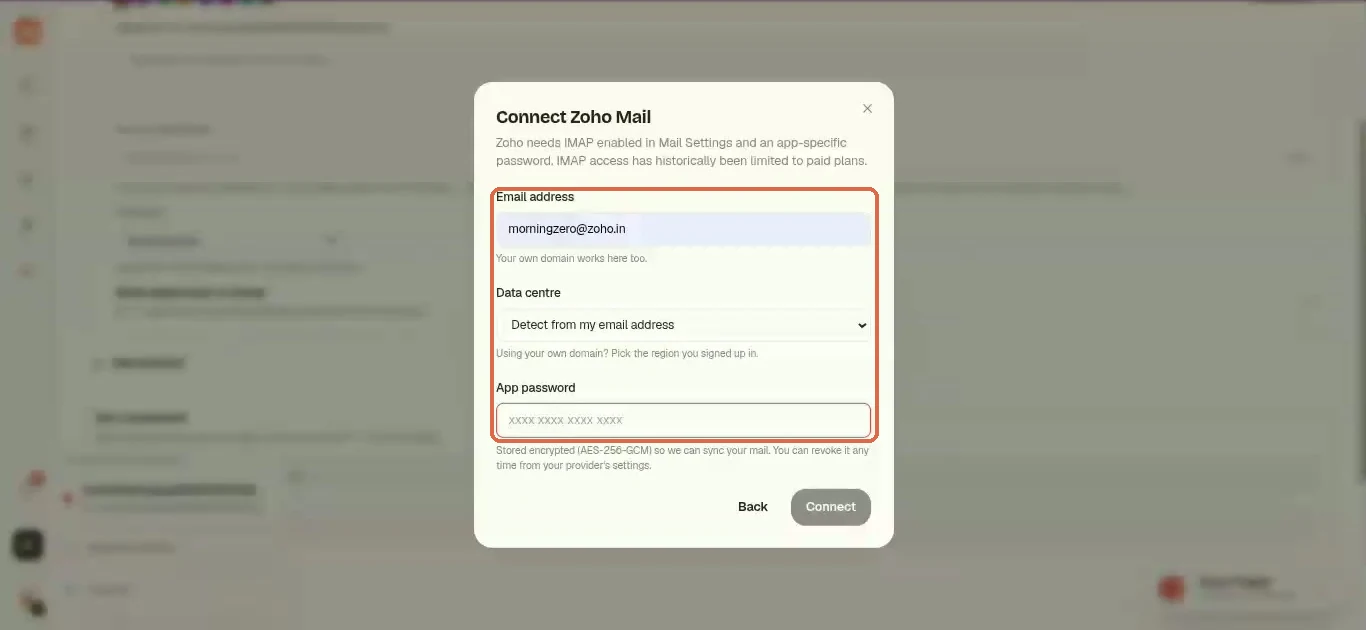
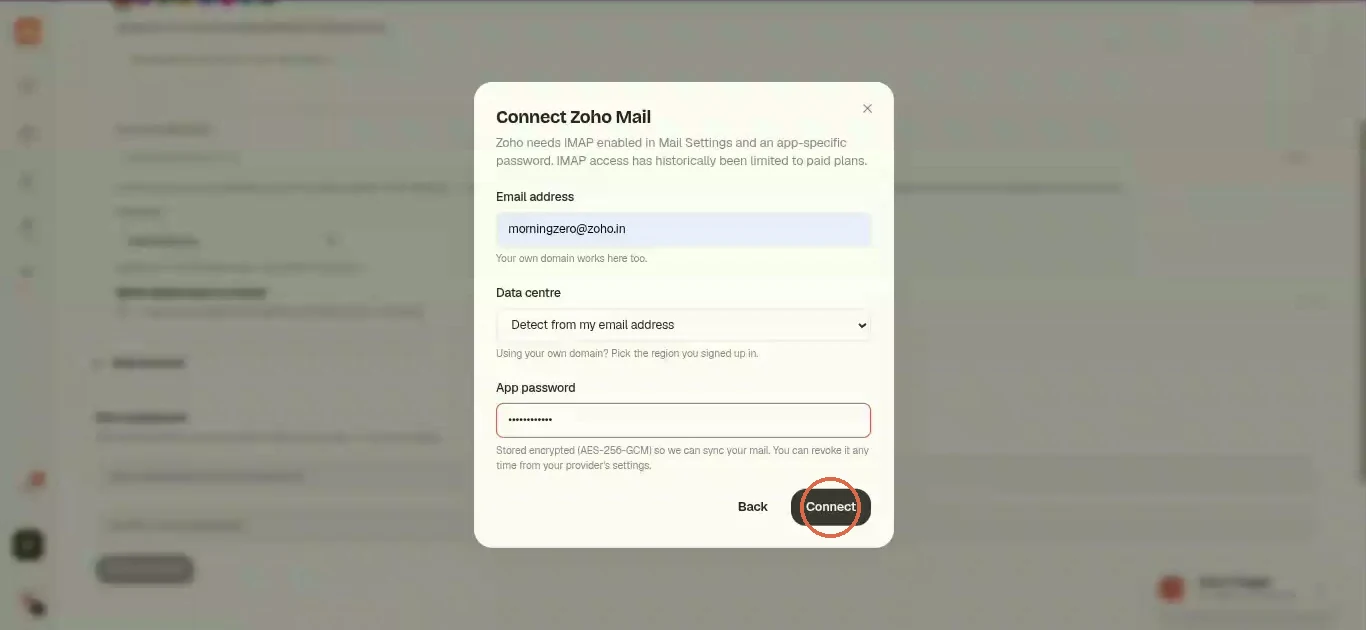
The Connect Zoho Mail form asks for three things: Email address, Data centre and App password. Type your address. If it's on your own domain, set Data centre to your region now, before you go and get the app password.
Create the app password in Zoho
-
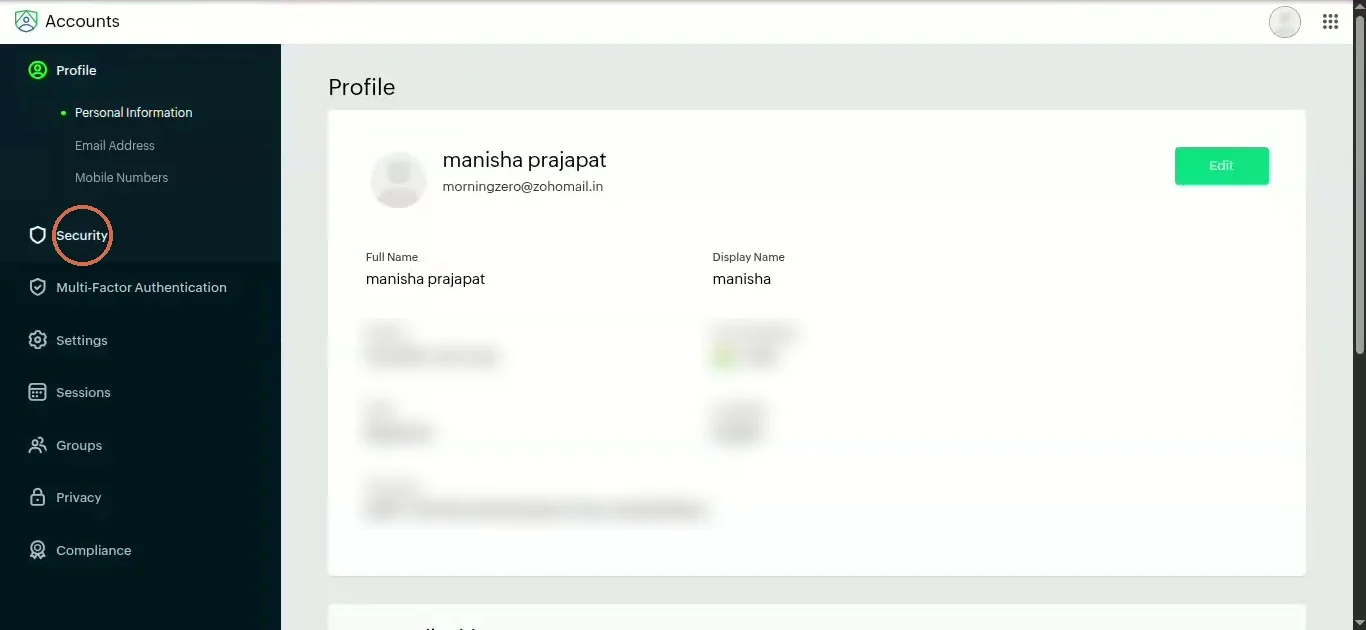
In a new tab, open your regional Zoho Accounts site (the one from the table above) and click Security in the left menu.
-
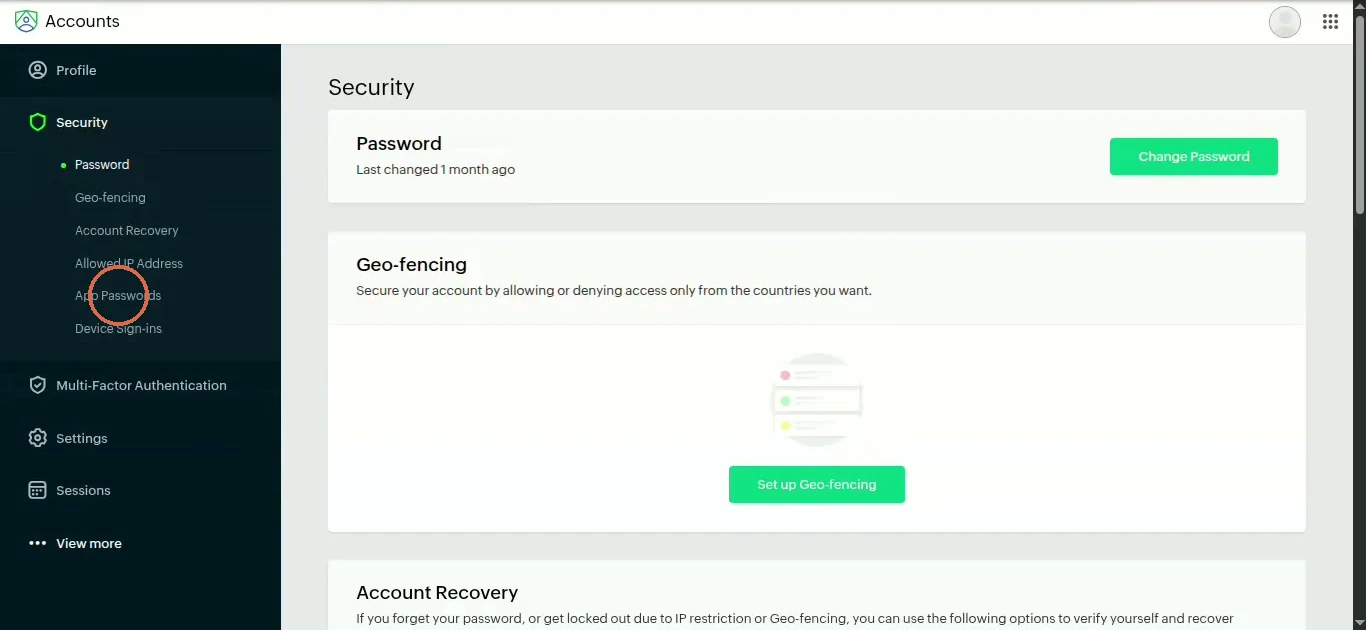
Under Security, open App Passwords. Zoho may want you to confirm it's you first, say with a OneAuth prompt on your phone.
-
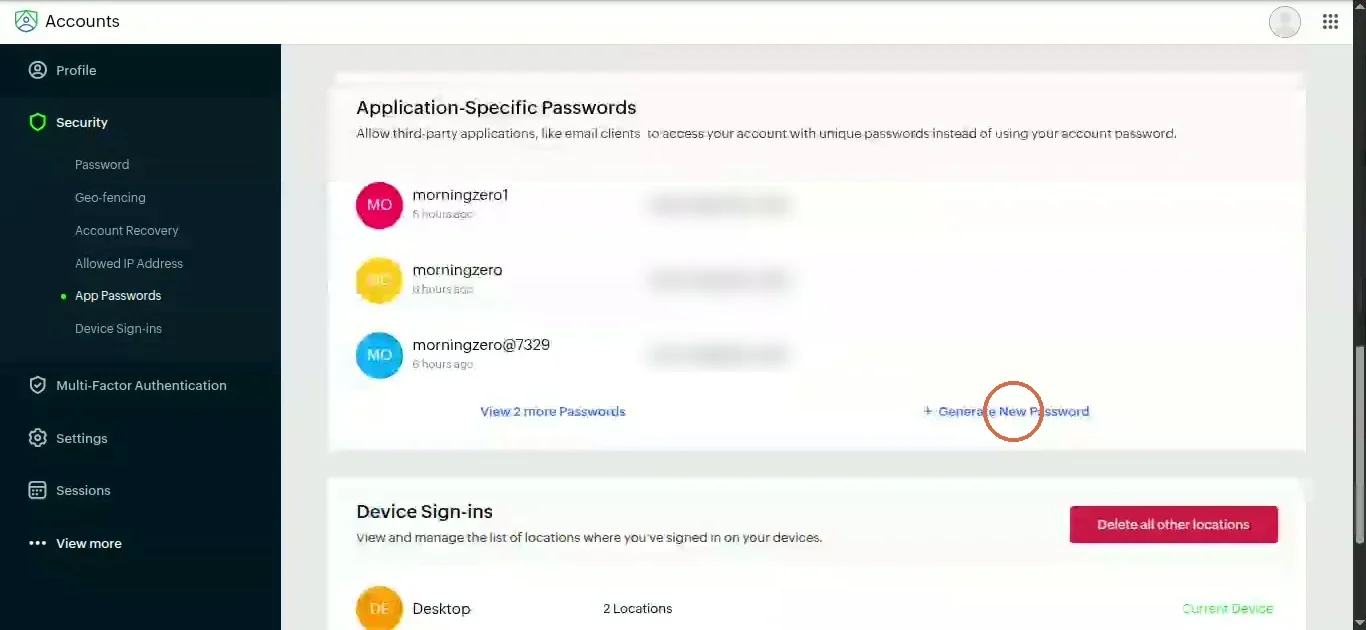
Click Generate New Password.
-
Enter an app name and click Generate.
MorningZerois fine. The name's only for you, so you can tell the passwords apart later.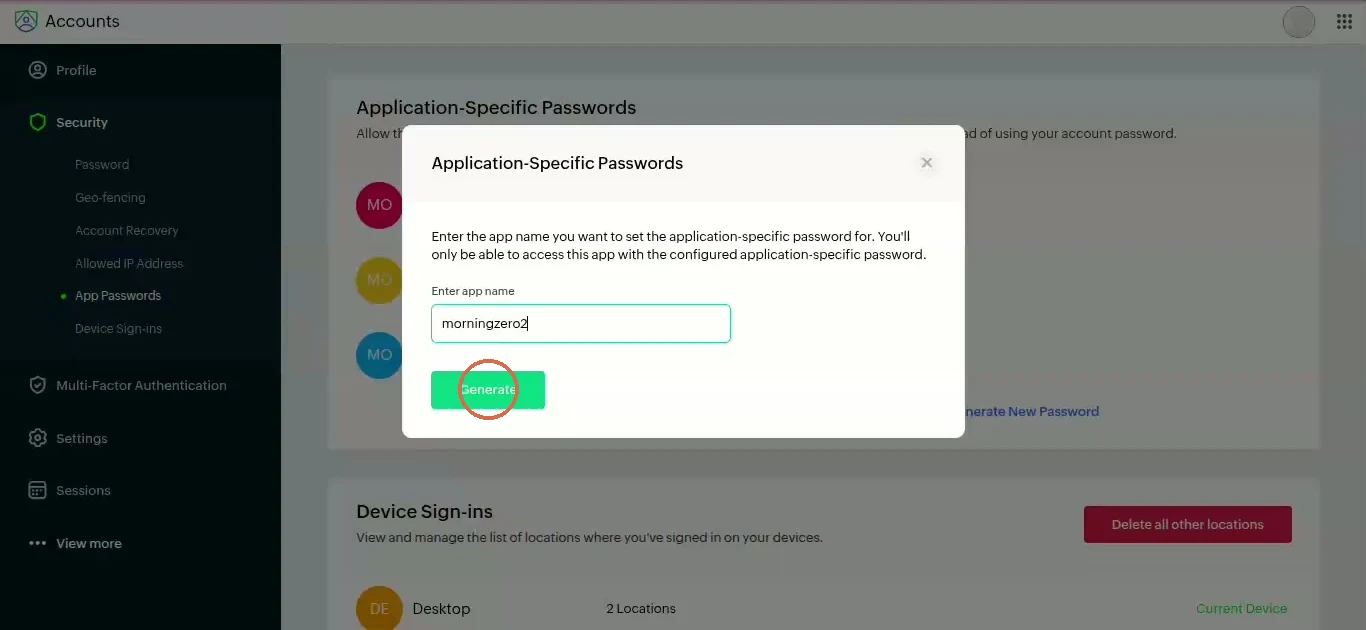
-
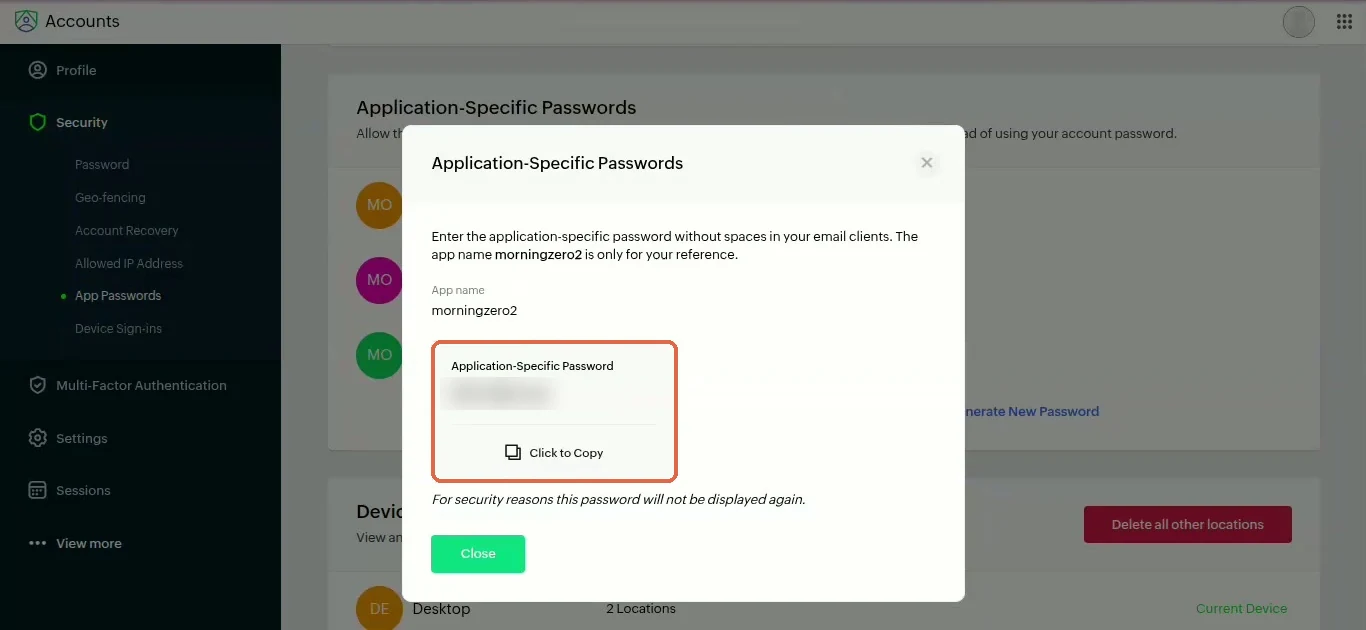
Copy the password before you close the box. Zoho says "For security reasons this password will not be displayed again", and it also asks you to enter it without spaces.
Paste it and connect
-
Back in MorningZero, paste the password into App password and click Connect. The button says "Connecting…" while we sign in.
-
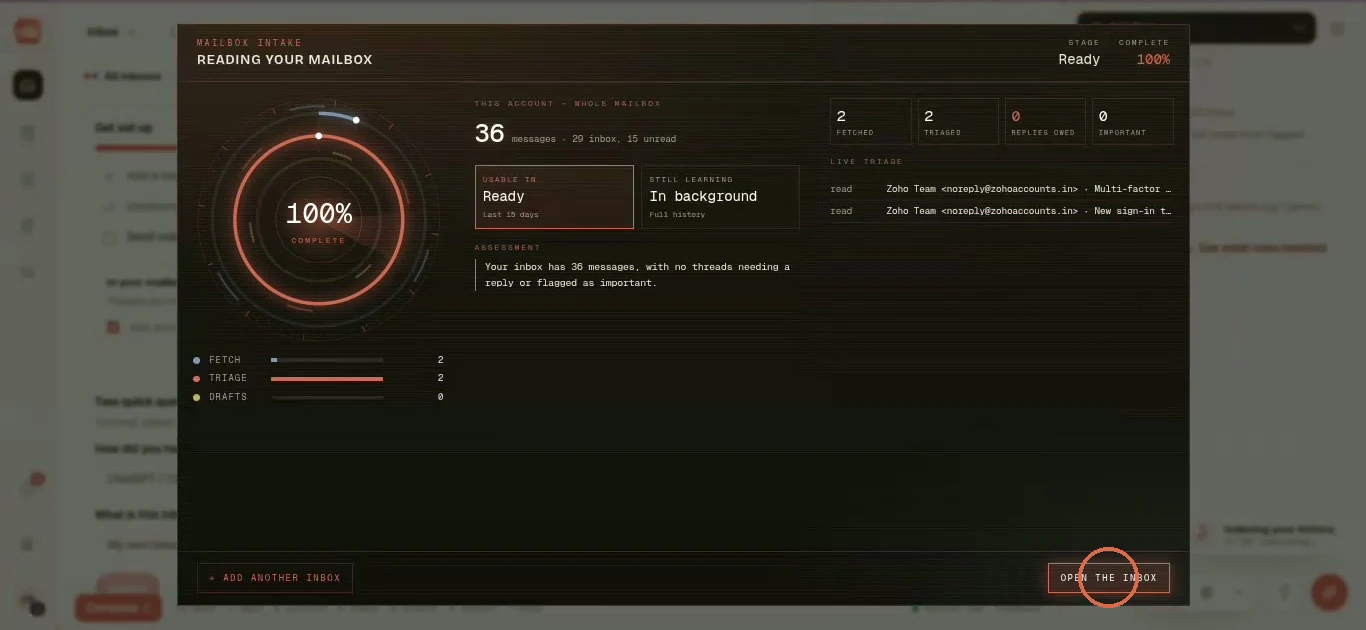
A Reading your mailbox screen fills to 100 percent. It tells you the inbox is usable now for the last 15 days, while full history keeps loading in the background. Click Open the inbox.
-
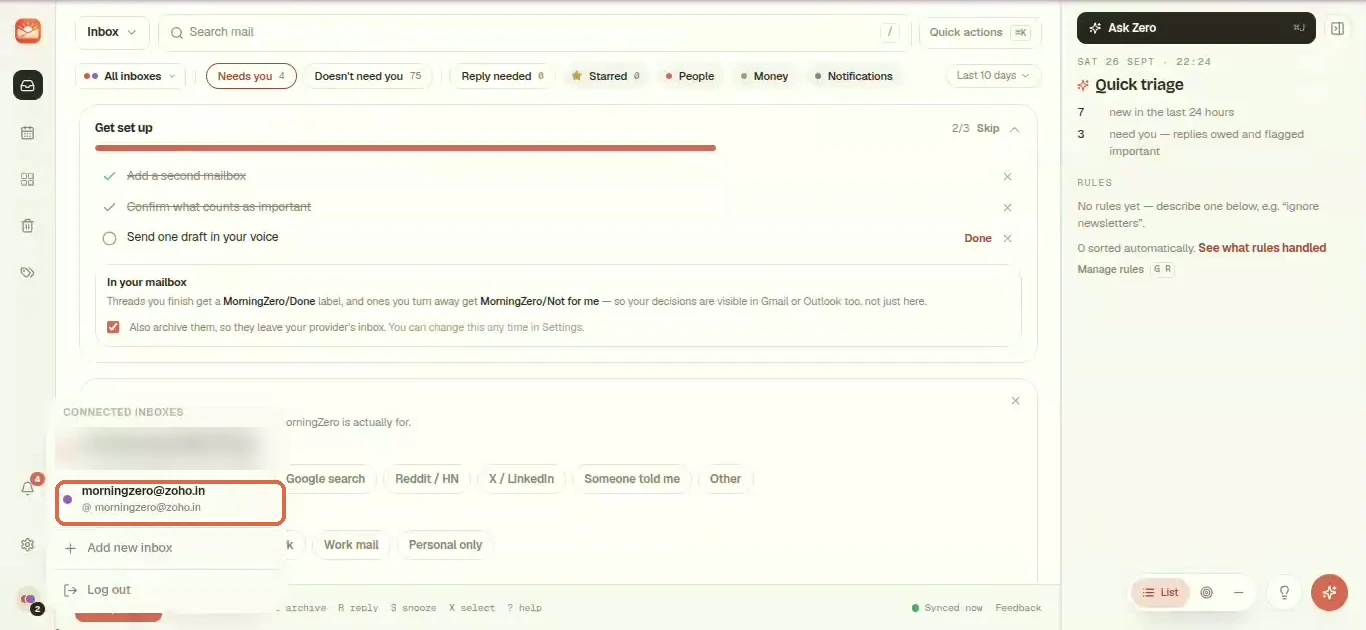
Zoho Mail now sits in the inbox switcher next to your other mailboxes.
Zoho IMAP settings for any mail app
The same details work in Apple Mail, Thunderbird or Outlook. Just swap .com for your region's ending from the table above.
| Setting | Personal and free organisation accounts | Paid organisation, your own domain |
|---|---|---|
| Incoming (IMAP) | imap.zoho.com, port 993, SSL | imappro.zoho.com, port 993, SSL |
| Outgoing (SMTP) | smtp.zoho.com, port 465 SSL or 587 TLS | smtppro.zoho.com, port 465 SSL or 587 TLS |
| Username | Your full email address | Your full email address |
| Password | The app password if two-factor is on, otherwise your Zoho password | Same |
If you're unsure which server your account uses, Zoho notes that it's listed in Zoho Mail under Settings, Mail Accounts, in the server configuration details.
There's one thing we haven't settled yet. MorningZero connects to imap.zoho.com and its regional versions, not imappro. So if you're on a paid organisation plan with IMAP on, a fresh password and the right region, and it still won't connect, write to us with your plan and region.
After connecting
We check Zoho for new mail on a five-minute poll, the same as every IMAP provider here. Archiving, read state and folder moves go back to Zoho the moment you make them.
When you connect, we check whether Zoho's server will store custom keywords, and the dialog tells you whether labels will stay inside MorningZero. Zoho's calendar runs on CalDAV, which we don't connect yet.
As the form puts it, your password is "Stored encrypted (AES-256-GCM) so we can sync your mail. You can revoke it any time from your provider's settings."
Revoking
To cut us off, go to your Zoho Accounts site, open Security, App Passwords, and delete the MorningZero entry. We lose access at once.
Disconnecting the mailbox from our side works the other way round: we delete everything from it here, along with the stored credential.
If it stops syncing
If you delete the app password or change your login password, the address shows as has stopped syncing — the app password was changed or revoked, with an Update password button. Generate a new one in Zoho and paste it there.
Sources
- IMAP and SMTP hosts, the
imapprohost for paid organisations, the free-plan limits and enabling IMAP: Zoho Mail Help, "IMAP and SMTP configuration details", read 28 September 2026. - Zoho's regional data centres: Zoho, "Know your datacenter", 28 September 2026.
Questions
Asked often enough to answer here.
What are Zoho Mail's IMAP settings?
Incoming imap.zoho.com on port 993 with SSL, outgoing smtp.zoho.com on 465 with SSL or 587 with TLS, for accounts in the US data centre. Other regions swap the ending, like imap.zoho.in or imap.zoho.eu. Paid organisation accounts on their own domain use imappro.zoho.com. Username is your full address.
Why does Zoho say sign-in failed when my password is right?
It's usually one of two things: IMAP is still switched off in Zoho Mail's settings, or the app is talking to the wrong region's server. An account in India doesn't exist on the US server, so the login gets refused even with the right password.
How do I know which Zoho data centre I'm in?
Sign in to Zoho Mail in a browser and look at the address bar. mail.zoho.in means India, mail.zoho.eu means Europe, mail.zoho.com means the US. Your Zoho Accounts site has the same ending.
Is IMAP available on Zoho's free plan?
Not for newly signed-up free accounts, per Zoho's help page. Zoho also notes its free plan is only offered in some data centres.
Where do I create a Zoho app password?
On your regional Zoho Accounts site, under Security, App Passwords, Generate New Password. Zoho shows it once.
Nothing sends itself
Connect Zoho next to the rest.
Once the region's right, it's a two-minute job. Up to five mailboxes on the trial, no card.