
Connect iCloud Mail with an app-specific password
Apple offers no sign-in for mail, so iCloud connects with a password you generate for this one app and can revoke any time. The step people trip on is which address to type, so we start there.
Facts and prices checked 26 September 2026
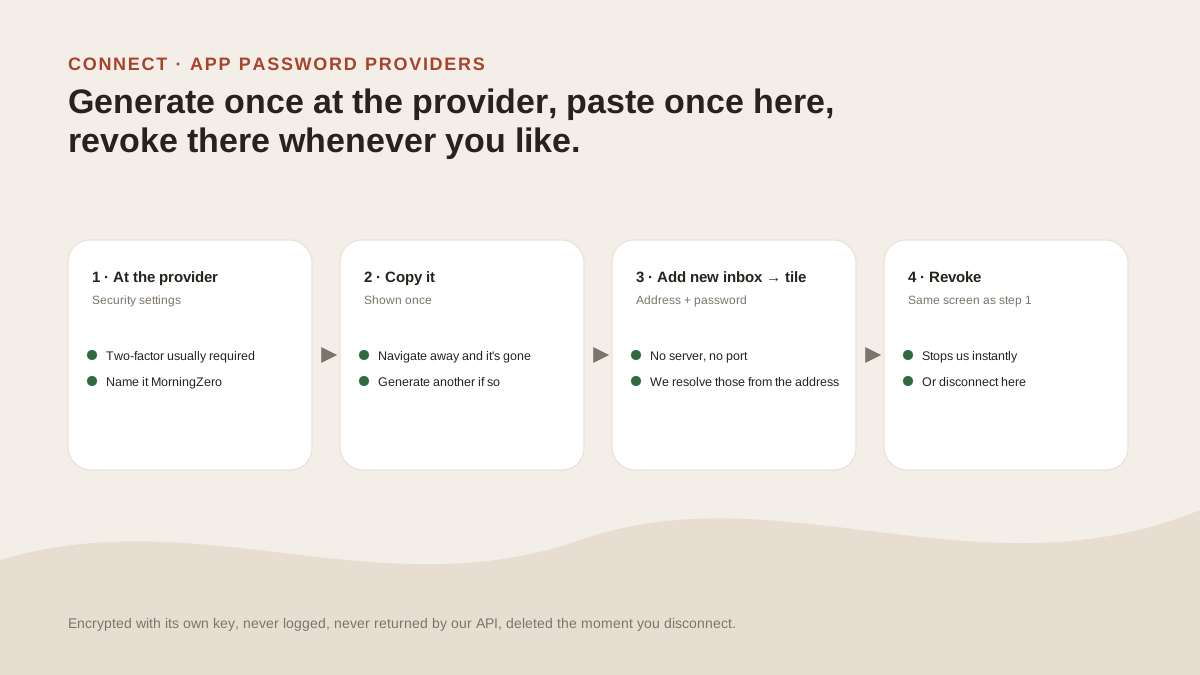
iCloud is the app-password provider people ask us about most, and nearly every question is the same one: which email address goes in the form.
So let's settle that before the steps.
Which address goes in the box
The app-specific password belongs to your Apple Account, and an Apple Account can sign in with any email. If you signed up to Apple with a Gmail address years ago, that Gmail address is your Apple Account.
The mailbox is a different thing.
iCloud's mail server takes your iCloud address as the username, so that's what goes in our form, whatever your Apple Account signs in with.
If sign-in fails with a freshly generated password, this is the first thing to check: is the address in the form the @icloud.com one?
Please don't type your Gmail address into the iCloud form to get around it. We refuse Gmail addresses there and send you to Google sign-in, which is for Gmail mailboxes, not iCloud.
Steps
You'll need two-factor authentication turned on for your Apple Account first. Apple doesn't offer app-specific passwords without it, and the menu item simply won't be there.
- Sign in at account.apple.com. Go to Sign-In and Security, then App-Specific Passwords.
- Choose Generate an app-specific password, and name it
MorningZero. - Apple shows the password once, so copy it now.
- In MorningZero, choose Add new inbox, then the iCloud Mail tile.
- For Email address, enter your iCloud address (
@icloud.com,@me.comor@mac.com). For App password, use the one you just copied. Hyphens or spaces are fine. - Press Connect. The last three days sort first.
You won't be asked for a server or port, because we already know iCloud's.
What syncs once you're in
We check iCloud for new mail every five minutes. Like other IMAP providers it's polled, and we don't hold an open connection, but changes you make here are written back straight away.
Labels are the part that varies. When you connect, we test whether labels you apply here can be stored on Apple's server, and the connect dialog tells you if they'll stay inside MorningZero. Folders and read state sync both ways either way.
The Calendar tab says unavailable for this account, because iCloud calendars use CalDAV, which we don't yet support.
When it stops syncing, or you want it gone
Changing your Apple Account password revokes every app-specific password. When that happens, MorningZero shows the address has stopped syncing — the app password was changed or revoked, with an Update password button and the address already filled in.
To fix it, generate a new password at Apple and paste it there.
To cut access yourself, go to account.apple.com, Sign-In and Security, App-Specific Passwords. Press Remove next to MorningZero, or Revoke All. We lose access the moment you do.
You can also work from the other end and disconnect in MorningZero. Its data here is deleted and the stored password discarded.
Sources
- Prerequisite, click path, the 25-password limit and revocation: Apple Support, "Sign in to apps with your Apple Account using app-specific passwords", read 20 September 2026.
- The username iCloud Mail expects: Apple Support, "Mail server settings for iCloud email clients", read 26 September 2026.
Questions
Asked often enough to answer here.
Why does iCloud need an app-specific password?
Apple doesn't offer an OAuth sign-in for mail. App-specific passwords are the safe alternative: one per app, revocable on their own, and useless for signing in to your Apple Account itself.
Which username do I use?
Your iCloud address, the @icloud.com, @me.com or @mac.com one. That's what iCloud's mail server expects, even when your Apple Account signs in with a different email. The app-specific password is generated under that Apple Account.
How many app-specific passwords can I have?
You can have twenty-five active ones, per Apple's support page.
What happens if I change my Apple Account password?
Apple revokes all your app-specific passwords, and MorningZero shows 'has stopped syncing' with an Update password button. Generate a new one and paste it in.
Nothing sends itself
Connect iCloud alongside your Gmail.
iCloud beside a Gmail is the mix most people start with. The trial covers up to five mailboxes, and there's no card to enter.