
Superhuman vs MorningZero: the question isn't speed, it's how many inboxes you have
If you run one inbox and want the fastest keyboard-driven client made, buy Superhuman. If you run several and the problem is the number of places you check, read on.
Facts and prices checked 26 September 2026
We'll start with what Superhuman gets right, because it's most of the product. It's fast in a way that's hard to describe until you've used it: deliberate shortcuts, interactions Superhuman says come in under 100 milliseconds, and an interface that never makes you wait.
At $30 a seat it's worth it for a lot of people, and nobody paying for it was tricked.
So we're not going to argue that it's overpriced. The narrower question is where it stops being the right tool. If you have one inbox, or two, and your mail is all Gmail or Outlook and always will be, you should probably just buy it.
The same goes if you're iPhone-first, since Superhuman has a native iOS app and we don't. And if moving through mail quickly matters more to you than not having to look at most of it, that's a fair thing to want, and it's what Superhuman is built for. That describes most people.
Three inboxes is where it gets awkward
Superhuman handles multiple accounts as separate views. Each connected account is its own inbox, and you switch between them.
Superhuman's own help centre calls the tab setup a Unified Inbox Workaround.
With one or two accounts you'd barely notice. At three, the switching turns into the problem you were trying to escape. You're still checking three places, and there's still no single answer to "what is waiting on me". Making each of those inboxes faster to move through doesn't reduce how many of them there are.
What we built instead is a merged stream: every account behind one login, in one list, each row tagged with its account, and one Needs-you view across all of them. That's the design we chose, and it's the only reason this comparison is interesting.
Why we care less about speed
Over the ninety days to 20 September 2026, 89 percent of the mail MorningZero sorted was machine-generated and 1.39 percent needed a reply. That mix is heavy on notifications, and yours will differ.
When fewer than two in a hundred messages want something from you, speed per message isn't the bottleneck; looking at the other ninety-eight is.
A faster client makes that 98 percent cheaper to skip. Classification means you don't open it, and the reason on each row lets you check the call without opening it either.
Superhuman optimises the time you spend in your inbox, and we're trying to reduce how much of it you need to see. That's a difference of opinion about what email is for, not a claim that one is better.
What it costs
Superhuman's /mail/pricing URL is a client-rendered shell that a script can't read. The plan cards at superhuman.com/plans/mail are readable, though, and show the annual rates, with the monthly rate behind a 17-percent-off badge. Those are the figures in this table.
| Superhuman | MorningZero | |
|---|---|---|
| Free plan | No | No. 14-day trial, no card |
| Entry tier | Starter $30/member/mo ($25 yearly) | Solo $19/mo for 5 mailboxes ($15 yearly) |
| Next tier | Business $40 ($33 yearly): advanced AI, auto drafts, Ask AI, custom auto labels, CRM integrations | Stack $29/mo for 15 mailboxes ($23 yearly). Same features as Solo |
| Extra accounts | Per member; the page doesn't say how many mailboxes a member covers | $3/mo each, no cap |
| Providers | Gmail, Workspace, Outlook.com, Microsoft 365 | Those four, plus nine app-password providers |
| Multiple accounts | One view per account | One merged stream, tagged per message |
| AI metering | No per-request limits published; the AI set depends on tier | No credits |
| Checked | 26 Sep 2026 | 26 Sep 2026 |
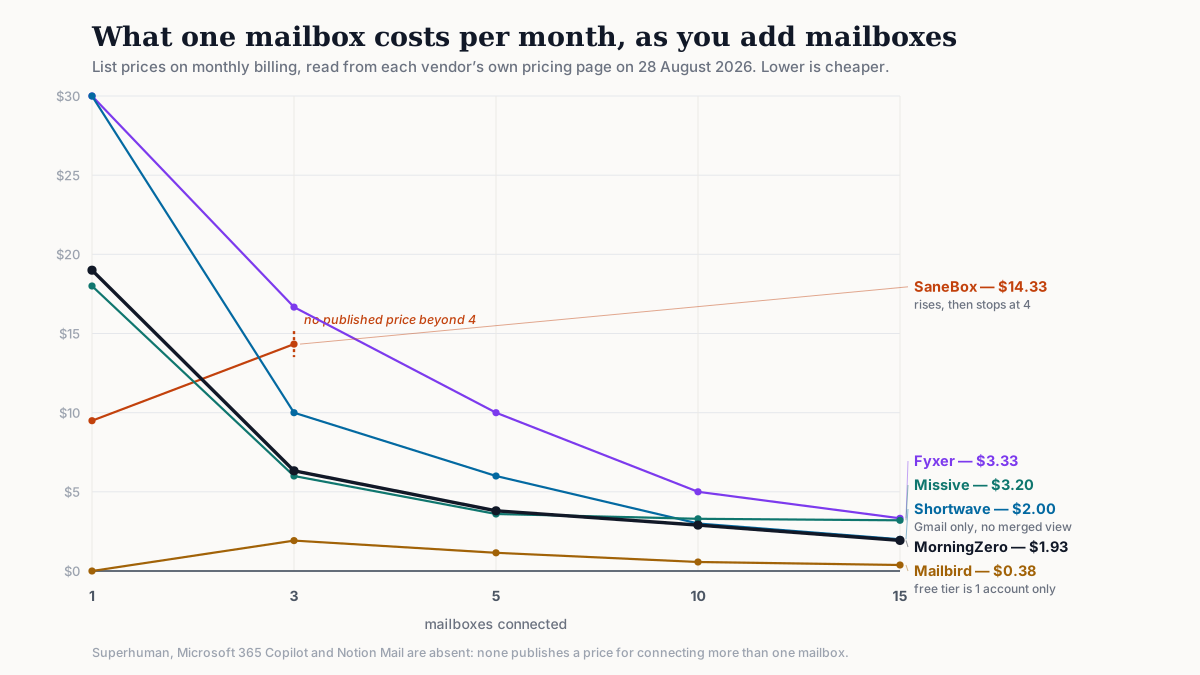
At 1, 3, 5 and 10 mailboxes
Superhuman's column stops at one: it doesn't publish what a seat covers.
| Mailboxes | Superhuman (Starter, monthly) | MorningZero (monthly) |
|---|---|---|
| 1 | $30 | $19 |
| 3 | $30 if one seat covers them; the page doesn't say | $19 |
| 5 | Same caveat | $19 ($3.80 each) |
| 10 | Same caveat | $29 ($2.90 each) |
Who's ahead on what
Superhuman is faster, has an iOS app, and has been polishing since 2017, against our three months.
There's also something every young "real-time" product should say out loud: between 23 July and 4 August 2026, our Gmail push sync failed on every message for eleven days while the polling fallback carried the load. We wrote it up.
What we have is several accounts in one list with one Needs-you view, from thirteen providers rather than Google and Microsoft alone, and a reason on every row that you can correct. There are no credits, nothing is sent without you, and it's $19 for five mailboxes against $30 for a seat.
Sources
- Superhuman prices and tier contents: superhuman.com/plans/mail, read 26 September 2026. The sub-100ms figure is Superhuman's own claim on its site, read the same day.
- Superhuman's per-account views and provider list: third-party reviews; Superhuman's help centre blocks automated reads. 20 September 2026.
What it won’t do
The limits, before you find them yourself.
We aren't faster than Superhuman. If sub-100ms response is what you optimise for, nothing here beats it.
We have no iPhone app. Superhuman does.
We connect thirteen providers and Superhuman connects Google and Microsoft, but neither of us does Proton or a self-hosted server.
We're younger. Superhuman launched in 2017. We've been shipping since June 2026.
Questions
Asked often enough to answer here.
Is there a cheaper alternative to Superhuman?
Superhuman's entry tier is $30 per member per month, or $25 yearly, as read from its plans page on 26 September 2026. MorningZero is $19 a month for five mailboxes. Spark has a real free tier if $0 is the requirement.
Does Superhuman support multiple email accounts?
Yes, as separate views you switch between, for Gmail and Outlook. There's no merged stream and no cross-account view of what needs a reply.
Which providers does each one connect?
Superhuman: Gmail, Workspace, Outlook.com and Microsoft 365. MorningZero: those four plus nine app-password providers. Neither supports Proton.
Does MorningZero limit AI usage the way Superhuman tiers it?
No. Superhuman's Business tier is where the advanced AI sits. MorningZero has no feature ladder; every AI feature is on both plans and there are no credits.
Nothing sends itself
Run three inboxes through one list for two weeks.
Fourteen days, up to five mailboxes, no card. If the tabs were never the problem, you'll know by Wednesday.