
One inbox for Gmail, Outlook, iCloud and the rest
Every mailbox you own arrives in one list, each row tagged with where it came from. You sign in once. Your mail stays with your provider.
Facts and prices checked 26 September 2026
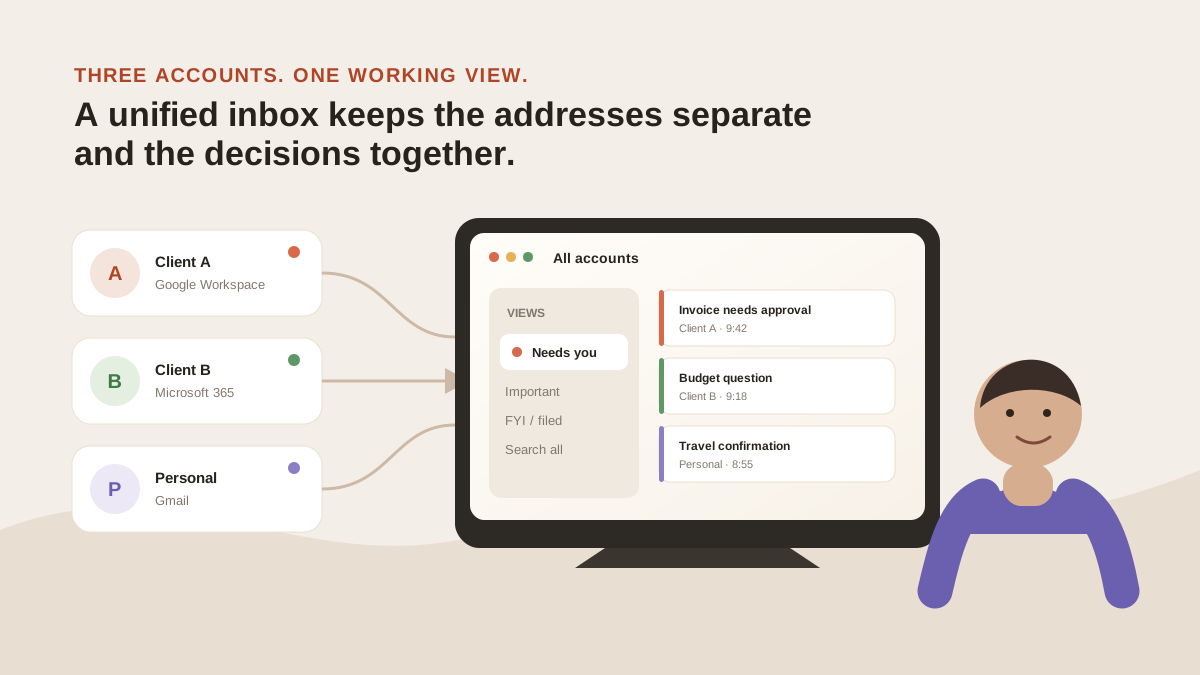
A unified inbox is a view, not a migration. Your Gmail stays Gmail. Your Fastmail stays Fastmail.
What changes is the number of places you check. All of them arrive as one list, sorted, with the account name on every row.
What the list holds
Every connected mailbox, merged by time. Each message carries a small tag with the mailbox it came from.
The tag follows the message everywhere: the row, the open thread, search results, Ask Zero's citations. You always know which identity a message belongs to and which one will reply.
Above the list are two tabs, Needs you and Other. The triage layer sorts each message into one of them as it lands, across every account at once. Needs you isn't only replies: a reply arrow marks the threads waiting on an answer, and an eye marks the ones you just need to read.
You can add more. + Add split turns any of your labels into its own tab beside them, like Money, a client, or a project, and Manage labels makes new ones.
One login covers the lot. Sign in on the web, the desktop app or Android and the same connected set is there, with the same tags and read state.
How each provider connects
There are two paths.
| Provider | How it connects | What you give us |
|---|---|---|
| Gmail, Google Workspace | Google's consent screen (OAuth) | A revocable token. Never your password |
| Outlook.com, Microsoft 365 | Microsoft's consent screen (OAuth) | A revocable token. Never your password |
| Fastmail, iCloud, Yahoo, AOL, GMX, Web.de, Zoho, Yandex, Mail.com | An app password you generate at the provider | That password, encrypted with its own key, deleted when you disconnect |
We prefer the OAuth path, and so do Google and Microsoft. You approve a listed set of permissions on their screen, you can see us in your account's connected apps, and you can revoke us there without asking.
The app-password path exists because we reach those nine over IMAP, and an app password is what they hand a third-party mail client. You generate one for this app, hand it to us, and revoke it at the provider whenever you like.
We refuse a Gmail or Outlook address on the app-password path and send you to the consent screen instead. There's no reason to hold a password when a token will do. The per-provider steps are in the connect guides.
What stays where
Your provider keeps the mail. Attachments never leave it.
We keep what the features need: subjects, senders, recipients, labels, timestamps, previews, the AI's verdicts, and the search vectors built from them. Plus the things you make here: drafts, queued sends, your conversations with Zero.
Message bodies are read from the provider when you open a thread and held in an encrypted cache for about ten minutes. The full list of what we store is on the security page.
On first connect the last three days are triaged while you watch, then the last two weeks are pulled and sorted, then history fills in behind: up to twelve months on a paid plan, three on the trial. All of it is searchable; the most recent three months are also tagged.
How new mail arrives
By push, where the provider offers it. Gmail sends a notification, Microsoft a subscription event, and a reconcile pass runs under both as a backstop.
Every IMAP mailbox is polled instead, every five minutes: Fastmail, iCloud, Zoho, Yahoo and the rest. We say "instant" about Gmail and Outlook, not about IMAP.
Writing back
Archive, trash, read state and stars sync both ways. When you mark a thread Done or Not for me, a MorningZero/Done or MorningZero/Not for me label is added at your provider, so the decision shows in Gmail or Outlook too.
Your other labels and Zero's tags stay here unless you switch on label write-back for that mailbox. It's off until you turn it on. Nothing is sent without you pressing Send.
What this doesn't fix
What arrives is the same. What you have to read is less.
If you have one account and the Gmail app, you don't need this. With two, what Gmail and Outlook already combine may be enough. If you have several, the morning usually goes: open one list, go through Needs you, reply from whichever address the thread belongs to.
What it won’t do
The limits, before you find them yourself.
It doesn't merge identities. A reply goes out from the mailbox the message arrived in, and the row says which one that was.
It doesn't connect Proton, or a mail server you run yourself. Proton Bridge only runs on your own machine, so a hosted service can't reach it.
It can't turn the AI off for one mailbox and leave it on for another. That control is planned, not shipped.
No iPhone app yet. MorningZero runs on the web, macOS, Windows, Linux and Android, and on an iPhone you can use the web app in Safari.
Questions
Asked often enough to answer here.
Which email providers can I connect?
Gmail, Google Workspace, Outlook.com and Microsoft 365 through their own sign-in. Fastmail, iCloud, Yahoo, AOL, GMX, Web.de, Zoho, Yandex and Mail.com with an app password. Thirteen in total.
Does a unified inbox move my email?
No. Each message stays in the account it was sent to. We keep an encrypted index of subjects, senders, labels and previews, and read the body from your provider when you open a message.
How is this different from adding accounts to the Gmail app?
The Gmail app combines accounts, but nothing spans them: no rules, no triage. Here every account is one list on every device, with one search and one rule layer.
How many mailboxes can I connect?
Five on Solo, fifteen on Stack, then $3 a month each with no ceiling. The trial covers five.
Nothing sends itself
See it on your own mail.
Fourteen days, up to five mailboxes, no card. Connect the two you check most and watch the first morning sort itself.