
An email client that works on a plane: the desktop app keeps a month of mail on your machine
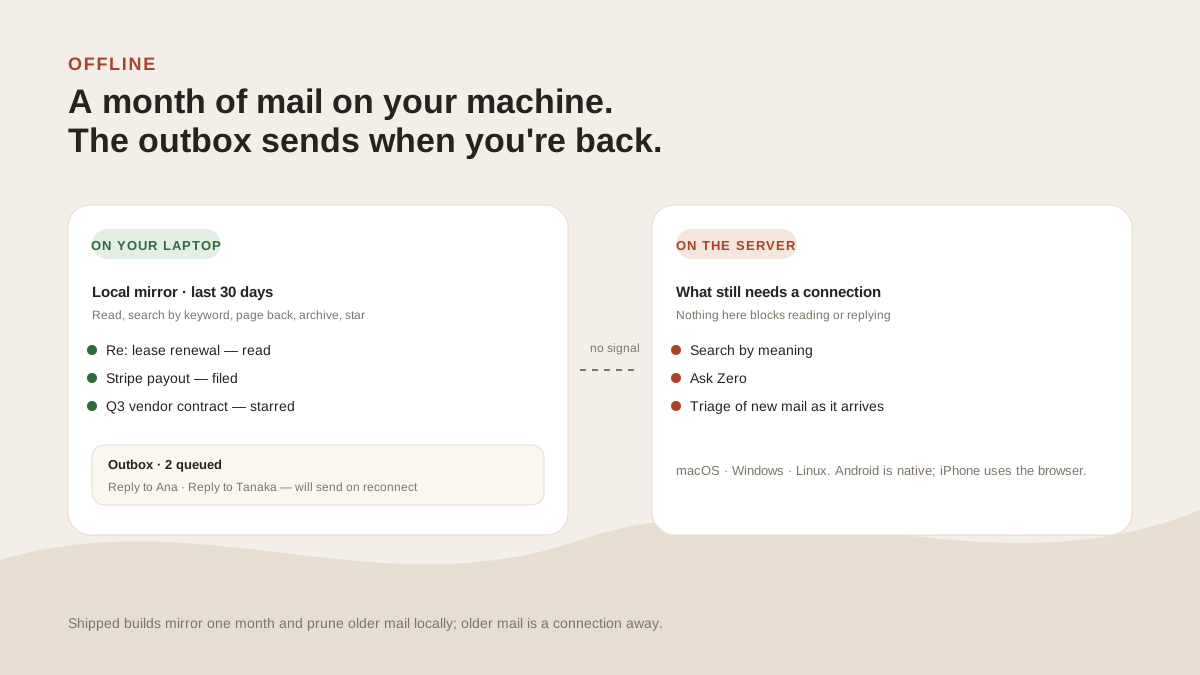
Read, search and reply with the wifi off. Your writes queue in an outbox and go out the moment you reconnect. The AI waits for the server; the mail doesn't.
Facts and prices checked 26 September 2026
A web app is a window onto a server. Close the connection and the window goes dark.
The desktop app is built the other way round. It holds a local copy of your recent mail, and the server is what keeps it fresh. When the server isn't reachable, the copy is what you're using.
Most of an inbox works fine against a copy.
What's on your disk
A mirror of the last month of mail across every connected mailbox, in an SQLite database in the app's data directory. Thread summaries, the searchable fields, read and star state, and message bodies for threads in the window.
The file isn't separately encrypted; your computer's user account is what protects it, as with the rest of your files.
Every request the app makes to the server is written through to that mirror on success. When the server is unreachable, the same request is answered from the mirror.
There's no offline mode to switch into. The local copy answers when the network doesn't.
The window is one month in shipped builds. Older mail isn't on the laptop; it's a connection away.
What works with the wifi off
- Reading any thread in the window, with its body if it was cached, which for recent mail it almost always was.
- Keyword search over subjects, senders and snippets. Bodies aren't searched offline.
- Paging back through the month.
- Archive, star, mark read, snooze. Each action lands in the mirror at once and is queued for the server.
- Writing replies and new messages. They go into the outbox.
The outbox
Every write the app can't deliver goes into a durable queue on disk, in order. Reconnect and the queue drains, oldest first.
A reply you wrote at 35,000 feet is sent when the wifi comes back or when you land.
A queued send is still a send you pressed, and there's no undo on it. The ten-second undo is a hold on the server, so it needs the connection; a send made offline leaves as soon as the queue drains. If a queued write keeps failing after you reconnect, the app tells you.
What needs the server
The AI. Semantic search runs against a vector index on the server; Ask Zero runs models there. Offline, search is keyword-only, and the header shows "Offline — showing your local copy".
Triage of new mail happens as it arrives at the server. When you reconnect, whatever came in while you were away is already sorted.
A language model on your laptop would make the app heavy for a case that comes up a few times a year. Your mail on your laptop costs almost nothing and comes up on every flight.
Platforms
| Platform | What you get |
|---|---|
| macOS | One universal .dmg for Apple Silicon and Intel. Notarised, no Gatekeeper prompt |
| Windows | An .msi installer. Not yet code-signed, so SmartScreen shows a notice |
| Linux | An AppImage, or a .deb. Make the AppImage executable and run it |
| Android | A native app, same account, same tags |
| iPhone | The web app in Safari. No native app yet |
All of them share one login and one connected set. Download.
What it won’t do
The limits, before you find them yourself.
Semantic search and Ask Zero don't work offline. Both need the server. Offline search is a keyword match over subjects, senders and snippets in the local mirror.
It keeps one month, not everything. Shipped builds mirror the last month and prune older messages locally.
New mail doesn't arrive offline. The list you see on the plane is the list as of when you lost the connection.
Windows builds show a SmartScreen notice because the installer isn't code-signed yet. Click More info, then Run anyway.
Questions
Asked often enough to answer here.
What can I do in the desktop app without a connection?
Read any thread from the last month, search by keyword, page back through the window, archive, star, mark read, and write replies. Everything you change queues in a durable outbox and sends when you're back online.
How much mail is stored on my machine?
The last month, in an SQLite database in the app's data directory. It refills in the background when you're online and prunes as messages age out.
Which platforms have the desktop app?
macOS (universal), Windows (.msi) and Linux (AppImage or .deb). Android has a native app. There's no iPhone app; on an iPhone it's the web app.
Do I have to sign in again when I'm offline?
No. A session lasts thirty days and works offline.
Nothing sends itself
See it on your own mail.
Fourteen days, up to five mailboxes, no card. Connect the two you check most and watch the first morning sort itself.