
Troubleshooting: sync, missing mail, labels and reconnecting
Nearly every ticket we get turns out to be a provider setting rather than a fault. Look for the exact message you saw below.
Facts and prices checked 26 September 2026
Every message below is quoted exactly as the app, or the provider's own screen, shows it. Search this page for the words you saw and you should land on the right row.
Connecting
These come up while you're adding a mailbox.
| You see | What it means | What to do |
|---|---|---|
| Sign-in failed. Check the address and app password. | The provider rejected the credential. With Zoho, usually IMAP is still off. | Generate a new app password rather than retyping. For Zoho, enable IMAP first (guide). For iCloud, check that the address is the iCloud one (guide). |
| Gmail accounts connect through Google sign-in. | You typed a Gmail or Workspace address into an app-password form. | Use the Gmail tile. Outlook.com, Hotmail, Live and MSN addresses are refused the same way; use the Outlook tile. |
| Which provider hosts domain? | A custom domain we couldn't place. | Pick the provider from the list and we resolve the server. If it isn't on the list, tell us which one. |
| That mail host isn't reachable. | Our validator refused the resolved server. Rare. | Contact us with the provider and the address domain. |
| Too many connection attempts. Try again shortly. | Five failed sign-ins in fifteen minutes. | Wait for the countdown, generate a fresh app password, try once. |
| Trials cover 5 mailboxes. Solo covers the same plus any number of extras at $3/mo, and Stack covers 15 — start one and this inbox connects straight away. | You're on the trial and adding a sixth mailbox. | Start a plan; the mailbox connects as soon as you do. |
| You're using all N mailboxes on your Solo plan. Add another for $3/mo, or move up. | You're at the plan's count: five on Solo, fifteen on Stack. | Add a mailbox at $3 a month, or move to Stack. |
| Need admin approval (Microsoft's screen) | Your Microsoft 365 tenant requires an admin to consent to third-party apps. | Send your admin the note in the Outlook guide. |
| This app is blocked (Google's screen) | Your Workspace admin restricts third-party app access. | Send your admin the note in the Gmail guide. |
After connecting
And these show up once a mailbox is already in.
| You see | What it means | What to do |
|---|---|---|
| address has stopped syncing — the app password was changed or revoked. Enter a new one to resume. | The provider no longer accepts the stored credential. Changing your Apple Account password revokes all app-specific passwords. | Click Update password, generate a new one at the provider, paste it. |
| address is disconnected — reconnect to restore access. | Our access to a Gmail or Outlook mailbox was revoked at the provider, or the token expired. | Click Reconnect. Same account; nothing is duplicated. |
| Calendar access isn't authorized for address — reconnect to create and edit events. | The mailbox was connected before we asked for the calendar permission. | Click Reconnect and accept the calendar permission. |
| New mail is late | Gmail and Outlook push; every IMAP provider is polled every five minutes. | IMAP: up to five minutes, always. Gmail or Outlook consistently minutes late: tell us. |
| Labels applied here don't appear in Gmail or Outlook | Copying your labels and Zero's tags is a per-mailbox switch, off by default. Done and Not for me labels are always added. | Settings, the mailbox, turn on label write-back. |
| Labels applied here don't appear in another IMAP client | That server doesn't store custom keywords; the connect dialog said so when you added it. | Expected. Folders and read state sync both ways. |
| Calendar isn't available for IMAP mailboxes | Every mailbox you've connected is IMAP. | Expected. Calendar works for Google and Microsoft accounts. |
| AI verdicts paused on a mailbox | That mailbox hit its daily ceiling on model work. Rules keep running. | Nothing to do; it resets within 24 hours. The app doesn't yet announce this. If it happens several days running, tell us. |
How sync works
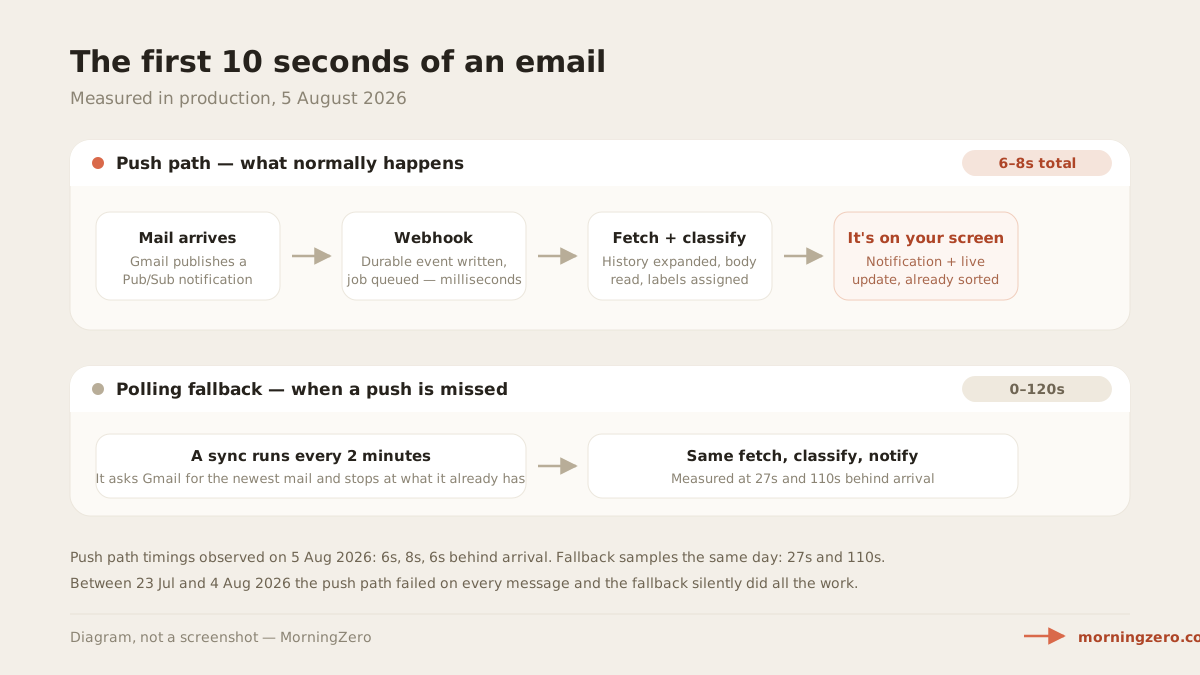
Gmail and Outlook push new mail to us, through Gmail's notifications and Microsoft's subscriptions. Under both we run a reconcile pass: hourly while push is healthy, and every two minutes if push goes quiet.
IMAP has no push, so we poll every IMAP mailbox every five minutes, on the trial and on both paid plans. We add a little jitter so accounts don't all fire at once.
Here's how that looked over the thirty days to 20 September 2026. Half of all messages had a triage verdict within 17 seconds of reaching us, and nine in ten within 158 seconds. The tail is the reconcile pass catching what push missed.
That backstop earned its keep in July, when one deleted Gmail message stalled our push sync for eleven days. We wrote up what happened.
Disconnecting and reconnecting
To disconnect, go to Settings, the mailbox, Disconnect. We delete its messages, labels, rules, drafts, conversations with Zero and learned preferences in one transaction, along with the stored password or tokens.
For Google, we also revoke our token at Google. Microsoft gives apps no revocation call, so if you want us cut off there too, remove us from your Microsoft account's app permissions.
To reconnect, go to Settings, Add account, and pick the same provider and the same address. We treat it as new, so the import runs again and the triage layer starts learning that mailbox from scratch.
You can also revoke us without opening MorningZero at all. Google keeps it under your account's third-party connections. Microsoft puts it in your account's app permissions, or your admin can do it. For app-password providers, delete the password where you made it.
Questions
Asked often enough to answer here.
Why did my mailbox stop syncing?
For an app-password provider, the password was changed or revoked at the provider. The mailbox says it has stopped syncing, with an Update password button. For Gmail and Outlook, revoking our access at the provider shows a disconnected banner with a Reconnect button.
How long should new mail take to appear?
Gmail and Outlook push, so usually seconds. Every IMAP provider, Fastmail, iCloud, Zoho, Yahoo, AOL and the rest, is polled every five minutes. Under push, a reconcile pass runs hourly and drops to every two minutes if push goes quiet.
I applied a label here and it isn't in my other mail app.
Done and Not for me always add a MorningZero/Done or MorningZero/Not for me label at your provider. Your other labels and Zero's tags are copied to Gmail or Outlook only if you switch on label write-back for that mailbox; it's off by default. For IMAP providers, it depends on whether the server stores custom keywords; the connect dialog told you which when you added it.
The Calendar tab says it isn't available.
Calendar works for Google and Microsoft accounts, because IMAP carries mail only. If every mailbox you've connected is IMAP, the tab says so; beside a Google or Microsoft account, IMAP mailboxes just don't appear on the grid.
Nothing sends itself
Still stuck? Write to a founder.
support@morningzero.com goes straight to the two people who built the sync. Tell us the provider and paste the exact text of the message you saw.