
Email for consultants and fractional executives: one client account per engagement
A fractional CFO has a seat at three companies. A consultant has one per engagement. Each comes with its own login, its own IT policy and its own idea of what's urgent. This is the case we built for.
Facts and prices checked 26 September 2026
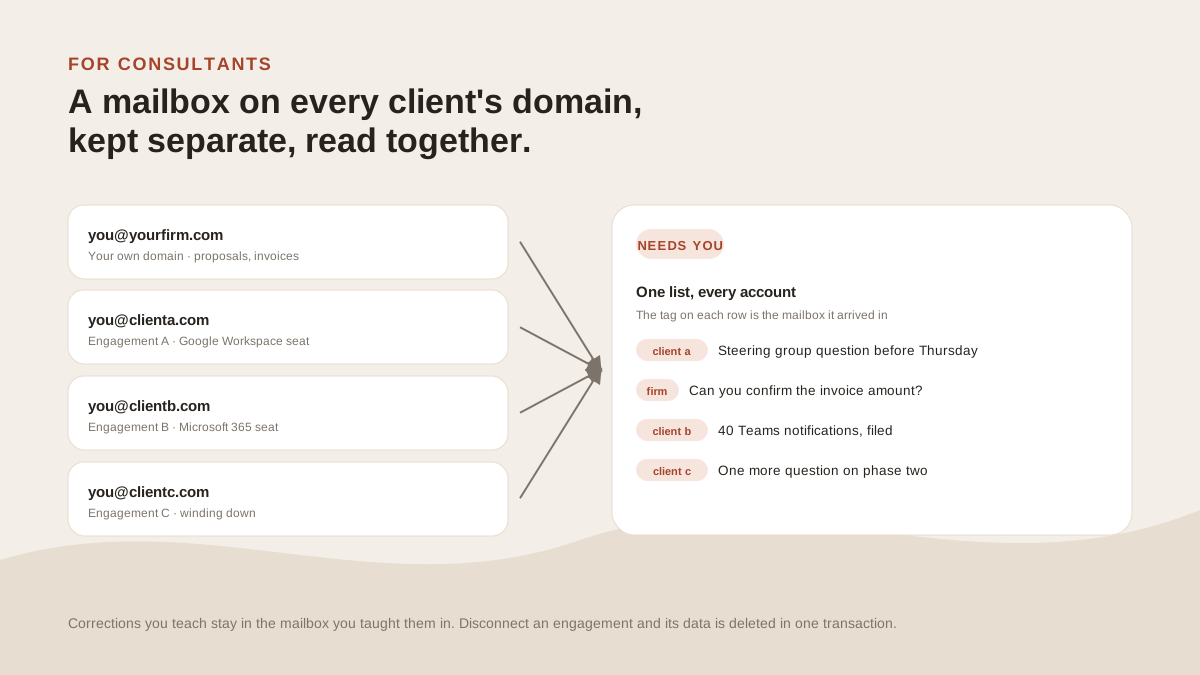
Most inbox tools assume the mailboxes are yours. A consultant's mostly aren't. They belong to clients, they come and go with engagements, and each arrives with somebody else's IT department attached.
One seat per client
A fractional CFO or CMO holds a seat at each company they serve. A consultant gets one per engagement. Three to six at a time is normal. Agency owners end up in the same place, with a studio address on top.
Each is a Google Workspace or Microsoft 365 account on the client's domain, with the client's calendar, the client's Teams or Slack notifications, and the client's all-hands invites. Plus your own domain, for proposals and invoices.
Getting past the client's IT
This is where most tools lose consultants, so it comes first.
Gmail and Workspace seats connect through Google's consent screen; Outlook and Microsoft 365 seats through Microsoft's. We hold a revocable token and never see the password.
Some Microsoft 365 tenants require an administrator to approve third-party apps. The connect step then says "Need admin approval". The Outlook guide has the exact paragraph to forward: which permissions, for whom, revocable where.
What the admin can check: Microsoft's verified-publisher mark on the consent screen, Google's CASA assessment for the Gmail scopes, and the CSA STAR entry, all on the security page.
If they still say no, that seat stays in their Outlook and the others come here.
Kept apart, read together
Every message carries the tag of the account it arrived in. It's on the row, the open thread, and every search result.
Replies go out from that account. A reply to Engagement A leaves as you-at-their-domain.
Rules can be scoped to one mailbox. Corrections you teach the triage layer stay in the mailbox you taught them in, so "everything from @vendor.com is noise" on Engagement A doesn't touch Engagement B, where that vendor is the client.
What's combined is your attention: one Needs-you tab across all of them, one search across all of them. If you want one client in view on its own, add that client's label as a split.
Search across engagements
"What did we agree with the steering group about phase two?" Ask Zero runs the search through every connected account, shows its steps, and cites the emails it read.
You don't have to remember which client's mailbox a decision landed in.
Offboarding
When an engagement ends, disconnect it. Everything from that mailbox held here is deleted, and the tokens we held are destroyed.
On Google Workspace we also revoke the grant at Google, so the app drops off the account's third-party list. Microsoft gives apps no revocation call, so on a 365 tenant the admin removes MorningZero from enterprise applications themselves. That's the step their security review will ask about anyway.
A Tuesday, with three clients
At the top of Needs you: Company A's steering-group question, captioned Asks a question, from a sender you usually reply to.
In Other: forty SharePoint notifications from Company B, filed. And one "one more question" from the engagement that ended in March, because you kept that seat for a month.
Two replies, from two addresses, without switching accounts.
The price
Solo covers five mailboxes for $19 a month, $15 billed yearly: your own plus four client seats. Six or more is Stack at $29 for fifteen, or Solo plus $3 a month per extra.
A seat takes a slot while it's connected and frees it when it isn't. You stop paying for the engagement that ended in March the day you disconnect it.
What it won’t do
The limits, before you find them yourself.
It won't move client mail into your own mailbox. Each message stays in the client's account, under their retention and their controls.
It can't override a client's IT policy. If their tenant blocks third-party apps, that mailbox stays in their Outlook.
It won't track hours, engagements or deliverables.
No iPhone app, which on a client-issued iPhone means Outlook stays on it.
Questions
Asked often enough to answer here.
Will the client's IT approve it?
Often, once they see what's asked. We connect through Google's or Microsoft's own consent screen, hold a revocable token rather than a password, carry Microsoft's verified-publisher mark, and have Google's CASA assessment on record. The Outlook guide has a paragraph to forward.
Does mail from different clients mix?
No. Each message keeps the tag of the account it landed in, and a reply leaves from that account. A rule or a correction made on one client's mailbox never reaches another's.
What happens when an engagement ends?
Disconnect it from Settings. That wipes what we held from that mailbox and destroys our tokens. On Google Workspace we also revoke the grant; on Microsoft 365 the admin removes the app from the tenant, which they can see in Entra.
What do five client seats cost?
Solo covers five mailboxes for $19 a month, $15 billed yearly. Six or more client seats plus your own is Stack at $29, or Solo plus $3 a month per extra.
Nothing sends itself
Connect your own domain and one engagement.
Your domain and one client seat, free for two weeks, no card. The account tag on every row is the part to watch.