
Drafts that wait for you, from whichever mailbox should reply
Threads that need a reply often have a draft waiting when you open them. Read it, change it, pick which mailbox sends. You press Send.
Facts and prices checked 28 September 2026
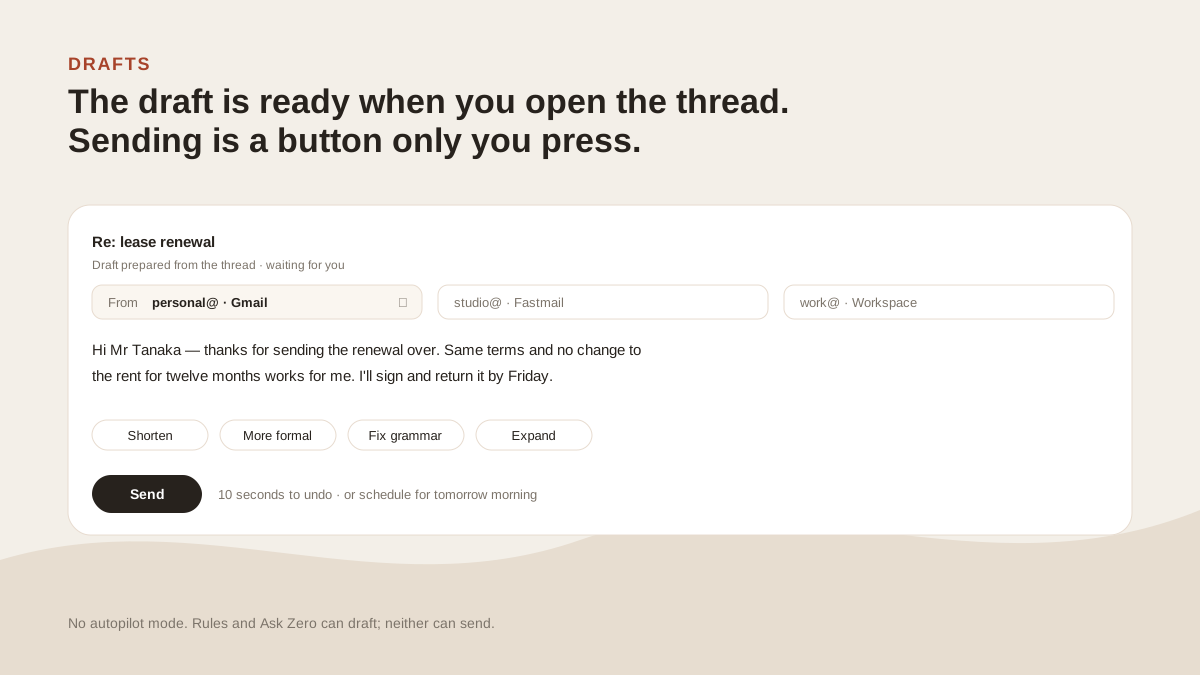
Nothing sends itself. On the other pages that's one line; on this one it's the whole subject.
Where drafts come from
Drafts come from three places and all end in the same compose window.
Threads that need a reply. When the triage layer flags a thread as waiting on you, an auto-draft can be prepared in the background. It's there when you open the thread. It's a switch in Settings, Auto-draft follow-ups, off until you turn it on.
The compose window. Give Zero an instruction, like "tell them Thursday works and ask for the revised quote", and it writes a body. Or write your own rough paragraph and ask for a rewrite: shorter, more formal, fix grammar, expand.
The thread is passed as context, capped at about 6,000 characters so a fifty-message chain doesn't drown the instruction. The draft being rewritten is passed whole.
Ask Zero. Ask it to reply to something, or to write to someone, and it writes the draft in the conversation for you to take into compose. How Ask Zero works.
Picking the mailbox
A reply defaults to the account the message arrived in. That's right nine times in ten.
The tenth time, a picker at the top of the compose window lists every connected mailbox and every verified alias on each.
Verified is the operative word. Gmail and Exchange don't reject a From address they won't honour; they quietly swap in the mailbox's own address and report success.
So before an alias can send, we send one probe message through it and read the delivered From back. On IMAP we also mail a token to the alias and watch it land. Only aliases that pass are in the picker.
The signature follows the mailbox. Signatures are stored per account and added on the server when the message goes out, so the desktop app, the web app and Android can't disagree about what gets added.
Send, schedule, undo
Press Send and you get ten seconds to take it back.
Or send it later. Focus reply offers one click, Send at 6:00 AM, which holds the message on the server until the next morning and sends it even if your laptop is closed. Undo within ten seconds cancels it; after that it goes.
The undo window and that hold are the only two states between a draft and a sent message.
What this isn't
A competitor page in this category will show you an autopilot toggle. Ours doesn't have one. We checked which tools really send on their own, and it's fewer than the marketing suggests.
Half the value of a draft is that you read it. Take away the review step and the tool has to be right every time, and no tool is.
In your tone, if you want it
Added 27 September 2026. Learn my tone is a switch in Settings, off until you turn it on.
When it's on, Zero reads up to 40 of your recent sent replies in each inbox. It cuts quoted text, signatures, forwards, auto-replies and one-word acknowledgements first, so what's left is how you actually write. It needs at least five usable replies before it has anything to say.
From that it writes a short profile: your greeting, your sign-off, how long you tend to be, the habits that recur. You can read it and edit it. Every drafter in that inbox, auto-drafts, compose and Ask Zero, follows it.
Two strengths. Closely copies your greeting, sign-off, length and habits. Light touch leans toward your tone but stays polished, which suits people whose sent mail is very casual.
Each inbox learns separately, because you probably write differently to clients than to your family. Profiles refresh every 30 days, unless you've edited one, in which case yours stands.
What it won’t do
The limits, before you find them yourself.
It doesn't send anything on its own. Rules draft, Ask Zero drafts, auto-draft drafts, and every one of them waits for you. There's no autopilot mode.
It won't learn your tone unless you ask. Learn my tone is off until you switch it on, and it needs at least five of your own sent replies in an inbox to work from.
It reads the thread, not your documents. A draft can quote the thread. It can't pull a figure from a spreadsheet.
It can't send from an address that hasn't passed a probe send. Only aliases we've watched deliver under their own name are offered.
Questions
Asked often enough to answer here.
Does MorningZero send emails automatically?
No. Drafts are created and wait. Sending is a button you press, with ten seconds to undo.
Can I choose which account a reply goes from?
Yes. Replies default to the mailbox the message arrived in. A picker in the compose window lets you switch to any connected mailbox or verified alias, and the signature changes with it.
How does the rewrite work?
Type a rough paragraph and ask for shorter, more formal, fixed grammar or expanded. Zero rewrites it using up to about 6,000 characters of the thread for context. The text being rewritten is never cut.
Does the draft sound like me?
It can. Switch on Learn my tone and Zero reads up to 40 of your recent sent replies in each inbox, with quotes, signatures, forwards and auto-replies cut out, and writes a short profile of how you write. Every draft in that inbox follows it. You can read and edit the profile, pick Closely or Light touch, and forget it.
Nothing sends itself
See it on your own mail.
Fourteen days, up to five mailboxes, no card. Connect the two you check most and watch the first morning sort itself.