
What Is an AI Email Agent? Assistants vs Agents, Explained With Real Examples
An AI email agent acts without a click — it files, archives, or sends a message on its own. An AI email assistant only drafts; you still hit send. Most 2026 tools marketed as “AI email agents” are the second kind. We checked eight products’ own docs to find which ones actually act on their own.
What makes something an agent instead of an assistant?
The test is simple: does the software take an action on your mailbox without you clicking anything first, or does it stop and wait for you? Drafting a reply, however good, is still a suggestion. Filing a message into a folder, archiving it, or sending it without a review step is an action — and that’s the line marketing copy blurs constantly, because “AI email agent” sells better than “AI email assistant” even when the product hasn’t changed.
The confusion runs deeper than labeling. A tool can be agentic about one thing and purely assistive about everything else. Superhuman’s Auto Labels run without a click; its Auto Drafts explicitly do not send automatically. That’s not a contradiction — it’s two different features with two different amounts of autonomy, sitting inside one product.
Can an AI agent send an email on its own?
Rarely, and almost never on the tools built for a personal inbox. Microsoft’s own support documentation for Copilot in Outlook is explicit that sending requires selecting the Send button, even when Copilot has drafted the entire message. Google says the same about Gemini’s Gmail features and about Gemini Spark, its personal agent launched in May 2026: Spark “is designed to ask you first before performing high-stakes actions like spending money or sending emails.”
The exception that proves the rule is Zapier. Its AI-by-Zapier documentation lets an agent call app actions mid-workflow, an email send through Gmail among them, and the require-approval toggle for that action is off by default — the opposite of every consumer inbox tool’s default. Google’s Workspace Studio, a separate business-automation product from the Gmail you check every morning, ships the same capability: “Automatically compose and send a new email from your Gmail account” when a form submission or other trigger fires. Both are built for triggered business workflows, not for standing between you and your own inbox.
The assistant-vs-agent spectrum: what 8 tools actually do, from their own docs
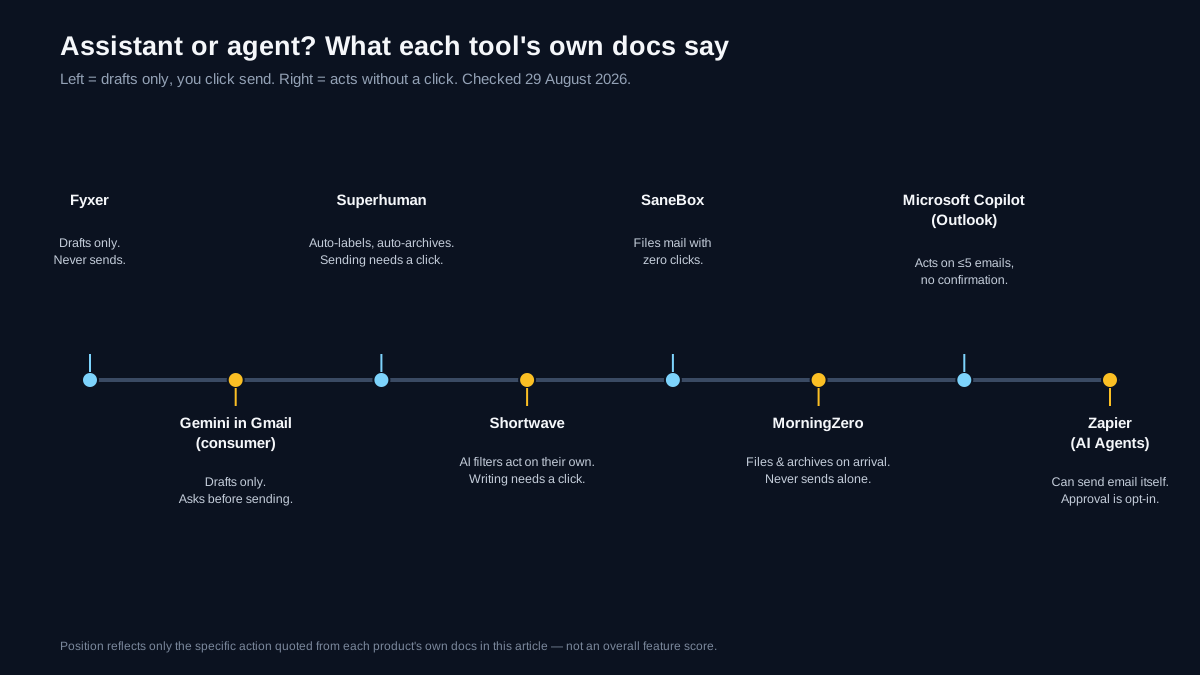
Position reflects the one specific action quoted from each product’s own documentation below — not a ranking of features. Checked 29 August 2026.
We read each tool’s current documentation, help center, or pricing page rather than trusting how it markets itself, and asked one question per product: does anything happen to a message without you clicking first?
| Tool | What runs without a click | What still needs your click | Checked |
|---|---|---|---|
| Fyxer | Automatic labeling and sorting into categories such as To respond, FYI and Marketing | Every send; Fyxer says “you decide what gets sent” | 25 Oct 2026 |
| Gemini in Gmail (consumer) | Nothing sends itself; Gemini Spark explicitly “asks you first” before sending anything | Sending, and approving Spark’s high-stakes actions | 29 Aug 2026 |
| Superhuman | Auto Labels and Auto Archive both run automatically once configured | Auto Drafts are “never sent automatically”; Instant Reply and Ask AI both end at “hit Send” | 29 Aug 2026 |
| Shortwave | AI filters “automatically organize your inbox,” including labeling, archiving, deleting and starring | The AI Assistant’s own inbox-organizing feature waits for confirmation at each step; writing waits for send | 29 Aug 2026 |
| SaneBox | Moves qualifying mail into SaneLater the moment it arrives, with no click at all | Never sends or replies to anyone on your behalf | 29 Aug 2026 |
| MorningZero | Labels, archives and files every message on arrival, across every connected mailbox | Sending — drafts from the composer or Ask Zero always wait for confirmation | 29 Aug 2026 |
| Microsoft Copilot in Outlook | Non-send actions (archive, delete, move, flag, categorize) execute immediately for up to 5 emails at a time, no confirmation card | Sending an email still requires selecting Send; more than 5 emails triggers a confirmation card | 29 Aug 2026 |
| Zapier (AI by Zapier / Agents) | Can be given an email-sending app action (for example, Gmail) as a tool mid-workflow; the require-approval toggle is off by default | Nothing, unless you turn approval on yourself | 29 Aug 2026 |
Two things stand out. First, filing mail automatically is now the norm, not the exception — six of the eight tools here do it without asking. Second, every tool built to sit in front of your inbox still refuses to send without you, no matter how agentic its other features get. The one tool that will send on its own, Zapier, was built for triggered business workflows in the first place, not for reading your morning email.
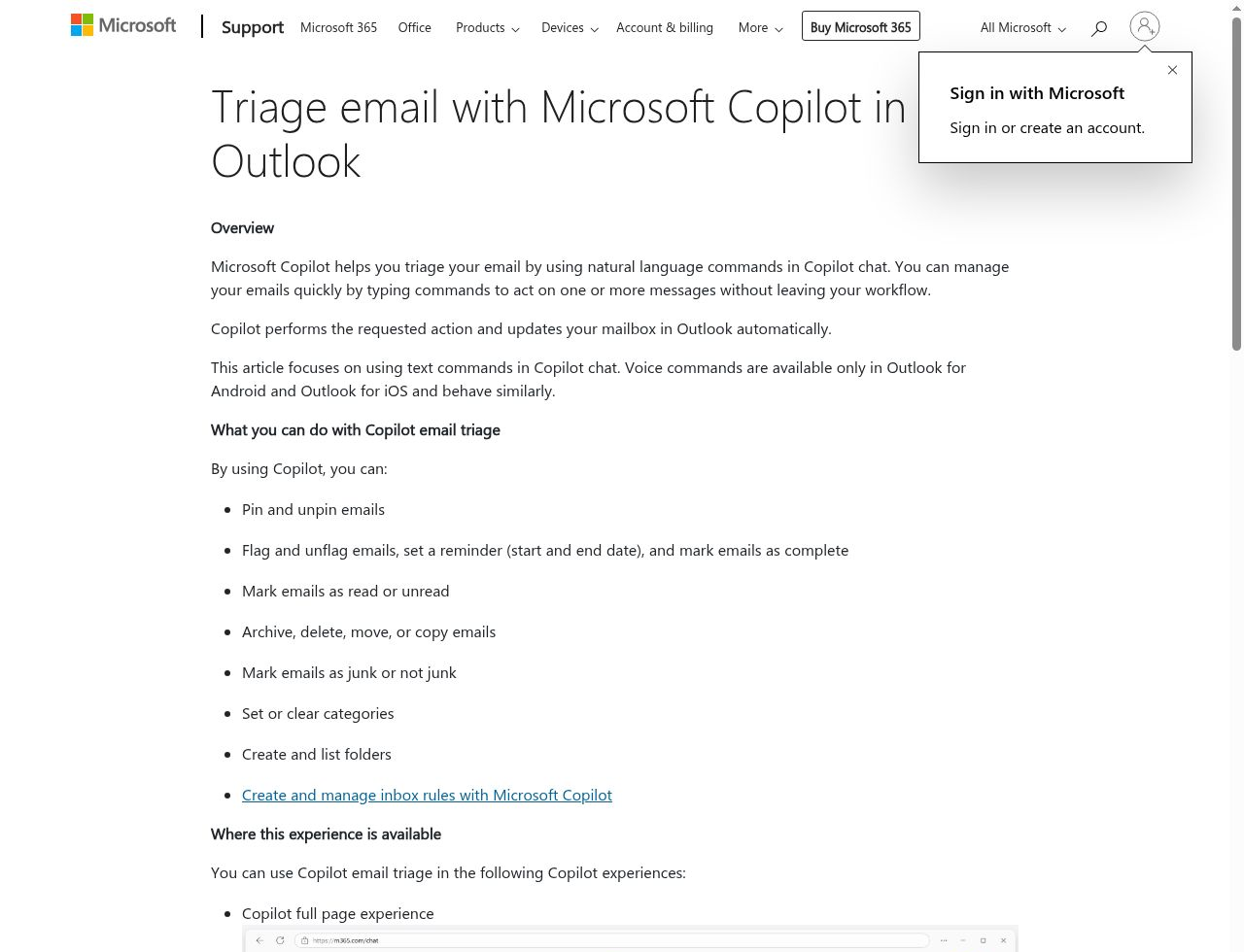
Microsoft’s own support page for Copilot email triage, stating plainly that “Copilot performs the requested action and updates your mailbox in Outlook automatically.” Source: Microsoft Support, checked 29 August 2026.
That’s a newer capability than most “best AI email assistant” roundups account for — Copilot picking up organizing actions without a click puts it closer to Superhuman and Shortwave on this spectrum than to the purely draft-only Copilot most articles still describe.
Is there a free AI email assistant?
Two of the eight are free outright for the features that matter, and Fyxer now has a credit-limited Free plan. Copilot Chat costs nothing extra on an eligible Microsoft 365 plan, and Gmail’s built-in Gemini writing and summarizing tools ship with a standard Gmail account. Everything cross-provider in this list runs on a paid subscription with a time-limited trial in front of it — Shortwave’s and MorningZero’s both run 14 days, and SaneBox’s runs 7 days. Fyxer apart, none of them publish a permanent free tier, which matters if you were hoping to run one of these indefinitely at zero cost rather than just try it.
Can ChatGPT write my emails?
ChatGPT will draft text if you paste in the context and copy the result back into your email client, but the consumer product has no access to your inbox and sends nothing on its own. The tools in this piece close that gap in one of two ways: an add-in like MailMaestro lets you pick the underlying model — including OpenAI’s GPT — while staying inside Outlook or Gmail, or an automation platform like Zapier’s AI Agents calls a model to draft and then routes the output straight into an email-sending step. In the second case, the model is doing the writing, but the automation layer around it is what makes the action agentic — that distinction is exactly what gets lost when people say “ChatGPT sent my email.”
How much does an AI email agent cost?
Pricing tracks the autonomy, roughly. The two free options — Copilot Chat and Gmail’s built-in Gemini — draft only. The filing-autonomous, sending-gated tier runs from SaneBox’s entry plan up through MorningZero at $19-$29 a month, Superhuman at $30-$40, Shortwave from $30 per seat, and Fyxer at $49 a seat monthly (its Free plan does not sort or draft mail). Zapier doesn’t sell “agent access” as a separate line item; autonomous email-sending steps run on its normal task-based plans, so what an actual agent costs you depends on how many times it fires, not on a flat per-seat price — check Zapier’s current pricing page directly if that’s the piece you’re comparing.
Which one should you actually use
Start from what you actually want automated, not from the word “agent” in a product’s marketing.
- You want faster drafts, nothing to happen without you: Gemini in Gmail, or Copilot Chat on a Microsoft 365 plan. Fyxer now sorts mail automatically too, so it belongs in the next line.
- You want your inbox pre-filed before you open it, but sending always in your hands: MorningZero, Superhuman, Shortwave, Fyxer or SaneBox — pick based on which one’s filing method (rules, AI filters, or SaneLater) fits how you think about your mail.
- You want a business workflow that emails someone the moment a trigger fires, with no human in the loop: Zapier’s AI Agents or Google’s Workspace Studio, and turn the approval toggle back on if that makes you nervous the first week.
Most people asking “what’s an AI email agent” are really asking whether any of this will act without them. For your own inbox specifically, in 2026, the honest answer is: it’ll file things for you constantly, and it still won’t hit send. If the filing half is what you’re after, the ten-tool AI email assistant comparison and the Outlook-specific architecture breakdown both go deeper on picking a specific tool once you know which category you’re shopping in. If the real problem is that the filing has to happen across several accounts, the system for managing multiple email accounts comes before any of these tools, and our Superhuman comparison shows where a single-account client stops.
First-party sources checked 29 August 2026
- MorningZero, pricing
- Superhuman: Auto Labels, Auto Archive & Auto Drafts, Instant Reply, Ask AI
- Shortwave: pricing, AI Assistant docs, changelog
- SaneBox: pricing, SaneLater, SaneReminders
- Fyxer: pricing
- Microsoft: Triage email with Copilot in Outlook, Draft and send email with Copilot Chat
- Google: Gmail is entering the Gemini era, the next evolution of the Gemini app, Workspace Studio Starters & Steps
- Zapier: adding tools to an AI by Zapier step, Zapier Agents guide
Frequently asked
What's the difference between an AI email assistant and an AI email agent?
An assistant drafts, summarizes or suggests, then waits for a human to click send, archive or approve. An agent takes that action on its own once it's set up. Most tools marketed as 'AI email agents' in 2026 are still assistants by this test — but several already act autonomously on filing and labeling even while keeping sending gated behind a click.
Can an AI agent send an email on its own?
Yes, some can. Zapier's AI Agents can be given an email-sending app action, such as Gmail, as a tool in an autonomous workflow, and the approval-before-sending toggle is off by default. Google's Workspace Studio can also send email automatically inside a configured business flow. Every personal-inbox tool in this article — MorningZero, Superhuman, Shortwave, Fyxer, SaneBox, Gemini in Gmail and Microsoft Copilot in Outlook — still requires a human click before anything goes out, even where filing and labeling already happen automatically. Superhuman's Mail MCP can send from Claude or ChatGPT, but only when you ask it to.
Is there a free AI email assistant?
Yes, up to a point. Microsoft 365 Copilot Chat is free for work and school accounts on an eligible Microsoft 365 plan, Gmail's built-in Gemini writing and summarizing tools ship with a standard Gmail account at no extra cost, and Fyxer now has a Free plan with monthly usage credits (checked 25 October 2026). None of MorningZero, Superhuman, Shortwave or SaneBox offer a permanent free plan; each runs a time-limited trial instead: 14 days for MorningZero and Shortwave, and 7 days for SaneBox.
Can ChatGPT write my emails?
ChatGPT can draft email text if you paste in the context and copy the result back into your email client, but the consumer product doesn't read your inbox or send anything on its own. Tools that plug an AI model into your actual mailbox — MailMaestro even lets you pick OpenAI's GPT as the underlying model — are a separate layer on top. When automation platforms like Zapier's AI Agents use a model to draft and then send, the automation layer is the agent; the model is just doing the writing.
How much does an AI email agent cost?
It depends which layer you're paying for. Assistants that draft only run from free (Copilot Chat, Gemini in Gmail) to $120 per seat monthly (Shortwave $30–$120). Tools that file or archive automatically but still gate sending run $19-$40 a month (MorningZero, Superhuman), and Fyxer is $49–$99 monthly or $37–$64 billed annually; its Free plan does not sort or draft mail. Zapier doesn't have a separate 'agent' price tag — autonomous email-sending steps run on its regular task-based plans, so check Zapier's current pricing page for what your volume would actually cost.
Try it on your own inboxes
Fourteen days, up to five mailboxes, no card. Connect Gmail, Outlook, iCloud or Yahoo and see what lands in Needs you.
Start free trial