
Best AI Email Assistant for Outlook in 2026: 8 Tools Compared by Architecture
The best AI email assistant for Outlook depends on where the AI actually sits. Microsoft 365 Copilot is free to chat with on eligible Microsoft 365 plans but only reads your primary mailbox. MailMaestro and Mailbutler add drafting inside Outlook itself. Only Spark and MorningZero treat every connected Outlook, Gmail or IMAP account as one workflow.
That architecture question gets skipped in most “best AI email assistant” roundups, which tend to rank by feature checklist instead. It matters more than the checklist once you’re choosing: a native feature and a full cross-provider layer solve different problems, even when both claim to “manage your inbox with AI.”
We picked eight tools that specifically compete for Outlook users, sorted each by how it attaches to Outlook, what mailbox scope it actually covers, and what it costs today.
The quick answer: which Outlook AI tool fits which architecture?
| Tool | Architecture | Mailbox scope | Current price |
|---|---|---|---|
| Microsoft 365 Copilot | Native Microsoft feature | Primary mailbox only | Chat: free with eligible M365; full Copilot $30/user/mo, paid yearly |
| MailMaestro | Outlook add-in | Whichever mailbox is open | Free (3 actions/wk) to $15/seat/mo; Maestro Duo $27/seat/mo |
| Mailbutler | Outlook add-in | Whichever mailbox is open | Free (watermarked) to $9/user/mo |
| Carly AI | Email-native agent | Per-account, via CC/forward | $35/month |
| Fyxer | Cross-provider client (Gmail + Outlook) | 1 inbox on Starter; multiple on Professional | $30/user/mo (1 inbox); $50/user/mo (multiple) |
| Superhuman | Cross-provider client (Gmail + Microsoft 365) | Search spans accounts; AI settings stay per account | $30/seat/mo ($25 annual) |
| Spark | Cross-provider client (multi-provider) | Unified inbox across accounts | Free, or $10-$20/user/mo for AI |
| MorningZero | Cross-provider layer | Cross-account triage, search and rules | $19/mo Solo (5 mailboxes) to $29/mo Stack (15) |
Prices above are current list prices, checked against each vendor’s own pricing page on 24 August 2026. Per-seat tools bill a second Outlook account as a second seat; MorningZero bills per mailbox allowance on one subscription.
How we picked these eight
We classified the first ten organic Google results for ai email assistant for outlook, US English, desktop, personalization off, checked 24 August 2026. Google showed an AI Overview, People Also Ask, reviews and video results.
| Rank | Result | Page type |
|---|---|---|
| 1 | Microsoft: AI Email Assistant for Outlook | First-party product page |
| 2 | Reddit: What are the best Outlook plugins and AI tools? | Forum |
| 3 | Zapier: The 10 Best AI Email Assistants | General editorial listicle |
| 4 | Microsoft Marketplace: AI MailMaestro | Marketplace listing |
| 5 | Lindy: 7 Best Outlook AI Email Assistants (14 Tools Tested) | Outlook-specific listicle |
| 6 | Saner.ai: Outlook AI Assistants, 5 Apps Tested | Outlook-specific listicle |
| 7 | Gmelius: 15 Best AI Email Assistants | General editorial listicle |
| 8 | Arahi.ai: Best AI Assistant for Outlook, 6 Picks Tested | Outlook-specific listicle |
| 9 | Sintra.ai: 15+ Best AI Email Assistants | General editorial listicle |
| 10 | ifourtechnolab: AI Email Assistant for Outlook | Vendor solution page |
Three of the ten are Outlook-specific listicles running 5-14 tools; the rest split between general “best AI email assistant” lists, a first-party page, a marketplace listing, a vendor page and one forum thread. That is a real, less-crowded sub-SERP, and eight tools sits comfortably inside the range those Outlook-specific pages use.
We did not install every add-in in the same live mailbox and score them side by side; that would dress up documentation research as testing we didn’t do. What follows is reproducible instead: each tool’s own pricing and product pages, checked on the date above.
1. Microsoft 365 Copilot: the native option, if primary-mailbox scope is enough
Copilot is the only tool here you don’t have to install. It ships inside Outlook for Microsoft 365 across Windows, Mac, web and mobile, and Microsoft’s own support pages show it live: a Summary by Copilot panel appears at the top of a thread, condensing a long back-and-forth into a few lines with citations back to the source messages.
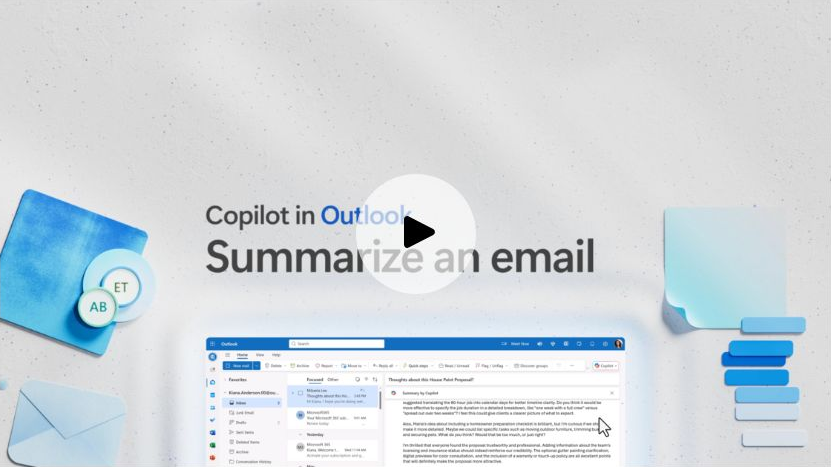
Microsoft’s own “Summarize an email thread with Copilot in Outlook” support page, showing the real Outlook for Windows interface. Source: Microsoft Support, checked 24 August 2026.
Chatting with Copilot, drafting with Copilot, and coaching by Copilot are all available at no extra cost with an eligible Microsoft 365 Business, school, Personal or Family subscription — Microsoft’s own FAQ notes that available features vary between the Business and Personal/Family tiers. The full Microsoft 365 Copilot add-on, which pulls in broader organizational context across Outlook, Teams, Word, Excel and PowerPoint, is a separate purchase at $30 per user per month paid yearly.
The scope limit is the one to remember: Microsoft documents Copilot scenarios as working on the user’s primary mailbox, not archive, group, shared or delegate mailboxes, and not mailboxes outside Exchange Online. A fractional CFO running three client Microsoft 365 tenants gets three separate Copilots, not one that spans them.
Choose Copilot when one Microsoft 365 mailbox is genuinely the whole job. For anything wider, keep reading.
2. MailMaestro: an Outlook add-in built to draft faster, not to unify accounts
MailMaestro installs as an add-in inside Outlook (and separately inside Gmail) rather than replacing the client. It writes, replies to and summarizes email and attachments using a choice of underlying models — OpenAI, Anthropic or Google, per its own marketing copy — and adds a scheduling assistant and meeting note-taker under the MaestroLabs umbrella.
On its own site, the free tier gives three AI compose, reply or improve actions a week and leaves a MailMaestro watermark on outgoing mail. Professional/Team runs $15 a seat monthly, or $12 annually, and removes the watermark while adding auto-labels and email or attachment summaries. Maestro Duo — a newer bundle pairing MailMaestro with its meeting-notes sibling TeamsMaestro — lists at $27 a seat monthly or $25 annual.
MailMaestro’s own FAQ makes its pitch against Copilot directly: “Copilot is 2.5x more expensive than MailMaestro.” That’s true at list price for the full Copilot add-on, but it compares a paid add-in against Copilot’s paid tier while ignoring that Copilot Chat itself is already free on eligible plans.
The add-in operates on whichever mailbox is open in Outlook. Running four client accounts means four separate MailMaestro sessions with no shared view between them.
3. Mailbutler: the older Outlook add-in, now the cheaper one
Mailbutler predates most of this list and still ships as an Outlook and Gmail add-in rather than a client replacement. Its feature set leans toward sales and follow-up workflows: email tracking, tailored sending, mail merge, smart follow-up reminders and, on higher tiers, an AI-assisted “Smart Summarize” and “Smart Task Finder.”
Mailbutler’s Starter tier is free forever, though a visible watermark stays on sent mail. Professional moves to $9 a user monthly, or $7 annually, and unlocks inbox collaboration, tags, automations and the AI features. Business is custom-quoted, aimed at teams that need CRM tracking sync and custom SMTP.
Like MailMaestro, Mailbutler runs per mailbox with no account-spanning view — it’s a cheaper add-in, not a differently-scoped one.
4. Carly AI: no add-in, no client — an agent you CC
Carly is the odd one out architecturally. It doesn’t install inside Outlook and doesn’t ask you to open a new app. You connect your Outlook account at the API level, then work with Carly by emailing her directly, CCing her on a thread, or forwarding mail to her address. She reads the thread, drafts a reply in your voice, or takes an action you’ve authorized, then sends from your own Outlook address once you approve.
Carly’s own comparison table pitches this as an advantage for “hands-off triage, drafting, follow-up,” and it’s a genuinely different shape from an add-in: nothing to install means it works identically whether you’re in Outlook on desktop, web or mobile. The trade-off is that Carly is a single agent per account rather than a merged view across several — her pricing page and integrations page describe connecting Google and Microsoft mailboxes, but the working model is still “CC the agent,” not “see every inbox in one list.”
Carly’s own site lists one plan, $35 a month, covering custom named agents, 200+ integrations, and unlimited connected email and calendar accounts under that single subscription.
Carly calling itself an “agent” is worth a beat: by her own pricing page, she still waits for your approval before anything sends. That’s the same test worth applying to any tool using the word — What Is an AI Email Agent? checks eight products’ own docs for which ones actually act without a click, and which just draft with agent-shaped marketing.
5. Fyxer: draft-and-meeting layer across Gmail and Outlook
Fyxer behaves like an executive-assistant layer rather than a new client: it categorizes incoming mail into buckets like “To Respond” and “FYI,” drafts replies in your voice, and sends a notetaker into video meetings to produce a follow-up draft afterward. It covers Gmail and Outlook, not the wider hosted-IMAP list some competitors support.
Fyxer’s own pricing page puts Starter at $22.50 a user monthly on annual billing ($30 month-to-month), covering one inbox and calendar. Professional jumps to $37.50 monthly annual ($50 month-to-month) for multiple inboxes and calendars, plus cross-team scheduling, Fyxer Chat and HubSpot integration. Fyxer is explicit that it drafts but never sends on your behalf.
The mailbox-scope split matters here: Starter buyers are stuck with single-inbox Fyxer, and only Professional actually spans more than one Outlook account.
6. Superhuman: the fast client that added Outlook and cross-account search
Superhuman’s whole pitch is speed — a deliberately keyboard-first interface with Write with AI, Instant Reply, Auto Summarize and Auto Labels layered on top. It supports Gmail and Microsoft 365, which puts Outlook users inside its addressable market without being an Outlook add-in; it’s a full client replacement.
Superhuman’s site currently lists Starter at $30 a member monthly ($25 annual), and Business at $40 monthly ($33 annual) for Auto Drafts, Ask AI, custom AI labels and CRM integrations.
Superhuman now documents cross-account search through its Mail MCP server, so hunting for a message doesn’t require picking an account first. Its AI Email Assistant settings, though, remain configured per account rather than as one shared rule layer — closer to Fyxer’s split than to a fully merged workflow.
7. Spark: the only other tool here with a real unified inbox and a free tier
Spark is the strongest direct alternative to a cross-provider layer, and the only tool on this list besides MorningZero that ships an actual unified inbox as a baseline feature rather than an add-on. Spark documents support for Gmail, Google Workspace, Outlook, Microsoft 365, iCloud, Yahoo and standard IMAP, including custom domains, across Mac, Windows, Android and iOS.
Spark’s Free plan includes the unified inbox, unlimited email accounts and smart notifications, with no AI attached. Plus, at $8.25 a user monthly annual ($10 month-to-month), adds Spark +AI — an AI Assistant, thread summaries and 40 AI meeting notes a month, capped by a monthly credit quota. Pro, at $16.58 monthly annual ($20 month-to-month), drops the meeting-notes cap but keeps that same shared AI credit model.
Spark has iOS, which none of the cross-provider tools higher up this list do, and a real $0 starting point. The trade-off against MorningZero is the credit quota: Spark’s AI runs on a shared monthly allowance, where MorningZero‘s triage and rules run on every message with no metering.
8. MorningZero: the unmetered cross-provider layer, including Outlook.com and Microsoft 365
MorningZero isn’t an Outlook add-in and isn’t trying to be a faster Outlook. It connects Gmail, Google Workspace, Outlook.com, Microsoft 365 and a named list of hosted-IMAP providers, then classifies every arriving message before you open it — regardless of which of those accounts it landed in.
Triage, Search, Ask Zero, Sweeps, plain-English rules and calendar all read across the full connected set. That’s the same distinction Spark makes with its unified inbox, extended further: nothing about MorningZero‘s AI is metered. There are no AI credits, no daily request caps and no message limits on either plan.
Solo is $19 per month for 5 mailboxes; Stack is $29 for 15 and adds priority support. Billed annually they are $180 and $276, about $15 and $23 a month. Extra mailboxes cost $3 per month each with no hard limit, and the pricing page suggests a negotiated rate past 20.
The honest limits: no iOS app, so Spark or Superhuman win outright on Apple mobile. No custom or self-hosted IMAP and no direct Proton connection. No team assignment or shared-inbox collaboration — that’s a different product entirely. And MorningZero is a layer, not a faster Outlook client, so if what you actually want is a snappier compose window inside Outlook itself, an add-in like MailMaestro solves that specific complaint better.
Does the architecture match your mailbox count?
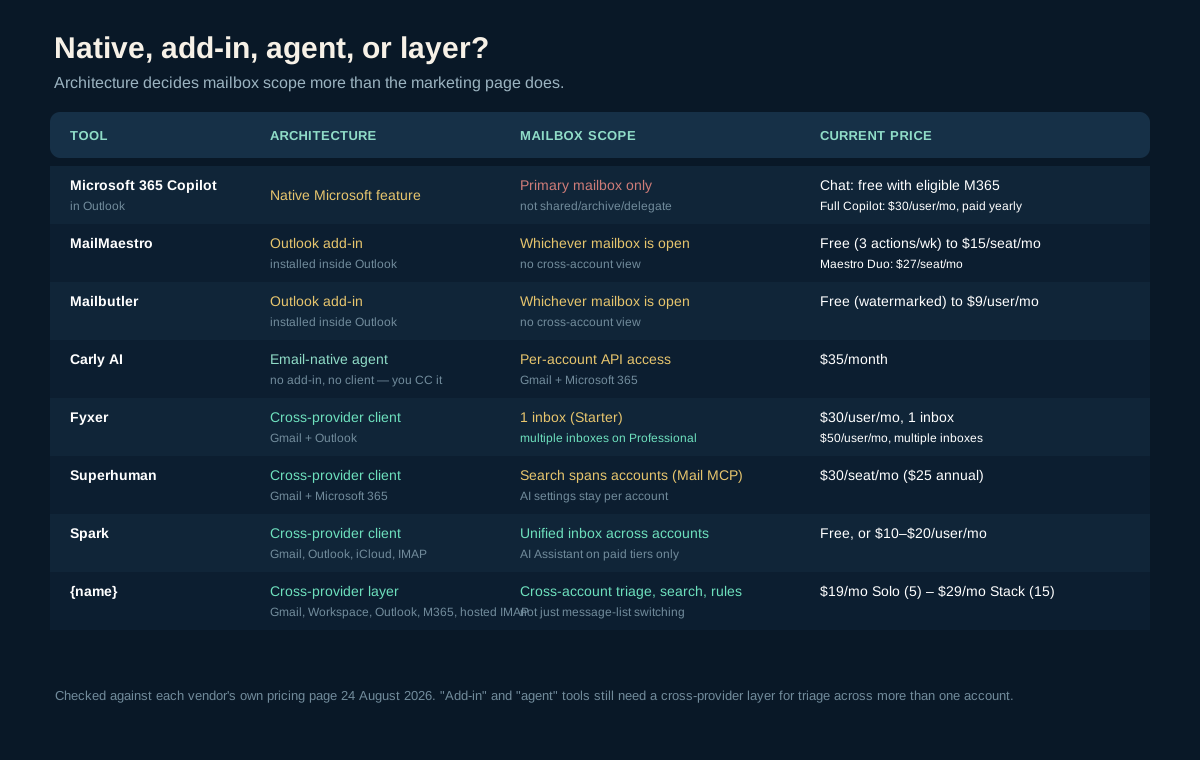
Native feature, add-in, email-native agent, or cross-provider layer — the architecture predicts the mailbox scope more reliably than the marketing copy does. Original matrix built from the first-party sources linked throughout this article, checked 24 August 2026.
Four architectures, one practical question each:
- Native (Copilot): is one Microsoft 365 primary mailbox actually the whole job?
- Add-in (MailMaestro, Mailbutler): do you just want faster drafts inside the Outlook you already have, one account at a time?
- Email-native agent (Carly): are you comfortable delegating by CC rather than watching a merged inbox?
- Cross-provider (Fyxer, Superhuman, Spark, MorningZero): does the real problem span more than one Outlook account, or more than one provider entirely?
The mistake we see most often is buying an add-in to solve a multi-account problem. MailMaestro and Mailbutler are both good at what they do — faster, cleaner drafts — and neither one will stop you from checking four separate Outlook logins every morning, because neither was built to. If that is the shape of your problem, the five-step system for running several accounts is the better starting point.
The useful way to choose
Pick the bottleneck before the tool.
- One Microsoft 365 mailbox, budget-conscious: start with Copilot Chat, which is already free on your plan.
- Faster drafts inside the Outlook you already run, one account: MailMaestro or Mailbutler.
- You’d rather delegate by email than manage a dashboard: Carly AI.
- Meeting follow-up plus drafting, Gmail and Outlook: Fyxer.
- Keyboard speed above everything else: Superhuman.
- Free tier, real unified inbox, and you need iOS: Spark.
- Several Outlook, Microsoft 365, Gmail or hosted-IMAP accounts, and you want triage that isn’t metered: MorningZero.
If that last line describes your week, the 14-day trial, which needs no card, is enough to connect one Outlook account first, then add the rest once the combined queue is actually clearer than four separate ones. For the wider field beyond Outlook specifically, the full ten-tool AI email assistant comparison covers Gmail-first and team tools this list leaves out, and the unified inbox guide explains the account-switching-versus-merged-workflow distinction in more depth.
First-party sources checked 24 August 2026
- MorningZero pricing
- Microsoft: AI Email Assistant for Outlook, Copilot in Outlook FAQ, and Summarize an email thread with Copilot in Outlook
- MailMaestro pricing and Microsoft Marketplace listing
- Mailbutler pricing
- Carly AI pricing and Outlook integration page
- Fyxer pricing
- Superhuman Mail plans and Mail MCP
- Spark pricing
Frequently asked
Is Copilot for Outlook free?
Chatting with Copilot in Outlook is included at no extra cost with eligible Microsoft 365 Business, school, Personal or Family subscriptions, and it can already answer questions about your inbox and calendar. The full Microsoft 365 Copilot add-on, which adds deeper enterprise-data context, costs $30 per user per month paid yearly and is a separate purchase from a base Microsoft 365 plan.
Is there a free AI email assistant available for Outlook?
Yes, several. Copilot Chat ships free with eligible Microsoft 365 plans. MailMaestro's free tier gives 3 AI compose or reply actions a week with a MailMaestro watermark. Mailbutler's Starter plan is free forever, also watermarked. Spark's free plan includes its unified inbox and account switching, but its AI Assistant is a paid-tier feature.
How do I turn on the AI assistant in Outlook?
In Outlook for Microsoft 365 (Windows, Mac, web or New Outlook for Windows), sign in with a work or school account and look for the Copilot icon in the ribbon or navigation header. Summary by Copilot appears at the top of a thread automatically; Draft with Copilot and Coaching by Copilot appear on the ribbon when composing. Chat with Copilot needs a Microsoft Copilot subscription tied to that account.
Is there a ChatGPT-style tool built into Outlook?
Not from OpenAI directly. Microsoft's own answer is Copilot, built on large language models but not literally ChatGPT. Third-party add-ins fill that gap differently: MailMaestro lets you pick the underlying model (OpenAI's GPT, Anthropic's Claude or Google's Gemini) for drafting and summarizing inside Outlook.
Which AI email assistant works across more than one Outlook account?
Copilot, MailMaestro and Mailbutler all operate on whichever mailbox is open in Outlook at the time, with no cross-account view. Spark's unified inbox and MorningZero's triage, search and rules span every connected Outlook, Gmail, Microsoft 365 or hosted-IMAP account at once. Superhuman and Fyxer sit in between: Superhuman's search spans accounts through its Mail MCP server while AI settings stay per account, and Fyxer's Professional tier covers multiple inboxes.
Does an AI email assistant for Outlook see shared or delegated mailboxes?
Microsoft documents Copilot in Outlook scenarios as working on the user's primary mailbox, not archive, group, shared or delegate mailboxes, and not mailboxes outside Exchange Online. Add-ins and cross-provider tools generally follow whatever access the connected account grants them, so check each vendor's own docs before assuming a shared mailbox is covered.