
The 11 Best Email Productivity Tools in 2026, Tested Across Several Mailboxes
The best email productivity tools cut the time your inbox costs you — by sorting it, drafting replies, clearing bulk mail, or replacing your mail client outright. We read the documentation for eleven of them on 9 September 2026 and put one question to each: does it work across every mailbox you own, or one at a time? Six cannot. If you are weighing the AI side specifically, the ten-tool AI email assistant comparison sorts those by job, and what an AI email agent is explains which of them act without a click.
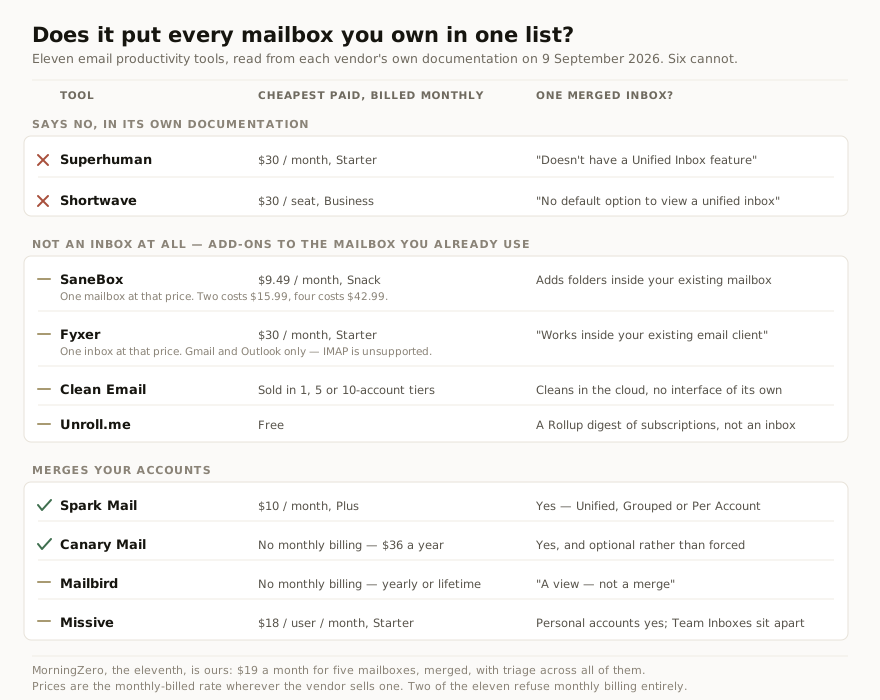
Read from each vendor’s own pricing page and help centre on 9 September 2026. Original illustration.
What counts as an email productivity tool
The category is broader than it looks, which is why most lists of it are incoherent. Four different kinds of software answer to the name: full mail clients that replace Gmail’s interface, AI assistants that draft and triage, cleanup services that unsubscribe and archive in bulk, and automation platforms that move mail between apps.
They are not substitutes for each other. A cleanup service will not make you faster at replying; a fast client will not clear nine thousand newsletters. The useful question is not which is best overall but which of the four jobs you actually need doing, and then whether the tool doing it can reach all of your mail.
That last part is where the category quietly fails, and it is what we set out to measure.
The one test, and how to re-run it
We asked a single question of each tool: can it show every mailbox you own in one list, and does its automation act on all of them or only the account you happen to have selected?
The method was deliberately dull. For each tool we opened the vendor’s own pricing page and help centre — no review sites, no listicles — set every billing toggle to monthly, and recorded the cheapest paid tier, how many mailboxes it covers, whether the docs promise a merged inbox, and whether search and AI span accounts. Where the documentation does not say, we recorded “not documented” rather than inferring it.
Anyone can repeat this in an afternoon. Every source URL is listed at the end, and the figures below are dated 9 September 2026 because several of them will move.
The eleven, side by side
Two earlier pieces cut this same field on different axes: the ten best AI email assistants sorts by the job each one does best, and what fourteen apps cost per mailbox prices them at one, three, five, ten and fifteen accounts. This table asks only the cross-account question.
| Tool | Cheapest paid, billed monthly | Mailboxes at that price | One merged inbox? | AI across accounts? | Providers |
|---|---|---|---|---|---|
| Superhuman | $30 Starter | Per person, not per address | No | Default account unless told otherwise | Gmail, Outlook |
| Shortwave | $30/seat Business | Flat rate, all your accounts | No | Not documented | Gmail only; M365 “not supported at this time” |
| Spark Mail | $10 Plus | Unlimited, all tiers | Yes | Yes, all connected accounts | Gmail, iCloud, Yahoo, Exchange, Outlook, IMAP/EWS |
| Missive | $18/user Starter | 10 personal per user | Personal only | Yes, all connected accounts | Any provider, including IMAP |
| Mailbird | No monthly billing | Unlimited on Premium | ”A view—not a merge” | Compose aid only | Gmail, Outlook, Yahoo, iCloud, Exchange, IMAP |
| Canary Mail | No monthly billing | Unlimited, all tiers | Yes | Yes, all connected accounts | Gmail, Outlook, iCloud, Exchange, IMAP |
| SaneBox | $9.49 Snack | 1 | No inbox of its own | Within your plan’s mailboxes | Anywhere you check mail |
| Fyxer | $49 Pro | 1 inbox | No inbox of its own | Several inboxes only on Team ($99) | Gmail and Outlook only, no IMAP |
| Clean Email | Sold per 1, 5 or 10 accounts | 1, 5 or 10 | No inbox of its own | Within your tier | Gmail, Yahoo, AOL, iCloud, Outlook, IMAP |
| Unroll.me | Free | Multiple, simultaneity undocumented | A Rollup digest, not an inbox | Subscriptions only | Not Outlook 365 or Exchange |
| MorningZero | $19 Solo | 5, then $3 each | Yes | Yes, the whole connected set | Gmail, Workspace, Outlook, M365 + 9 IMAP providers |
Superhuman and Shortwave both document the gap
The two most expensive tools here are the two that tell you outright they cannot do this, and both do it in a help article rather than on the pricing page.
Superhuman’s is titled Unified Inbox Workaround. It reads: “While Superhuman Mail doesn’t have a Unified Inbox feature, we can offer a workaround using tabs in our Native Apps to keep an eye on all of your inboxes, and quickly switch between them.” Our Shortwave comparison covers what that means day to day. Its MCP documentation adds that “your AI assistant acts on your default account unless you specify otherwise.”
Shortwave’s multi-account guide is just as plain: “While currently there is no default option to view a unified inbox in Shortwave, you can easily sign into multiple accounts on each device and quickly switch between them.”
Both are excellent at what they are for, and on a single mailbox we would still rate Superhuman the fastest thing here to actually work in. Neither is the tool for someone holding five mailboxes.
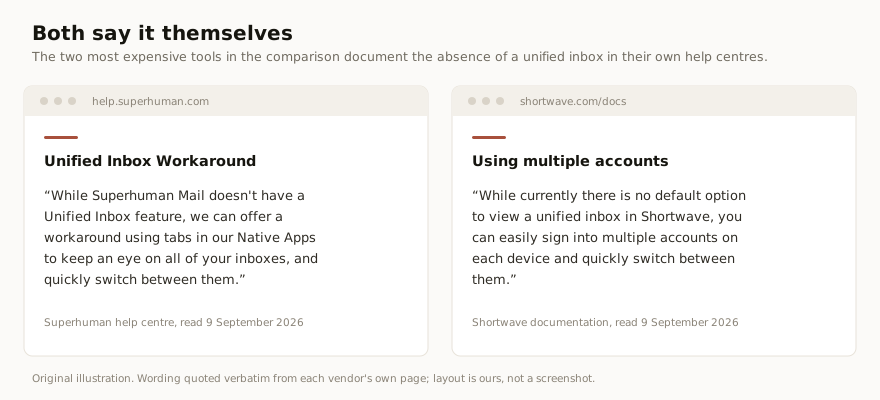
Both quotes taken from the vendors’ own help centres on 9 September 2026. Original illustration; the wording is theirs, the layout ours.
Spark and Canary Mail merge accounts properly
Spark is the strongest free option in the category and it is worth saying so before any paid recommendation. Unlimited email accounts on every tier including Free, and an inbox with three modes its help pages spell out: “Unified displays emails from all of your accounts together”, Grouped shows unread counts per address, Per Account keeps them separate. Search spans everything by default. Its help centre says you can “let the AI Assistant index your email history for all the email accounts you have to be able to search across it.”
Canary Mail does the same and frames it as a choice: “A unified inbox is there when you want it, not forced on you.” Its AI “spans all connected accounts”, and unlimited accounts are included even on the free tier.
The catch with Canary is billing, not features. It caps devices instead — two on Free, five on paid — and it will not sell you a month.
Mailbird calls it a view, not a merge
Mailbird is the most honest piece of copy we read all day. Its own page explaining how to combine accounts says: “The unified inbox is a view—not a merge—so messages stay tied to their original accounts, and you can still open each inbox separately when you need to.”
That distinction is real and most vendors blur it. Mailbird gives you one scrollable list across unlimited accounts on Premium, with cross-account search, though its help centre notes search excludes Spam and Trash by default.
Where it stops is AI. Mailbird’s only AI feature is a ChatGPT integration for drafting, invoked per message, running on your own OpenAI account. Nothing in Mailbird’s documentation frames it as acting across your accounts, because it does not act on accounts at all — it helps you write one email.
Missive is built for teams, which changes the answer
Missive is the tool most often misfiled in comparisons like this one. It describes itself as “inbox collaboration for teams that run on email”, and the shape of the product follows.
Your personal accounts do merge: paid plans include ten per user, and the AI “searches across all your connected accounts.” But shared accounts behave differently. A Team Inbox “appears as a separate item in the sidebar, keeping emails separate from your personal inbox” — deliberately, because those conversations are not assigned to anyone yet.
For a five-person agency splitting a support address, that separation is the feature. For one consultant holding six client mailboxes, it is a second place to look. Which of those you are decides whether Missive belongs on your shortlist at all.
Four of the eleven never give you an inbox
SaneBox, Fyxer, Clean Email and Unroll.me are not email apps and do not pretend to be. They reorganise the mailbox you already use. SaneBox “simply add[s] a folder to your current email setup”; Fyxer “works inside your existing email client, so there’s no new interface to figure out.”
That is a legitimate design, and for people happy in Gmail it is the lighter choice. It also means the merged-inbox question does not apply — you keep switching accounts exactly as before, with better-sorted mail in each.
What does apply is how they price mailboxes, and this is where they get expensive quietly. SaneBox’s Snack plan covers one account at $9.49 a month; two costs $15.99, four costs $42.99. Fyxer’s Pro plan is $49 a month and covers one inbox; several inboxes means Team at $99 a month (checked 25 October 2026). Clean Email sells in bundles of one, five or ten accounts.
Unroll.me is free because the data is the product
Unroll.me costs nothing and has no paid tier we could find. Its own data page explains the model without much euphemism.
“Unroll.Me is owned by NielsenIQ, an e-commerce measurement and consumer data company… When you register for Unroll.Me, we access your commercial emails, using that data to enhance advertising products, measurement products, datasets and other services for our customers.” And: “We sell our advertising products, measurement products, and datasets to companies that want to learn more about their business, markets, competitors, and current and prospective customers.”
The same page states that your identifiable personal information will never be sold or shared to directly target you, and that qualification belongs next to the rest. Two practical limits also apply: Unroll.me is “incompatible with platforms like Outlook 365 and Microsoft Exchange emails”, and bulk multi-select works only in its mobile app.
Two of the eleven will not sell you a month
Canary Mail’s FAQ is unusually direct: “No, Canary Mail does not offer monthly subscriptions… Any monthly price shown on the pricing page is a monthly equivalent of the yearly plan, not a monthly billing option.” The “$3/month” on its page is $36 billed yearly.
Mailbird is the same shape. Its billing toggle offers Yearly and Lifetime with no monthly tab, and the per-month figure it shows is a yearly rate divided by twelve. The price we saw sat under a site-wide countdown banner, so treat it as promotional rather than a stable list price.
This is why every figure in the table above is the monthly-billed rate wherever one exists. It is the same pattern we found reading six Spark alternatives, where five of six showed a discounted annual rate first, and Spark’s own pricing page opens on the yearly toggle too. To be fair, our own pricing page now leads with its annual number as well.
What the lists ranking for this term recommend
We also read the pages currently ranking for this search, because they are what most people find first.
The one holding the top spot was last modified in December 2023. Two of its ten entries are Gmail’s own built-in features: the ”?” keyboard-shortcut key, and Gmail templates. Another page, titled “The Top 14 Tools to Maximize Email Productivity”, lists fifteen entries, seven of which are not tools for handling your own mail — Alexa, Doodle, Facebook Pages Inbox, GetProspect, Dropbox for Gmail, Todoist for Gmail and Grammarly. An eighth, Woven, points at a domain that returned HTTP 502 on every attempt we made.
None of that is malice. It is what happens to a listicle nobody revisits. It is also the reason this one carries a date on every figure.
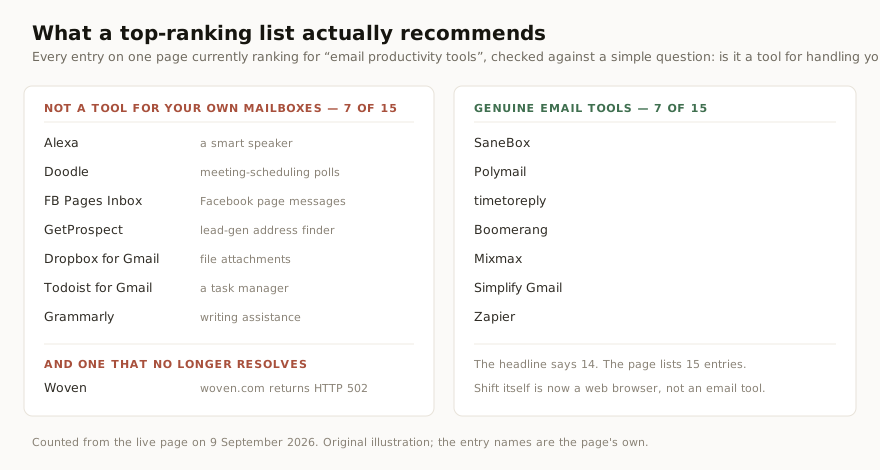
Counted from the live page on 9 September 2026. Original illustration.
Where MorningZero fits, and where it loses
MorningZero is ours, so treat this section accordingly. It is an AI-sorted unified inbox: Solo is $19 a month billed monthly for five mailboxes, Stack is $29 for fifteen, extra mailboxes are $3 each with no cap, and triage, search, rules and Ask Zero all read across the whole connected set rather than a selected account. Annual works out at $15 and $23 a month.
Where we lose: there is no iOS app, which rules us out for a lot of people on its own. Proton needs Bridge running on your machine, so we cannot reach it. Custom or self-hosted IMAP is not self-serve. And if you want a free tier, Spark’s is better than anything we offer — it has unlimited accounts at $0, and plenty of people searching this term do not need to spend anything.
If several mailboxes is the actual problem, the 14-day trial needs no card and covers five mailboxes, so you can connect the ones that argue with each other most and see whether one list helps.
First-party sources checked 9 September 2026, rechecked 25 October 2026
Every figure above came from one of these pages, read on 9 September 2026:
- Superhuman — Pricing Plans, Account Structure, Unified Inbox Workaround, MCP Server
- Shortwave — pricing, multi-account guide, AI quota, Microsoft support note
- Spark Mail — pricing, add and manage accounts, customise your inbox, AI Assistant, Smart Search
- Missive — pricing, billing and plans, AI overview, search and filter
- Mailbird — pricing, combine multiple accounts, unified inbox article, ChatGPT integration
- Canary Mail — pricing, unified inbox, AI, FAQ
- SaneBox — pricing, FAQ
- Fyxer — pricing, AI email assistant, supported setups
- Clean Email — plans, features, privacy
- Unroll.me — your data, supported providers
- MorningZero — pricing
Two notes on what we could not confirm. Clean Email renders its prices in the browser rather than in the page source, so we have published its account tiers and no dollar figure, because we could not confirm one from a first-party source. And neither Shortwave nor Superhuman documents whether its native search spans every signed-in account, so both are recorded as “not documented” rather than guessed.
Frequently asked
What is an email productivity tool?
An email productivity tool is software that reduces the time your inbox costs you. In practice it does one of four jobs: sorting incoming mail by importance, drafting or automating replies, clearing bulk mail and subscriptions, or replacing your mail client with a faster one. Some are full email apps, some are add-ons that reorganise the mailbox you already use without giving you anywhere new to read it.
Which email productivity tools work across several mailboxes at once?
Of the eleven read on 9 September 2026, Spark Mail, Canary Mail and MorningZero merge every connected account into one list and run their AI across all of them. Missive does this for personal accounts but keeps Team Inboxes in a separate sidebar item. Mailbird shows a combined view its own documentation describes as 'a view—not a merge'. Superhuman and Shortwave both state in their help centres that they have no unified inbox.
How much do email productivity tools cost per month?
Billed monthly, the range in this comparison runs from $9.49 for SaneBox's single-mailbox Snack plan to $49 for Fyxer Pro (checked 25 October 2026). Superhuman Starter and Shortwave Business are $30, Spark Plus is $10 and Missive Starter is $18 per user. Two of the eleven decline to sell monthly billing at all: Canary Mail sells yearly or lifetime only, and Mailbird offers yearly or lifetime.
Is SaneBox one subscription for all my mailboxes?
No. SaneBox prices by mailbox count. On 9 September 2026 its Snack plan covered one email account at $9.49 a month, Lunch covered two at $15.99, and Dinner covered four at $42.99. Its FAQ says SaneBox 'can be used with up to 4 email accounts. If you need more, please contact support!' So a subscription covers several mailboxes, but only up to the cap you pay for.
Is Unroll.me really free?
It costs no money. Its own data page states that Unroll.me is owned by NielsenIQ, that it accesses your commercial emails to 'enhance advertising products, measurement products, datasets and other services for our customers', and that it sells those products and datasets to companies. The same page says your identifiable personal information will never be sold or shared to directly target you. Decide with that in front of you rather than after.
Does Shortwave work with Outlook?
Not natively. Shortwave signs in with Gmail and Google Workspace only, and its documentation says Microsoft 365 and Exchange are 'not supported at this time' with no timeline offered. Other providers, including Outlook.com, iCloud, Fastmail and generic IMAP, are reachable only by auto-forwarding them into a Gmail account first.
Try it on your own inboxes
Fourteen days, up to five mailboxes, no card. Connect Gmail, Outlook, iCloud or Yahoo and see what lands in Needs you.
Start free trial