
Gmail Is Removing "Check Mail From Other Accounts": We Checked Whether Google's Replacement Actually Works
Gmail’s check mail from other accounts setting stops fetching in January 2027. Google’s recommended replacement is automatic forwarding, configured at your other provider. We checked six providers against their own documentation on 4 September 2026: that replacement is free and frictionless on exactly one of the three providers Gmailify supported.
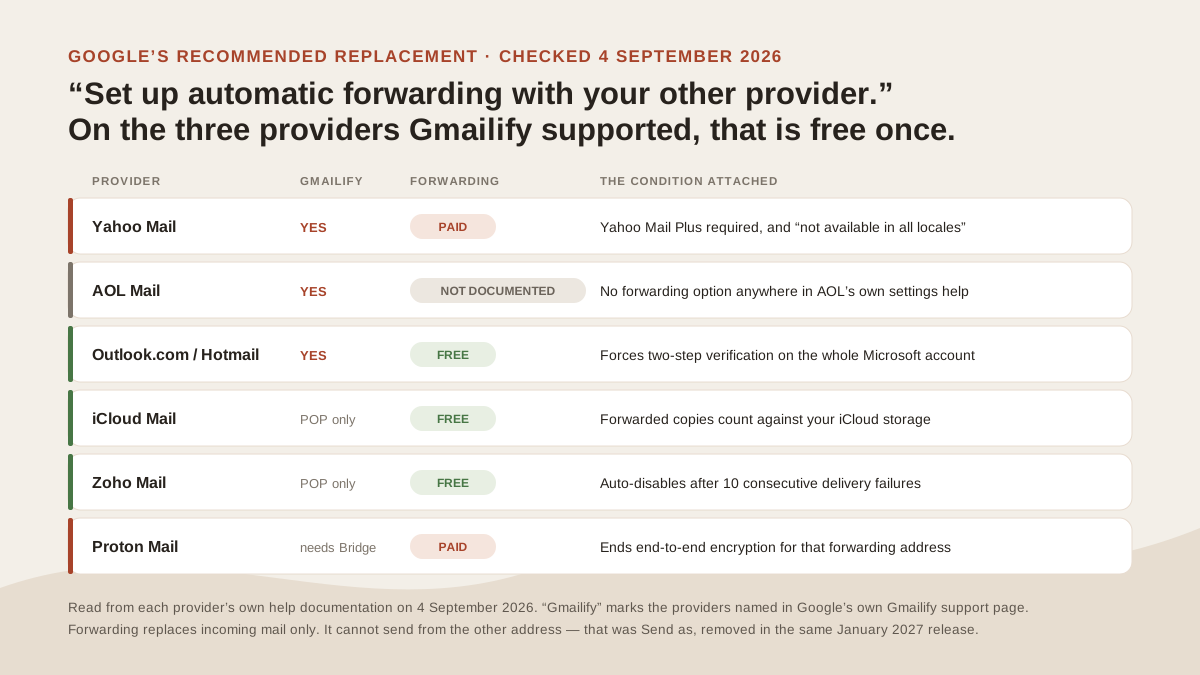
What Google’s recommended replacement actually costs, provider by provider. Original illustration, built from each provider’s own help documentation on 4 September 2026.
What the setting did, and what removal means
The setting lived in Gmail’s Settings under Accounts and Import. You gave Gmail the POP credentials for another mailbox and Gmail logged in on a schedule, pulling new messages into your inbox. One direction, no sync back, and it worked with any server that spoke POP, including custom domains.
Google’s timeline: new setups stopped after the first quarter of 2026, and existing users keep the feature until January 2027. Mail already fetched stays in Gmail permanently. What ends is the ongoing pull, so any message sent to the other address after your cutoff simply never arrives in Gmail.
The setting also hosted Gmailify, a separate feature with its own removal. Both shared one settings panel, which is why they are constantly confused. The full picture of what Google is removing covers all three features and Google’s stated reason for the change.
Google’s replacement, and the assumption inside it
Google names two paths. Set up automatic forwarding with your other email provider, or add that account to the Gmail mobile app, which connects over IMAP.
The second is honest but narrow: it puts the mail in the phone app, not in Gmail on the web. If you read mail on a desktop browser, nothing about it helps you.
The first carries an assumption worth testing. Google’s wording defers the work outward: “set up automatic forwarding with your other email provider. Refer to your provider’s documentation for instructions on how to do this.” That sentence quietly transfers responsibility to companies with no obligation to make it easy, free, or available. So we went and read those providers’ documentation.
What forwarding actually costs, provider by provider
Six providers, checked against their own help pages on 4 September 2026. The three marked as Gmailify providers are the ones Google’s own Gmailify documentation names.
| Provider | Gmailify supported it | Auto-forwarding | Cost | The condition |
|---|---|---|---|---|
| Yahoo Mail | Yes | Yes | Paid — Yahoo Mail Plus | Also “not available in all locales” |
| AOL Mail | Yes | Not documented | — | No forwarding option in AOL’s settings help |
| Outlook.com / Hotmail | Yes | Yes | Free | Forces two-step verification on |
| iCloud Mail | POP fetch only | Yes | Free | Forwarded copies consume iCloud storage |
| Zoho Mail | POP fetch only | Yes | Not on the Free plan for new users | Auto-disables after 10 consecutive failures |
| Proton Mail | No, needs Bridge | Yes | Paid plans only | Disables end-to-end encryption to that address |
Read the top three rows again, because that is the finding. Of the providers Gmailify officially supported, Google’s recommended replacement is free and unconditional on one: Outlook.com, and only if you accept two-step verification.
Yahoo charges for it, and not everyone can buy it
Yahoo’s help page is unambiguous: “Upgrade to Yahoo Mail Plus to use the email forwarding feature in your Settings.” The same page adds a second limit: “Not available in all locales - If the option isn’t listed in your account, it’s not available at this time.”
Both halves matter. A Yahoo user following Google’s advice finds a paywall, and a Yahoo user in the wrong country finds nothing at all, with no upgrade available to fix it.
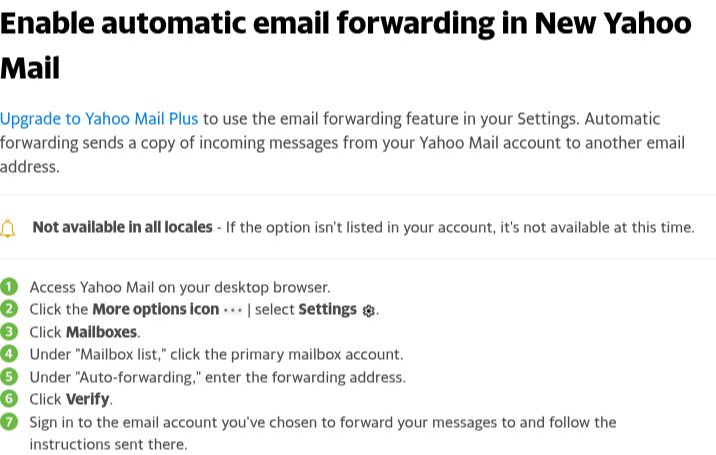
Both limits sit in Yahoo’s first two lines: the upgrade requirement and the locale caveat. Source: Yahoo Help, “Enable automatic email forwarding in New Yahoo Mail”, captured 4 September 2026.
Yahoo was the launch partner for Gmailify in February 2016. Anyone who took Google up on that offer a decade ago, with a Yahoo address, is now told to solve the problem using a feature Yahoo sells separately. If that is you, the routes for getting Yahoo mail into Gmail covers the free and paid options in detail.
AOL does not document forwarding at all
AOL is the outlier, and its absence is harder to report than a paywall. We could not find automatic forwarding documented anywhere in AOL’s own help.
AOL’s “Update AOL Mail settings” article lists what you can change: Reading, Contacts, New Mail, Inbox Style, Today on AOL, Mail Away Message, Sender Name Display. No forwarding. Its filters article says filters “automatically sort new emails to a folder or the trash” — sorting, not forwarding. AOL’s POP and IMAP pages cover third-party apps, not forwarding.
Stated precisely, because absence of documentation is not proof of absence: AOL may still offer forwarding to some accounts, and third-party guides report that availability varies by account age and region. What we can say is that a user following Google’s instruction to consult their provider’s documentation will not find an answer in AOL’s.
Outlook.com is free, with a condition nobody mentions
Outlook.com is the one clean path among the Gmailify three, and it still comes with a requirement. Microsoft’s support page states it plainly: “If two-step verification isn’t turned on for your Microsoft account, you will be prompted to enable it when you turn on forwarding.”
You cannot enable forwarding on Outlook.com without also enabling two-step verification on the whole Microsoft account. That is good security and a genuine surprise mid-task, especially for someone who came to fix an email routing problem and now needs their phone.
Microsoft also flags a behaviour worth knowing before you rely on it. Forwarded messages arrive as forwards from your own account, so replies address you rather than the original sender. If you need replies to reach the sender, Microsoft points you at a redirect rule instead.
The free providers, and the small print
iCloud Mail forwards free. Apple’s guide notes that keeping copies of forwarded mail reduces your available iCloud storage, and offers a “Delete messages after forwarding” option if you would rather not pay for the duplication in space.
Zoho Mail forwards after you verify the destination address, but not on the Free plan for accounts created since its July 2026 change: “For the new users who signed up under the Free plan, the Email Forwarding feature will not be available.”
Its documentation adds a reliability detail that matters for anything you depend on: “If the Email Forwarding fails ten times consecutively, the email forwarding will be automatically disabled.” Forwarding is not set-and-forget.
Proton Mail restricts forwarding to paid plans, and attaches a cost that has nothing to do with money. Per Proton’s own support page, forwarding to a non-Proton address disables end-to-end encryption for mail to and from that forwarding address. For a provider chosen specifically for encryption, that is a significant trade to make in order to satisfy Gmail.
What forwarding cannot do, whatever it costs
Even where forwarding is free and instant, it replaces half of what you had. Forwarding moves incoming mail. It does not let you answer from that address.
Sending as a non-Google address relied on Gmail’s Send as feature, and Google is removing that in the same January 2027 release. So anyone who used POP fetch and Send as together loses both halves and can only rebuild one of them with forwarding. Google’s suggested answer for the sending half is your provider’s own app, or a desktop client over IMAP and SMTP.
Two further gaps apply everywhere. Forwarded mail arrives as a forward, so Gmail’s filters see your forwarding address rather than the original routing, and rules built on the old fetch may not match. And forwarded mail can land in spam more readily than fetched mail, because it arrives via a redirect rather than from the sending domain.
First, check whether this affects you at all
Open Gmail on a computer, go to Settings, then See all settings, then Accounts and Import. Two sections tell you your exposure.
Anything listed under Check mail from other accounts stops fetching in January 2027. If an entry shows “Gmailify” beside the address, you have the linked-account version and lose Gmail’s spam filtering and categories on that mail as well.
Anything non-Google listed under Send mail as stops working in the same release. Gmail addresses and Google Workspace aliases are unaffected, so an entry there is only a problem if the address is not Google-hosted.
Empty lists mean this change does not touch you, and no action is needed before January 2027.
Then pick by the job, not by the settings screen
Decide by what you actually need, because the three replacements solve different halves of the problem:
- Mail arriving in Gmail on the web. Provider-side forwarding, if your provider offers it free. Check the table above first rather than assuming.
- Sending from that address too. Forwarding will not do it. Use the provider’s own app, or a desktop client over IMAP and SMTP.
- Mail on your phone only. Add the account to the Gmail mobile app over IMAP. Free, and unaffected by this change.
- Several mailboxes at once, across providers. That is a different problem from routing one account into another, and the guide to running multiple email accounts works through it. The unified inbox explainer sets out what that pattern does and does not solve.
You have until January 2027, and Google says affected users get an in-product notice. The thing not worth doing is discovering the paywall on the day the fetch stops.
Where a unified layer fits, and where it does not
MorningZero connects Gmail, Workspace, Outlook and Microsoft 365 through their own consent screens, and Fastmail, iCloud, Yahoo, AOL, GMX, Web.de, Zoho, Yandex and Mail.com with an app password, from $19/month for 5 mailboxes. It does not put mail into Gmail, which is worth being clear about: it is a separate place to work, not a fix for Gmail. If what you need is mail arriving in Gmail specifically, forwarding is the answer, and on Outlook.com and iCloud it is free.
Provider documentation checked 4 September 2026, rechecked 25 October 2026: Yahoo, AOL settings, Outlook.com, iCloud, Zoho Mail, Proton Mail. Gmail changes per Gmail Help: “Learn about upcoming changes to Gmailify & POP in Gmail” and “Learn about changes to third-party email account support in Gmail”, both retrieved 31 August 2026 and rechecked 25 October 2026.
Frequently asked
What is replacing Gmail's Check mail from other accounts?
Google names two replacements: automatic forwarding set up at your other provider, or adding that account to the Gmail mobile app over IMAP. Neither is a like-for-like swap. Forwarding brings mail in but cannot send on your behalf, and the mobile app does not put the mail in Gmail on the web.
When does Check mail from other accounts stop working?
January 2027. Google stopped accepting new setups after the first quarter of 2026, and existing users keep the feature until January 2027. Messages already fetched into Gmail stay there; only the ongoing fetch ends.
Is provider-side forwarding free on every provider?
No. We checked six providers on 4 September 2026. Yahoo requires a paid Yahoo Mail Plus subscription and says the feature is not available in all locales. Proton restricts forwarding to paid plans, and Zoho Mail no longer offers it to new Free-plan users. Outlook.com and iCloud offer it free. We rechecked all six on 25 October 2026. AOL does not document automatic forwarding at all.
Does Yahoo charge for email forwarding?
Yes. Yahoo's own help page says to upgrade to Yahoo Mail Plus to use the email forwarding feature, and adds that it is not available in all locales. Yahoo was one of the providers Gmailify officially supported, so anyone moving off Gmailify with a Yahoo address hits a paywall on Google's recommended fix.
Why does Outlook.com ask for two-step verification when I enable forwarding?
Microsoft requires it. Its support page states that if two-step verification is not turned on for your Microsoft account, you are prompted to enable it when you turn on forwarding. Forwarding is free on Outlook.com, but you cannot switch it on without also switching on two-step verification.
Will forwarding let me still send from my other address?
No, and this is the gap that catches people. Forwarding only moves incoming mail. Sending from a non-Google address relied on Gmail's Send as feature, which Google is removing in the same January 2027 release. Replacing one does not replace the other.
Try it on your own inboxes
Fourteen days, up to five mailboxes, no card. Connect Gmail, Outlook, iCloud or Yahoo and see what lands in Needs you.
Start free trial