
Gmailify Is Being Removed in January 2027: What Breaks, What Survives, and How to Move
Gmailify ends in January 2027, not January 2026. So do Gmail’s POP-based Check mail from other accounts and Send as for third-party addresses. Google’s documentation says existing users keep all three until then. New Gmailify and POP setups stopped after the first quarter of 2026; Google says it will restrict new Send as configurations before January 2027. Mail already in your Gmail account stays where it is.
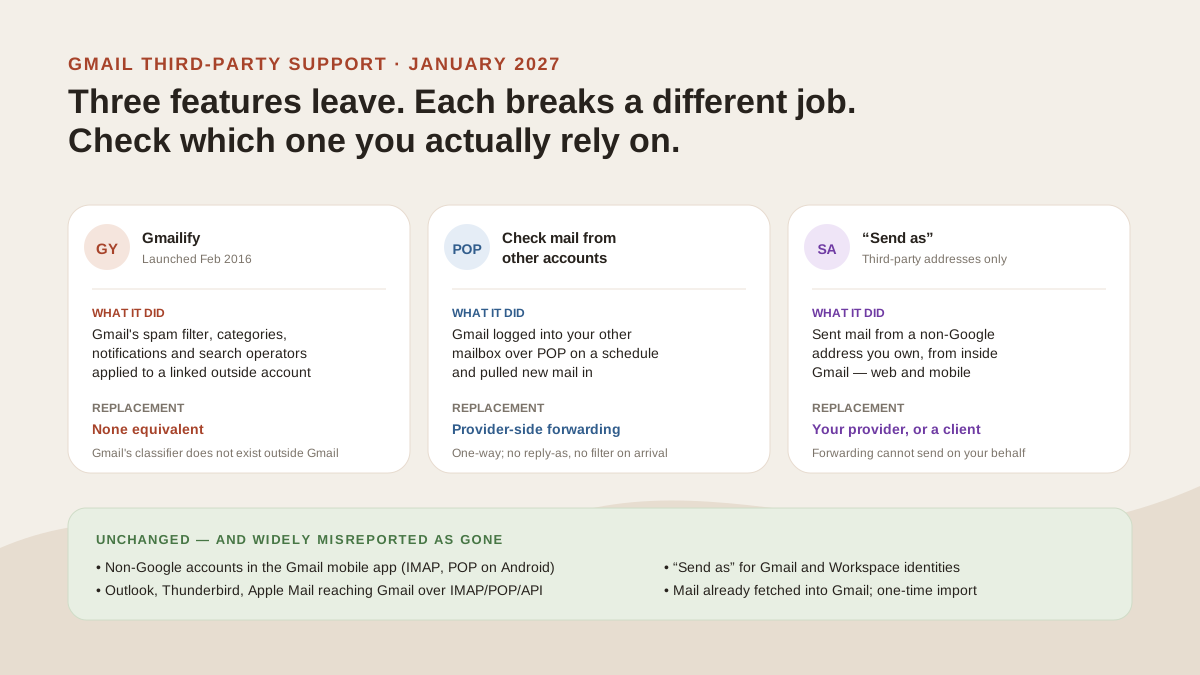
Three separate jobs, three separate failure modes. Only one of them has a replacement that does the same thing. Original illustration for this guide.
The change in one place
- What ends, January 2027: Check mail from other accounts (POP fetch on the web); Send as for non-Google addresses; and the feature layer on a linked account.
- What continues: non-Google accounts in the Gmail mobile app; Outlook, Thunderbird and Apple Mail reaching your Gmail over IMAP, POP or the Gmail API; Send as for Gmail and Workspace identities; mail already fetched; one-time import.
- Google’s stated reason: features that require “disproportionate maintenance resources”.
- Who should act: anyone whose Gmail Settings → Accounts and Import lists an outside address under Check mail from other accounts or Send mail as.
What Gmailify actually was
Google launched Gmailify on 17 February 2016. The pitch was in the title of the announcement: the best of Gmail, without an @gmail address. You linked a Yahoo, Hotmail or Outlook.com account, AOL arrived later, and Gmail applied its own machinery to mail hosted somewhere else.
Per Gmail Help, linking gave you four things:
- Spam protection
- Better mail notifications on mobile
- Automatic sorting by type (Social, Updates, Promotions)
- Faster search, with advanced search operators
The setup path explains a decade of confusion. On the web it ran through Settings → See all settings → Accounts and Import → Check mail from other accounts → Add a mail account, and only then Link account with Gmail (Gmailify). Gmailify lived inside the POP-fetch panel. Two different features, one door.
Is Gmailify already gone? No, and here is where that idea came from
The January 2026 date is everywhere, including in Google’s own AI answer. On 31 August 2026 we ran gmail pop3 on Google (desktop, United States, personalisation off) and the AI answer at the top of the page stated that Google “discontinued” both features “in January 2026” — while Google’s documentation, one result below, says existing users keep them until January 2027. Its top-cited source was a Reddit thread titled “Gmail will stop supporting POP3 at 2026 january”, which describes the new-user cutoff; the answer restated that as a completed event. AI answers vary between users and sessions, so yours may differ. Re-run the query and check the date against Google’s own page rather than the summary above it.
What Google said, and the reason it gave
Most coverage reported that Google gave no reason. True of the page everyone read, support.google.com/mail/answer/16604719, which covers Gmailify and POP without explaining why. A second page, answer/17101213, covers all three features and opens with one:
“In our ongoing commitment to ensuring Gmail remains secure, smart, and easy-to-use, we occasionally have the difficult choice to discontinue features that require disproportionate maintenance resources.”
Maintenance cost, in writing. Not security, not strategy. That second page also carries the timeline.
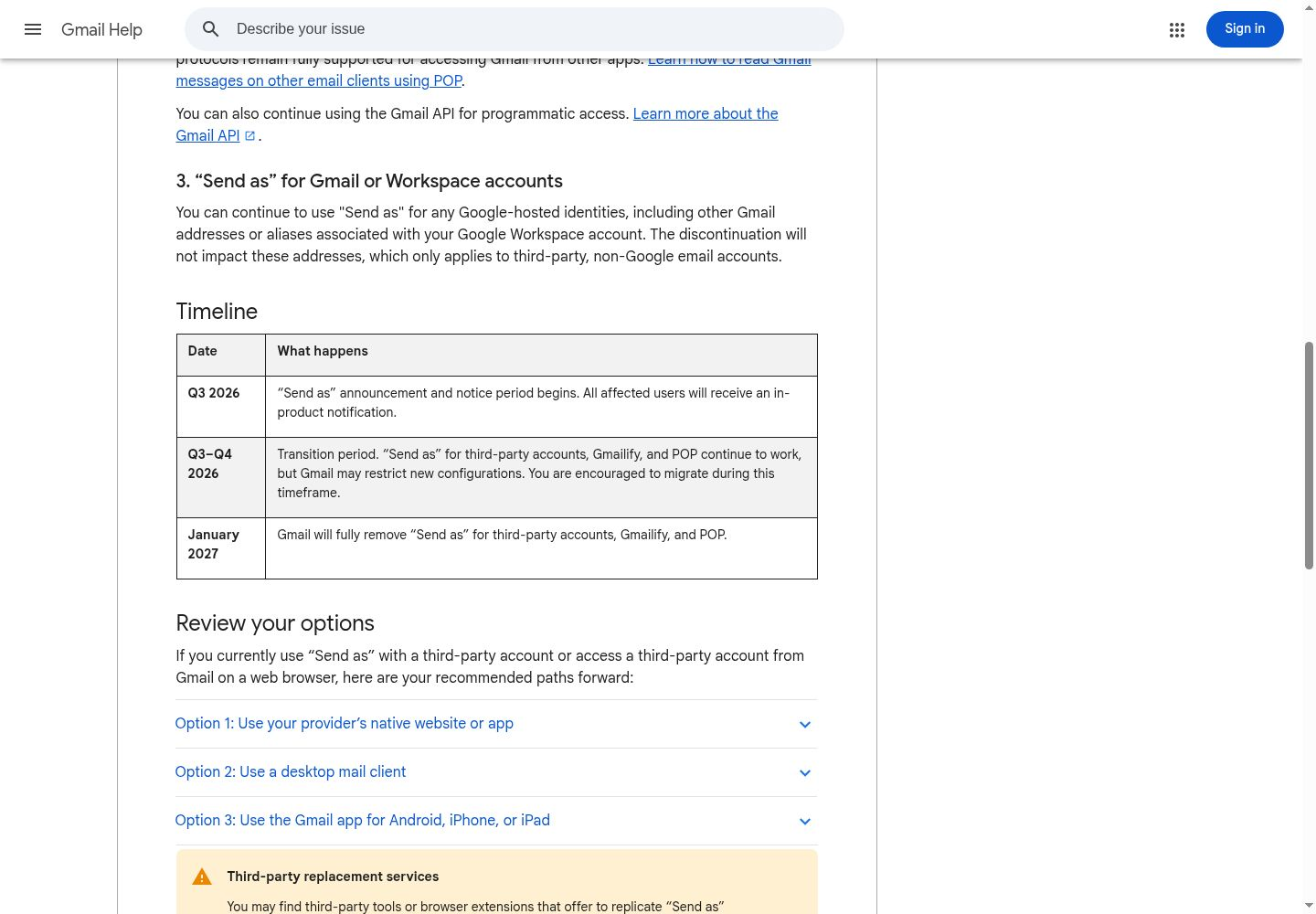
Google’s timeline, with the note that Send as for Google-hosted identities is unaffected directly above it. Source: Gmail Help, “Learn about changes to third-party email account support in Gmail”, captured 31 August 2026.
| Date | What happens |
|---|---|
| Q3 2026 | Send as notice period begins. Google says affected users receive an in-product notification. |
| Q3–Q4 2026 | Transition period. All three features keep working; Gmail may restrict new configurations. |
| January 2027 | Gmail fully removes Send as for third-party accounts, Gmailify, and POP. |
What is not changing
Read this before rebuilding anything, because most of the panic traces back to it.
Your own Gmail account is not losing POP or IMAP. Outlook, Thunderbird and Apple Mail connect to it exactly as before, and the Gmail API still works. If you read that Gmail is dropping POP3, it means Gmail fetching from other providers, not POP access to Gmail.
The Gmail mobile app is unaffected. You can still add and use non-Google accounts there over IMAP, and Google notes POP still works for third-party accounts on Gmail for Android. The protocol Google is retiring on the web survives on Android.
Send as for Google-hosted identities stays. Other Gmail addresses and Workspace aliases are untouched; only non-Google addresses lose it. Messages already fetched stay put, and one-time import of mail and contacts remains available on the web.
Does this affect Google Workspace?
Partly, and published answers contradict each other on it.
Send as for Google-hosted identities is explicitly exempt. Google says the discontinuation “only applies to third-party, non-Google email accounts”, so a Workspace admin managing aliases carries on.
Gmailify and web POP fetch are different. They are Gmail client features, not plan features, and Google’s guidance on the POP change opens by pointing work and school accounts at the Workspace data migration service. If you are on Workspace and pulling an outside mailbox into Gmail on the web, you are in scope. Both blanket answers, “Workspace is affected” and “Workspace is not affected”, are half right.
Why these two features get confused
They did different jobs through the same settings panel, and Google announced both removals together.
Check mail from other accounts was a utility: Gmail logged into an external POP server on a schedule and copied new messages in. One direction, no feature layer, and it worked with anything speaking POP, including custom domains.
Gmailify was a linked account with Gmail’s processing on top, and Gmail Help documents effects running in both directions:
- Archive a message in Gmail and an Archive folder appears at your other provider.
- Add a label in Gmail and a folder of that name appears there too. Add several labels and you get several folders, each holding a copy of the message, which Google warns about if the outside account is short on space.
- Trash follows the other service’s empty-trash schedule, not Gmail’s 30 days. A provider keeping deleted mail 60 days means Gmail shows it for 60 days.
- Linking can push you into your Google storage limit.
One caution on mechanism: Google’s documentation never names the protocol behind Gmailify. Third-party write-ups assert IMAP; Google does not say. The documented behaviour shows a folder-capable two-way sync, which plain POP cannot do, so treat the mechanism as inferred from behaviour rather than published fact.
If you unlink and keep copies in Gmail, later moves and deletions in Gmail stop reflecting back to the other account. The mirror breaks quietly.
What each replacement actually costs you
Google’s two help pages name four paths between them: provider-side forwarding, the provider’s own website or app, the Gmail mobile app, and a desktop client. None is Gmailify.
| Option | New mail reaches Gmail on the web? | Send from the other address? | Gmail’s spam filter and categories? | Honest gap |
|---|---|---|---|---|
| Provider-side auto-forwarding | Yes | No | Applied as inbound Gmail mail, not to the source account | One-way. Some providers charge for forwarding, and forwarded mail can land in spam |
| Gmail mobile app over IMAP | No, it appears in the app | Yes | No | Mobile only; nothing changes on a desktop browser |
| Desktop mail client (IMAP/SMTP) | No, mail stays with the provider | Yes | No | You maintain a client, and Gmail’s web view no longer holds everything |
| One-time import | Existing mail only | No | n/a | History transfer, not a sync |
| MorningZero unified layer | No, mail stays with each provider and appears in MorningZero | Yes, replies stay tied to the source account | MorningZero‘s own triage, not Gmail’s | Another working layer rather than Gmail itself; no iOS app |
The second row catches people out. Losing Send as and gaining forwarding are not symmetrical: forwarding brings mail in, and nothing about it lets you reply as that address. Anyone using forwarding and Send as together loses the half that forwarding cannot rebuild. Whether the forwarding row costs anything depends on which provider you are leaving. We read six providers’ own help pages to find out: Google’s recommended fix is free and frictionless on one of the three providers Gmailify supported.
What Google says about third-party replacements, including us
Google’s page ends with a warning worth quoting rather than paraphrasing:
“You may find third-party tools or browser extensions that offer to replicate ‘Send as’ functionality. Exercise caution with these services, as they often require access to your email credentials or OAuth tokens. This can expose your account to security and privacy risks. Google cannot guarantee the safety, reliability, or data practices of these services.”
Fair, and aimed at the category this blog belongs to. So: MorningZero connects Gmail and Microsoft accounts through those providers’ own consent screens rather than asking for your password, and it has completed Google’s CASA security assessment for the Gmail scopes it uses. Providers with no OAuth, such as Yahoo, iCloud and Fastmail, use an app-specific password you generate in their settings and can revoke there. Tokens are encrypted at rest, and mailbox access can be withdrawn from your Google or Microsoft account settings without involving us.
None of which is a reason to skip Google’s question. It is the question, and it is worth asking of everything here, this tool included: password or revocable token, can you revoke without going through the vendor, and is your mail used to train anything. A tool that cannot answer those three plainly is the one the warning was written about.
Google’s own second option, incidentally, is “use a desktop mail client… to manage multiple accounts in one place.” The category is Google’s recommendation.
What to do before January 2027
Open Gmail on a computer and go to Settings → See all settings → Accounts and Import. Two sections show your exposure:
- Check mail from other accounts. Anything listed here stops fetching. An entry showing “Gmailify” beside the address is the linked-account version, which loses the feature layer as well.
- Send mail as. Any non-Google address here stops working. Gmail addresses and Workspace aliases are fine.
Empty lists mean this change does not touch you.
Otherwise, decide by the job rather than the settings screen:
- Need new mail in the Gmail web inbox? Provider-side forwarding, configured at the provider.
- Need to send as that address? Forwarding will not do it. Use the provider’s own app, a desktop client, or a layer that keeps each identity connected.
- Running several mailboxes at once? That case is covered on our page for several Gmail accounts, and the unified inbox explainer sets out what the pattern does and does not solve.
- On Yahoo? Yahoo’s own automatic forwarding is a paid Yahoo Mail Plus feature in some locales, worked through in how to forward Yahoo Mail to Gmail.
- Comparing tools rather than protocols? Start with the best email apps for multiple accounts.
No rush beyond the date. Google’s timeline put the Send as notice period in Q3 2026 and the transition in Q3–Q4 2026; as of 25 October 2026 its help page still gives January 2027 for full removal. The one thing not worth doing is waiting until a mailbox you depend on goes quiet, then working out which of three separately-announced changes caused it.
MorningZero runs from $19/month for 5 mailboxes if a cross-provider working view is what you want. If you just need mail arriving in Gmail, set up forwarding instead. It is what Google recommends, and on Outlook.com and iCloud it is free.
Sources, retrieved 31 August 2026 and rechecked 25 October 2026: Gmail Help, “Learn about upcoming changes to Gmailify & POP in Gmail”; Gmail Help, “Learn about changes to third-party email account support in Gmail”; Gmail Help, “Get Gmail features for your other email accounts”; Google, “Gmailify: The best of Gmail, without an @gmail address”, 17 February 2016.
Frequently asked
Is Gmailify discontinued, and when exactly does it stop working?
Not yet. It stops in January 2027. Gmail closed new Gmailify setups after the first quarter of 2026, but Google's documentation says existing users keep the feature until January 2027. Pages claiming it was removed in January 2026 have confused the new-user cutoff with the shutdown.
Will I lose emails that Gmailify or POP fetch already brought into Gmail?
No. Google states that all messages synced before the deprecation stay in Gmail. What ends is the ongoing fetch, not the archive. The risk is new mail sent to the other account after the cutoff, which will not reach Gmail unless you set up a replacement first.
Does the Gmailify and POP removal affect Google Workspace accounts?
Partly. Send as for Google-hosted identities, meaning other Gmail addresses and Workspace aliases, is explicitly unaffected. Gmailify and POP fetch on the web are Gmail client features, and Google points work and school account holders at the Workspace data migration service, so those users are in scope for that half of the change.
Is Gmail dropping POP and IMAP support?
No, and this is the most common misreading. Outlook, Thunderbird and Apple Mail can still reach your Gmail account over IMAP or POP, and the Gmail API still works. What ends is Gmail reaching out to fetch from someone else's POP server.
What replaces Gmailify?
Nothing replaces it exactly. Google's recommended options are provider-side automatic forwarding, adding the account to the Gmail mobile app over IMAP, or a desktop mail client. None of them apply Gmail's spam filter or inbox categories to an outside account, because Gmail's classifier does not run outside Gmail.
What is the difference between Gmailify and Check mail from other accounts?
Gmailify linked an account and applied Gmail's features to it, with two-way effects: archiving in Gmail created an Archive folder at the other provider, and labels became folders there. Check mail from other accounts was a one-way POP pull with no feature layer. They shared one settings panel, which is why they get conflated, and Google is removing both.
Try it on your own inboxes
Fourteen days, up to five mailboxes, no card. Connect Gmail, Outlook, iCloud or Yahoo and see what lands in Needs you.
Start free trial