
How to Forward Yahoo Mail to Gmail in 2026 (What Still Works After Gmailify)
To forward Yahoo Mail to Gmail in 2026, use Yahoo Mail Plus for true automatic forwarding into Gmail on the web. If you want a free option, add Yahoo to the Gmail mobile app through IMAP, but the messages remain in Yahoo. One-time import moves history. A custom Gmail API bridge can copy new mail continuously.
That answer is more complicated than it was a year ago because Google is retiring the two features most guides still recommend. Gmailify and Gmail’s POP-based Check mail from other accounts stopped accepting new users after the first quarter of 2026. Existing setups end in January 2027. There is a third feature going in the same release — third-party Send as — and forwarding cannot replace it; we cover all three, and Google’s stated reason, in what breaks when Gmailify, POP fetch and Send as are removed.
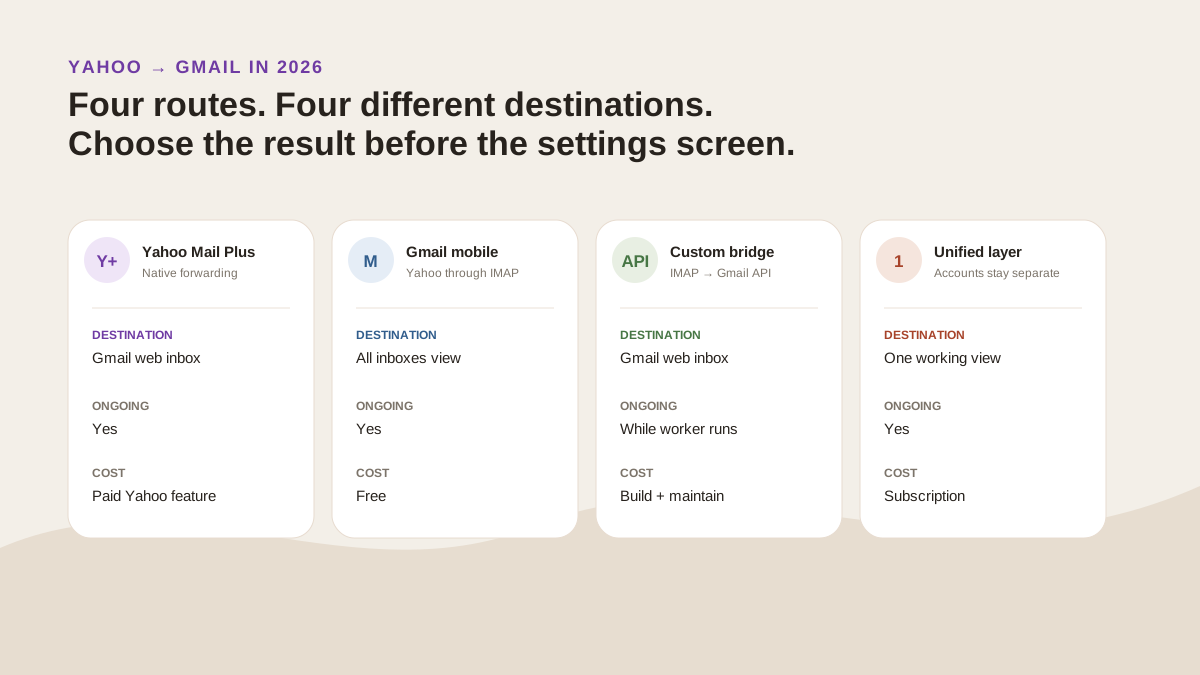
Four routes lead to different destinations. Only Yahoo Mail Plus forwarding and a custom API bridge put ongoing copies into the Gmail web mailbox. Original illustration for this guide.
Which Yahoo-to-Gmail method should you use?
Choose by the result you need, not by whichever settings screen an old tutorial happens to show.
| Method | Yahoo mail appears in Gmail web? | Ongoing new mail? | Price | Can reply as Yahoo? | Honest gap |
|---|---|---|---|---|---|
| Yahoo Mail Plus forwarding | Yes, as forwarded copies | Yes | Paid Yahoo Mail Plus feature | Not automatically; configure and test a sending identity separately | Not available in every locale |
| Yahoo in the Gmail mobile app | No; it appears in the app’s All inboxes view | Yes | Free | Yes, from the connected Yahoo account in the app | Mobile view, not a Gmail web import |
| Gmail one-time import | Yes | No durable sync | Free | Not automatically | History transfer, not a long-term forwarding system |
| Custom IMAP-to-Gmail API bridge | Yes, as imported messages | Yes, while the worker runs | Development and hosting cost | Not automatically | You own authentication, deduplication, retries and maintenance |
| MorningZero unified layer | No; mail stays in Yahoo and appears in MorningZero | Yes | Solo $19/month for 5 mailboxes | Replies stay tied to the source account | No iOS app; it is another working layer rather than Gmail itself |
The cheapest answer is not always the simplest. Gmail mobile is free and requires no custom service. Yahoo’s native forwarding costs money but keeps Gmail as the destination. The API bridge looks elegant on a diagram and becomes a small software product once it is running every day.
Why so many ranking instructions are now stale
We classified the first ten organic Google results for add yahoo mail to gmail on 21 August 2026, using US English, desktop results and personalisation turned off. The SERP also contained an AI Overview, People Also Ask, video, reviews and related searches.
At least 5 of the 10 results depended on Gmailify, Gmail’s retiring POP fetcher or historical Yahoo forwarding instructions. Three focused on migration or import rather than ongoing forwarding. One explained adding Yahoo to Gmail mobile. One was a video.
| Rank | Page | What it actually covers in August 2026 |
|---|---|---|
| 1 | Gmail Community: adding Yahoo to Gmail | Community thread describing the old Gmail web route |
| 2 | Yahoo: add another email to Gmail | Adding a non-Google account to the Gmail app |
| 3 | VaultMe: transfer Yahoo Mail to Gmail | Migration and paid transfer tooling |
| 4 | Reddit: importing Yahoo email | Forum discussion of import and POP-era setup |
| 5 | Google: Gmailify another account | First-party Gmailify instructions that Google is retiring |
| 6 | YouTube: add Yahoo to Gmail | Video walkthrough |
| 7 | YAMM: add Yahoo to Gmail | One-time import with temporary collection of new mail |
| 8 | Google Groups: forwarding Yahoo to Gmail | Historical Yahoo Mail Plus instructions |
| 9 | RecoveryTools: import Yahoo to Gmail | Migration methods and paid software |
| 10 | Medium: easiest Yahoo import | Recommends Gmailify, the route now being retired |
The pages are not all badly written. The platform underneath them moved. A current guide has to distinguish forwarding, viewing, importing and copying by API because those actions no longer share one Gmail setting.
Option 1: use Yahoo Mail Plus automatic forwarding
This is the direct answer when you want each new Yahoo message to arrive as a copy in your Gmail web inbox.
Yahoo’s current forwarding help says automatic forwarding requires Yahoo Mail Plus. It also says the option is unavailable in some locales. If Auto-forwarding is absent from your account, you cannot force it to appear with a Gmail setting. Yahoo is not the only provider that attaches a condition, and the conditions are not comparable: a six-provider audit of forwarding availability found two charging for it, one not documenting it at all, and one turning on two-step verification as a side effect.
The setup is short:
- Open Yahoo Mail and go to Settings.
- Choose Mailboxes and select the primary Yahoo mailbox.
- Enter the Gmail address under Auto-forwarding.
- Click Verify.
- Open the verification message in Gmail and complete the confirmation.
Send yourself two tests after setup: a fresh message and a reply to an existing conversation. Confirm where each arrives, whether the thread stays coherent and which address Gmail selects when you reply.
Forwarding changes delivery, not identity. The copy lands in Gmail, but Gmail does not automatically gain permission to send as the Yahoo address. If replies must come from Yahoo, configure a supported sending identity separately and test it before relying on the setup for client or business mail.
Option 2: add Yahoo to the Gmail mobile app for free
This is the honest free answer for most people who only need one place to read and reply on a phone.
Google’s current Gmail app instructions name Yahoo as a supported non-Gmail account. Add it from the profile menu, then choose All inboxes from the Gmail app menu. Yahoo and Gmail mail appear together, while each message keeps its source account.
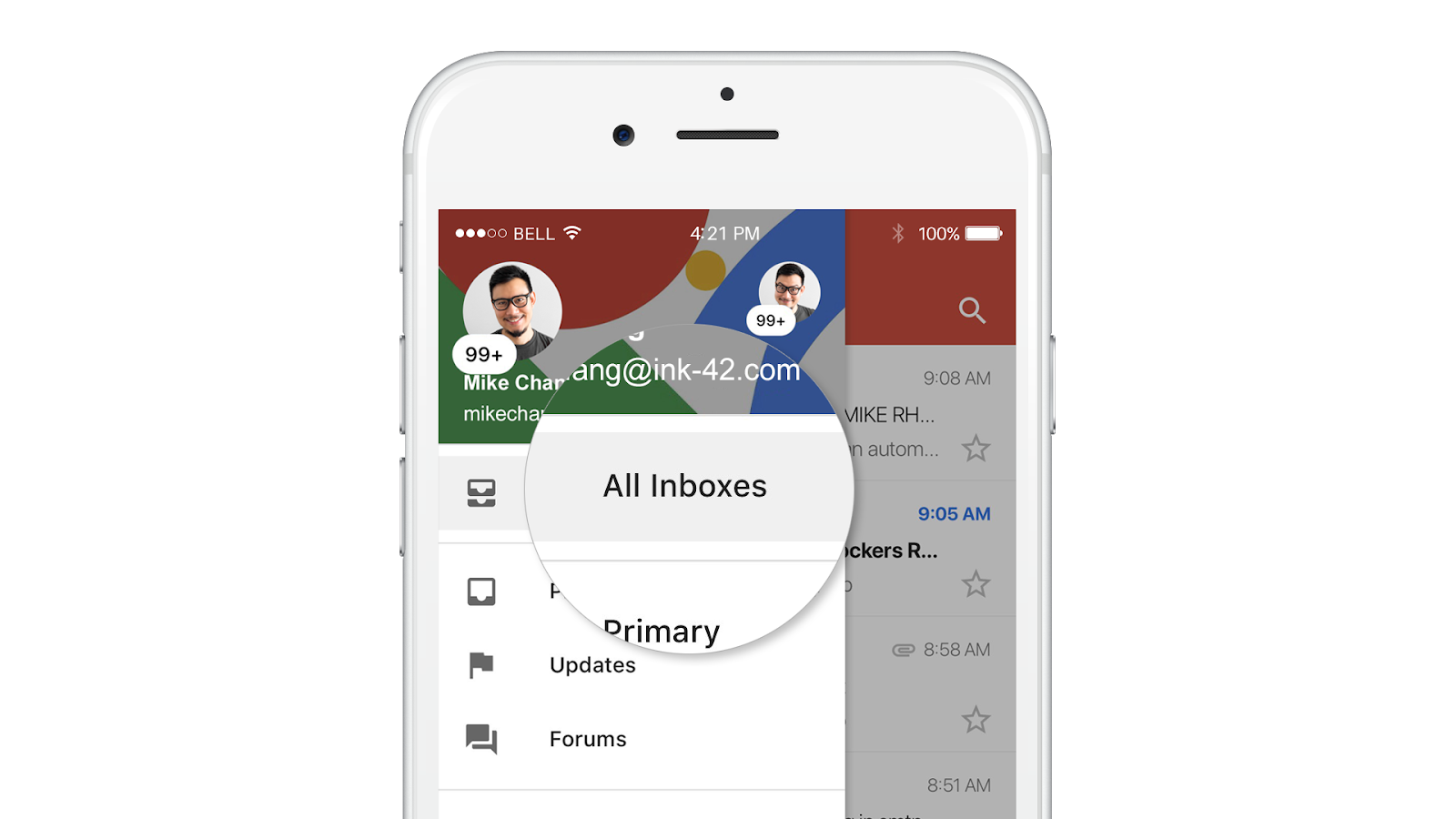
Google’s interface image shows the mobile All Inboxes view. Gmail Help separately confirms that Yahoo can be added as a non-Gmail account. Screenshot source: Google Workspace Updates; setup source: Gmail Help, checked 21 August 2026.
The catch is destination. The app reads Yahoo through its connection to Yahoo; it does not turn those messages into Gmail messages. Open Gmail on the web and the Yahoo mailbox is not suddenly part of the Gmail inbox.
That separation is often useful. You get one mobile list and can send from Yahoo without copying the archive or managing a forwarding rule.
Option 3: import old Yahoo mail once
Use import when the goal is history rather than an ongoing bridge.
Google says third-party mail and contacts can still be imported after Gmailify and POP fetching retire, but the import is one-time rather than continuous sync. Gmail’s computer setup guide places the tool under Settings → Accounts and Import → Import mail and contacts.
This is appropriate when you are leaving Yahoo, need an old archive searchable in Gmail, or want contacts moved before you stop using the address. It is not a dependable answer for every new message that arrives next month.
Keep the Yahoo account open until you have checked message counts, dates, folders and attachments. An import that says “complete” is not proof that the result contains every record you care about.
Option 4: build an IMAP-to-Gmail API bridge
A developer can recreate the useful part of forwarding without Yahoo Mail Plus: read messages from Yahoo through IMAP and insert copies into the user’s Gmail mailbox through the Gmail API.
The architecture is straightforward on paper:
- Connect to Yahoo’s IMAP server over SSL using the full Yahoo address and an app-specific password.
- Record a durable cursor, such as the last processed UID, and fetch each new raw RFC 822 message.
- Preserve the original headers, body, attachments and message date.
- Authenticate the destination Gmail user with OAuth.
- Call
users.messages.importfor delivery-like scanning, orinsertwhen bypassing most Gmail classification is intentional. - Store a stable source-to-destination mapping so retries cannot create duplicates.
- Keep the worker running, monitor failures and refresh or revoke credentials safely.
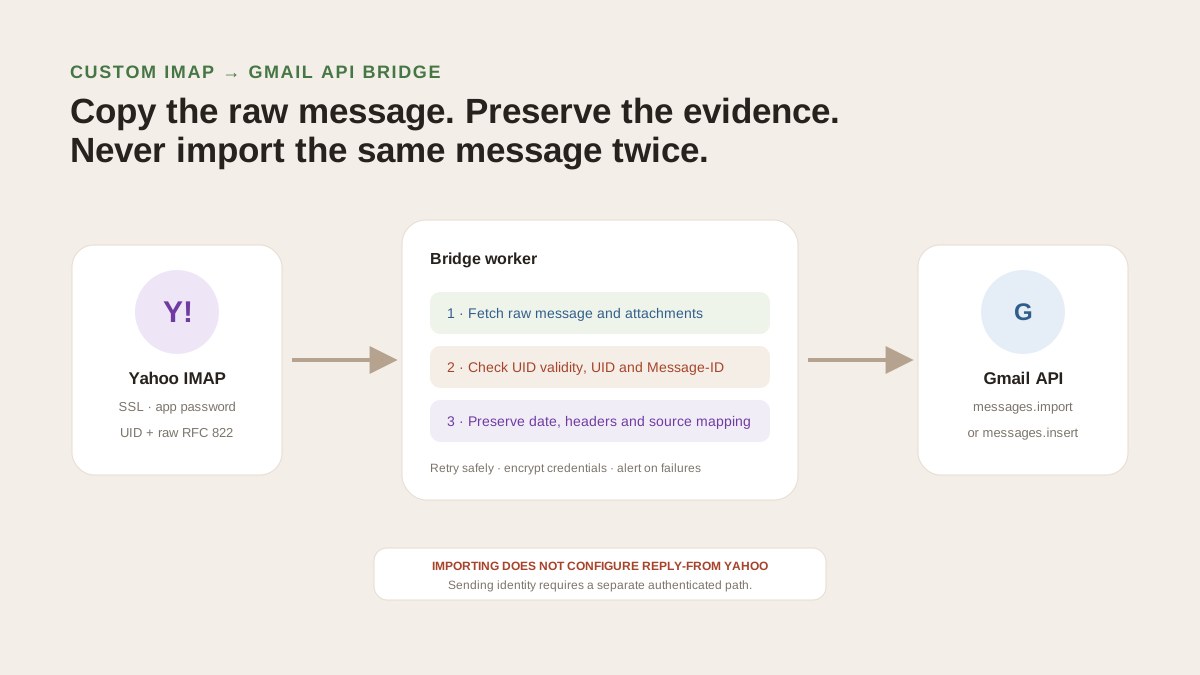
The bridge copies messages; it does not ask Yahoo to forward them. Gmail’s import method performs delivery-like scanning, while insert bypasses most scanning. Original diagram based on the official Yahoo IMAP and Gmail API documentation.
A few details decide whether this is reliable or annoying:
- Use raw messages. Rebuilding a message from parsed fields can lose headers, attachment metadata and threading clues.
- Preserve dates deliberately. Both Gmail methods expose an internal-date source option. Without it, a ten-year-old imported message can look newly received.
- Deduplicate before import. Track Yahoo UID validity, UID and Message-ID together; none is a perfect global identifier alone.
- Treat credentials as production secrets. Yahoo app passwords remain valid until revoked. Gmail OAuth tokens require secure storage and the narrowest practical scope.
- Expect edge cases. Gmail says
importdoes not perform SPF checks and can reject some spoof-like spam. The method accepts messages up to 150 MB. - Replies are separate. Importing a message does not configure Yahoo as a Gmail Send-as identity. Sending through Yahoo requires its own authenticated path.
- One-way is simpler. Copying new Yahoo messages into Gmail is manageable. Reflecting Gmail archive, delete, label and read-state changes back to Yahoo is a different synchronization project.
This route fits a developer who specifically wants Gmail to remain the system of record and is willing to own the bridge. For one person who only wants one screen, it is usually too much machinery.
Option 5: use a cross-provider unified layer instead of copying mail
The other design is to leave Yahoo mail in Yahoo and bring the working view together elsewhere.
MorningZero connects Yahoo through an app-specific password, then shows it beside Gmail, Google Workspace, Outlook, Microsoft 365 and other supported hosted IMAP accounts. Search, Triage, Ask Zero, Sweeps, rules and calendar work across the connected set. Messages stay tagged with the source mailbox, and drafts wait for confirmation before sending.
That is not an IMAP-to-Gmail importer. The Yahoo messages appear in MorningZero‘s unified stream rather than being written into the Gmail mailbox. The distinction should be explicit because it changes where your archive lives and which app becomes the place you work.
The limits are also explicit: no iOS app, no team assignments, no custom or self-hosted IMAP, and no direct Proton connection. Solo is $19 per month for 5 mailboxes; Stack is $29 for 15 and adds priority support. Both include the same core AI and workflow features, with no message limits or credits.
For the broader decision about keeping several accounts separate while combining the work, read How to Manage Multiple Email Accounts in One Place. The unified inbox guide compares provider-native and cross-provider approaches.
The short recommendation
Use Yahoo Mail Plus forwarding when Gmail on the web must receive every new Yahoo message and paying for Yahoo’s native feature is acceptable.
Use Gmail mobile All inboxes when you want a free combined phone view and do not need messages copied into Gmail.
Use one-time import when you are moving history.
Build the IMAP-to-Gmail API bridge only when Gmail must be the destination and someone will maintain the software.
Use a unified layer when the real goal is one working view across providers, not a second copy of every message.
Do not start a new Gmailify or POP-fetch setup from an old tutorial. Google has already closed that door to new users, and the remaining existing setups end in January 2027.
Frequently asked
How do I forward Yahoo Mail to Gmail in 2026?
For an ongoing copy in Gmail on the web, Yahoo's official forwarding feature requires Yahoo Mail Plus and is unavailable in some locales. Free alternatives are adding Yahoo to the Gmail mobile app through IMAP or importing old Yahoo mail once. A custom IMAP-to-Gmail API bridge can copy new messages continuously, but it requires development and secure credential handling.
Can I forward Yahoo Mail to Gmail for free?
Not through Yahoo's current automatic-forwarding setting: Yahoo says that feature requires Yahoo Mail Plus. You can add Yahoo to the Gmail mobile app for free and view both accounts under All inboxes, but that does not copy Yahoo messages into Gmail on the web. Gmail's import tool handles old mail but is not a durable live sync.
Does Gmailify still work with Yahoo Mail?
Google stopped accepting new Gmailify and POP-fetch users after the first quarter of 2026. Existing users can continue until January 2027. Google says the replacements are provider-side forwarding for Gmail on the web, adding Yahoo to Gmail mobile through IMAP, or a one-time import for existing mail.
Can the Gmail app show Yahoo and Gmail together?
Yes. Google documents adding Yahoo as a non-Gmail account in the Gmail apps for Android, iPhone and iPad. All inboxes then shows mail from the added accounts in one mobile view. The accounts remain separate, and this is not the same as copying Yahoo messages into the Gmail web mailbox.
Can a developer copy Yahoo messages into Gmail with the Gmail API?
Yes. A service can read Yahoo through IMAP, preserve each raw RFC 822 message, and add it to the user's Gmail mailbox with users.messages.import or insert. It must run continuously for new mail, prevent duplicates, preserve dates, retry failures and protect the Yahoo app password and Gmail OAuth token.
Does MorningZero forward Yahoo messages into Gmail?
MorningZero's public product pages describe a different workflow: connect Yahoo with an app-specific password and work with it beside Gmail in MorningZero's own unified stream. They do not claim that Yahoo messages are copied into the Gmail mailbox. Use it when one cross-provider working view matters more than keeping Gmail as the destination.