
IDN homograph attacks: Punycode examples, and a detector you can test yourself
In an IDN homograph attack, someone registers a domain whose Unicode letters pass for a trusted brand’s: a Cyrillic о sitting where a Latin o should be is invisible in most fonts. The obvious defence, flagging every xn-- (Punycode) domain, fell over in our 120-domain synthetic test. It caught two thirds of the attacks and also flagged a third of the legitimate domains we mixed in. Unicode skeleton matching did far better, though plain ASCII lookalikes such as morning-zero still needed a rule of their own.
MorningZero is an AI email client that unifies Gmail, Outlook, iCloud, Yahoo and IMAP inboxes. Lookalike-domain checks are one of the sender signals an inbox layer can show, so we tested what actually works.
What an IDN homograph attack looks like: аррӏе.com
In April 2017, researcher Xudong Zheng registered xn—80ak6aa92e.com. Decoded, it’s аррӏе.com, spelled entirely in Cyrillic letters. In Chrome, Firefox and Opera at the time, it displayed like apple.com. Chrome changed how it displays such domains shortly afterward.
Two things make it a good test case:
- Every letter is from one script. A rule that only looks for mixed Latin and Cyrillic misses it.
- Its skeleton is “apple”. Under the current Unicode 18 data,
аррӏеandapplereduce to the same comparison form, so skeleton matching catches it.
Every domain has a Unicode form and a DNS form
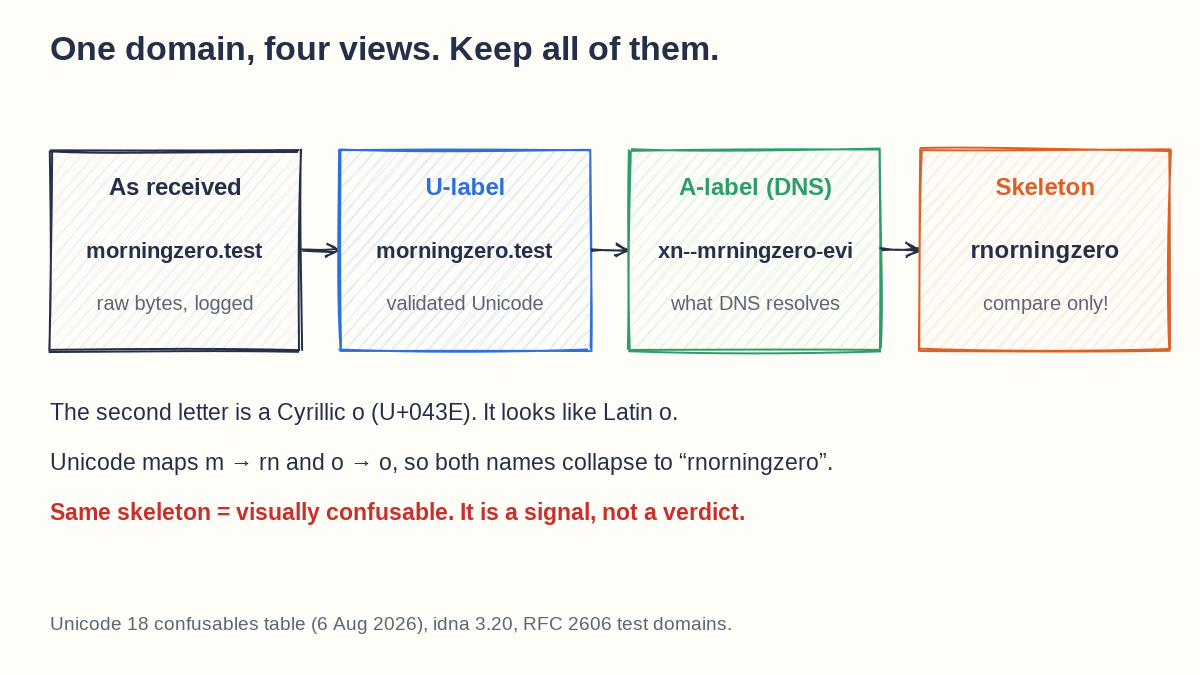
International domains can contain non-ASCII letters. You might see the U-label mоrningzero.test, where the second letter is a Cyrillic о (U+043E). DNS uses the A-label:
xn--mrningzero-evi.test
The xn-- prefix is only an encoding marker. It says nothing about intent.
A detector should keep three values:
- The raw hostname as received.
- The validated Unicode U-label.
- The ASCII A-label used for DNS.
Validate by round trip: decode the A-label, process it under a documented IDNA profile, encode it again and require the same result. Invalid labels go in their own error bucket, not into a fuzzy-match score. Our generator uses the Python idna library (3.20) with UTS #46 nontransitional processing and STD3 rules.
Unicode skeletons compare lookalike characters
Unicode Technical Standard 39 publishes a table of characters that can be visually confused. Applying it to a label produces a skeleton you can compare.
With the Unicode 18 data, Latin m maps to rn, and Cyrillic о maps to Latin o. So our protected label and the lookalike both reduce to:
rnorningzero
The skeleton is not a domain. Don’t show it to users, store it as an identifier or send it to DNS. It’s an internal value for one question: do these two labels look alike under this version of the table?
Pin the version, because the table changes. Our generator records the SHA-256 of confusables.txt dated 6 August 2026. We checked on 5 November 2026 that Unicode’s current file still has the same hash.
Rule 1: flag every Punycode domain
Our test set has 20 protected names. For each, the generator makes six domains:
- Attacks: a single lookalike character, a multi-character lookalike, and an ASCII hyphen insertion.
- Legitimate: the protected name itself, an unrelated real-looking international domain (like a
cafélabel), and a neighbouring ASCII name.
That’s 60 attacks and 60 legitimate domains.
Flagging anything whose A-label starts with xn-- reached 66.7% recall: it can’t see the ASCII hyphen attacks. Precision was also 66.7%, because every legitimate café-style domain is valid Punycode too. The rule confuses the technology with the threat.
Rule 2: flag mixed scripts
If a brand is normally written in one script, a label that mixes Latin and Cyrillic deserves a second look. On our set this rule caught every synthetic Cyrillic swap without a single false positive, which sounds better than it is.
Recall still stopped at 66.7%, because the ASCII hyphen attack never leaves Latin. And аррӏе.com, above, shows an attacker can skip mixing scripts altogether by spelling the whole label in Cyrillic.
There’s a cost on the other side too: block every mixed-script domain and you punish real international names. We’d treat script checks as one piece of evidence, read alongside the user’s language and the contacts they already have.
Rule 3: skeleton match
Comparing skeletons for exact equality caught both Unicode attack types at 100% precision and 66.7% recall, and it left the legitimate international and ASCII-neighbour domains alone.
The third it missed was, again, the ASCII hyphen family. That’s not a bug in the confusables table; it was never meant to catch inserted or deleted characters, swapped letters or extra words. Plenty of phishing domains are plain ASCII, morning-zero or morningzeromail for instance, and looking related doesn’t make them homograph attacks. Give them their own label in your data so the two problems don’t blur together.
Rule 4: add edit distance
Measuring edit distance between skeletons, with a threshold of one, caught both Unicode types and the hyphen insertion. On this generated set that gave perfect precision and recall.
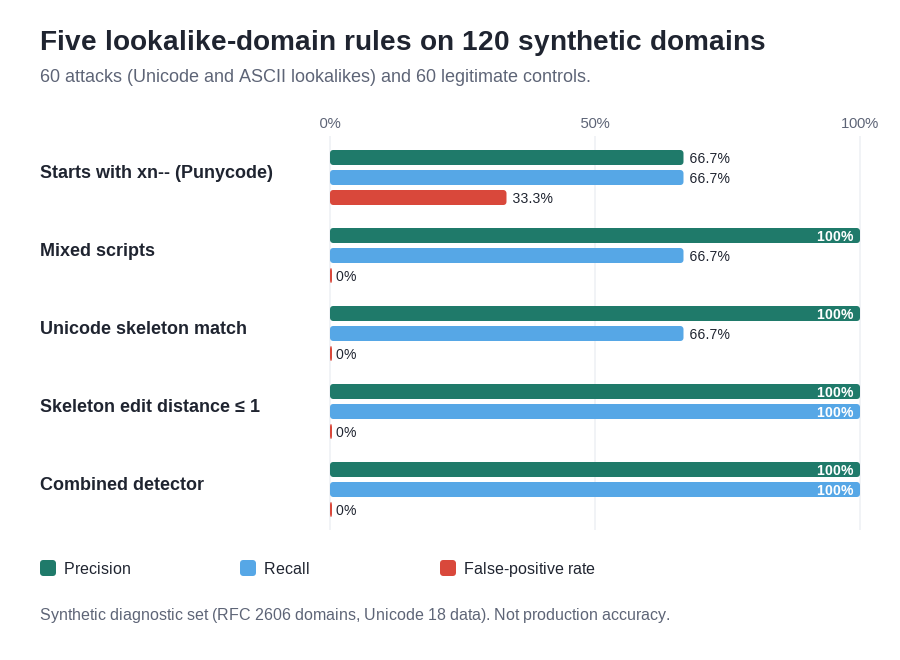
Perfect rows reflect transformations the generator knows about. Download the results.
That’s not proof of real-world accuracy. The legitimate controls were built to be more than one edit away, and every attack was built within one. Real traffic has brands one letter apart, short words, transliterations and regional domains the generator never imagined. Test the threshold against that before it blocks anything.
Compare the registrable domain, not the whole URL
A URL has more in it than the domain someone registered. A trusted brand can appear in the path, the query string or the user-info part before @, and subdomains can belong to a hosting platform.
Parse the URL with one documented library, take the hostname, validate every label and use a pinned Public Suffix List to find the registrable domain. Compare that against your protected names, and look at subdomains as a separate signal. Record it when parsers disagree; differences in how they handle backslashes, user info and percent-encoding can move where the hostname appears to start.
Certificate Transparency finds candidates, not verdicts
Certificate Transparency logs publish certificates as they’re issued, so a new lookalike name often shows up there before anyone receives mail from it. All a log entry proves, though, is that a certificate exists, not that the site ever went live, sent email or did anything malicious.
We’d use CT as a list of candidates: validate the names, find the registrable domain, run the skeleton and ASCII rules, and leave the result unlabeled until something else turns up. Call every lookalike certificate “phishing” and a useful early warning turns into a pile of false accusations.
Threat feeds don’t share one definition, or one licence
- PhishTank publishes a developer feed of verified, online phishing URLs.
- OpenPhish’s terms bar commercial use without permission, including security operations, detection, product development and automation.
- URLhaus tracks malware-distribution URLs, which is a different problem from phishing.
Being publicly downloadable isn’t the same as being licensed for your product. We didn’t use any of these feeds here. If you add them later, record the terms, retrieval time and hash, and keep phishing, malware, unlabeled CT and synthetic lookalikes as separate classes.
What the dataset contains
Each of the 120 rows records the protected domain and its skeleton, the Unicode candidate and its A-label, IDNA validity, the scripts used, the candidate skeleton, the edit distance, the ground truth, the output of every rule, and the date and SHA-256 of the confusables file.
The rows, generator, Unicode table snapshot and results are downloadable, and we recomputed every result from the rows on 5 November 2026. The Unicode table’s licence allows redistribution with its notice, which the snapshot keeps. All domains use RFC 2606 reserved names, and no live malicious page was visited.
Show the reason, not just a red flag
A single skeleton match is not a reason to silently delete a message. What we’d want in front of the reader is the evidence, put together:
- whether the skeleton matches a protected name,
- what the script check found,
- the ASCII edit distance,
- whether the domain only just appeared in CT logs,
- the message’s authentication results, and
- whether you’ve written to this domain before.
Then say it in plain words: “The domain uses a Cyrillic о. Its Unicode skeleton matches morningzero. The real domain is xn--mrningzero-evi.test.” That’s more useful than a red “unsafe” label, and it gives a legitimate domain a clean way to be allowlisted.
Where MorningZero fits
MorningZero can compare sender domains, authentication results and your correspondence history in one inbox. Lookalike detection is one narrow signal in that view.
It can’t replace browser Safe Browsing, DNS intelligence, a secure email gateway or your provider’s reputation systems, which see campaigns across millions of mailboxes.
A trusted name in front of an ordinary attacker domain is a different trick, covered in our display name spoofing tests.
Try MorningZero free for 14 days. Cancel anytime.
How we checked
We used Unicode 18 confusables.txt (dated 6 August 2026), UTS #39 skeletons, UTS #46 processing through idna 3.20, RFC 2606 reserved domains and a fixed generator seed. On 5 November 2026 we confirmed the Unicode file’s hash, recomputed the A-label and skeleton examples, and reread each source below.
Sources
- Unicode Technical Standard #39: Security Mechanisms
- Unicode Technical Standard #46: IDNA Compatibility Processing
- Unicode confusables data
- RFC 5890: Internationalized Domain Names for Applications
- RFC 9162: Certificate Transparency
- Xudong Zheng: Phishing with Unicode domains (2017)
- PhishTank developer information
- OpenPhish terms
- URLhaus API
Checked on 5 November 2026.
Frequently asked
What is an IDN homograph attack?
It is a lookalike domain built from Unicode characters that resemble the letters of a trusted name, such as a Cyrillic а in place of a Latin a. The app may show the Unicode form while DNS uses an ASCII form starting with xn--. In 2017 a researcher registered xn--80ak6aa92e.com, which is аррӏе.com written entirely in Cyrillic and displayed like apple.com in several browsers.
Does every xn-- domain mean phishing?
No. xn-- (Punycode) is the normal DNS form of every valid international domain. In our synthetic test, flagging every xn-- domain caught two thirds of the attacks and wrongly flagged a third of legitimate domains.
How can I see the real domain behind a link?
Don't click it. Copy the link and paste it into a plain-text editor, or hover over it and read the address your email app or browser shows. A domain that uses non-Latin letters shows up in its DNS form starting with xn--, which is a cue to look closer, though plenty of legitimate international domains look like that too.
What is a Unicode confusable skeleton?
Unicode Technical Standard 39 maps characters that look alike to a common comparison form called a skeleton. If two labels have the same skeleton, they are visually confusable under that version of the data. Skeletons are for comparison only, never for display or DNS.
How do I detect homograph domains in email?
Validate the domain with IDNA, keep the Unicode and ASCII forms, compare the Unicode skeleton against the names you protect, check for mixed scripts, and run a separate edit-distance check for ordinary ASCII lookalikes. Treat a match as a signal to explain to the user, not an automatic block.
Was customer email used to build this dataset?
No. All 120 rows use synthetic names, RFC 2606 reserved domains and the public Unicode 18 confusables table.
Try it on your own inboxes
Fourteen days free, every feature. Cancel anytime. Connect Gmail, Outlook, iCloud or Yahoo and see what lands in Needs you.
Start free trial