
Display name spoofing: five detection rules, tested on 200 messages
Display name spoofing is when an attacker writes a trusted name, say your CEO’s, in the From line and sends from an address they control. DMARC won’t catch it on its own; it looks at the domain and ignores the name. To see how far simple rules get, we ran five of them against 200 synthetic emails, and four ended up flagging 20% of legitimate mail, mostly outside consultants who happened to share a protected person’s name.
MorningZero is an AI email client that unifies Gmail, Outlook, iCloud, Yahoo and IMAP inboxes. We publish this because client-side sender checks are part of what an inbox layer can add, and their limits matter.
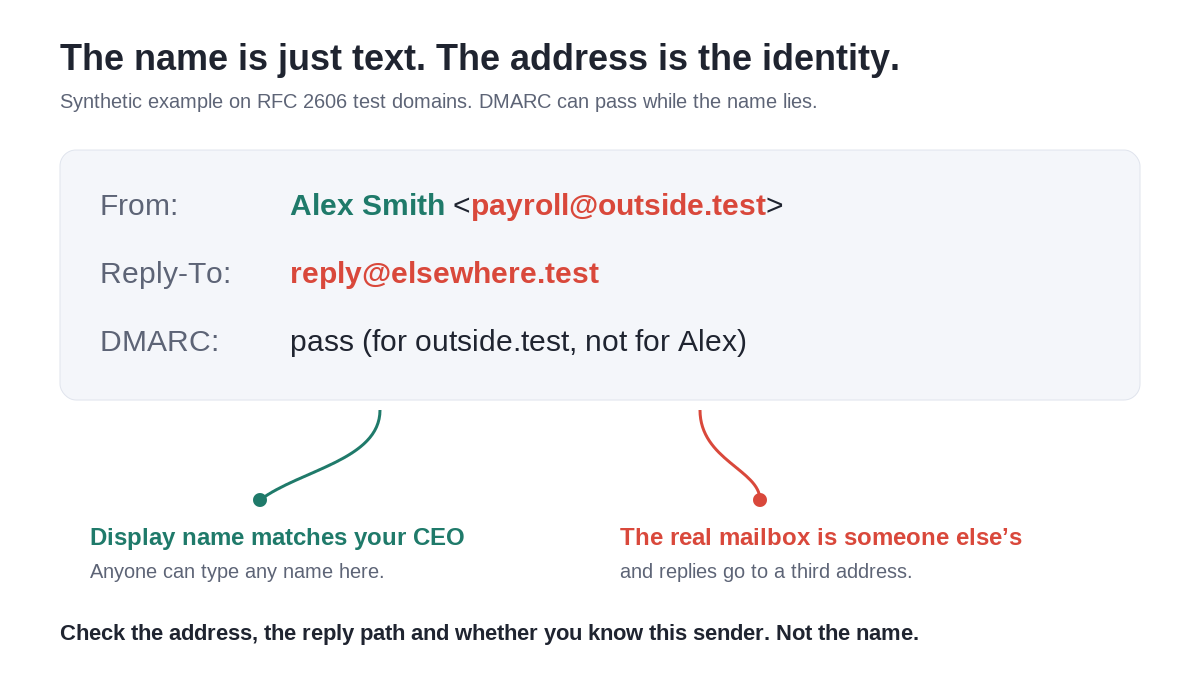
A synthetic example on RFC 2606 test domains. No customer mail was used.
Why display name spoofing gets past DMARC
An email address can carry a display name in front of it:
Alex Smith <payroll@outside.test>
Most email apps show “Alex Smith” in bold and fade the address, and on a phone you often don’t see the address at all until you tap the name. Anyone can type any name there.
The authentication checks don’t help with that:
- SPF checks the server that sent the message.
- DKIM checks the domain that signed it.
- DMARC checks that those line up with the domain in the From address.
None of them says the words “Alex Smith” belong to Alex. The current DMARC standard, RFC 9989 (which replaced RFC 7489), says so directly: DMARC does not address abuse of the display name or visually similar domain names.
A DMARC pass is still useful. It tells you which domain took responsibility for the message. It just isn’t proof of who the name refers to.
Rule 1: exact name match from an unknown address
List the people attackers are most likely to impersonate: executives, payroll, accounts payable, HR, the help desk. Normalize case and spacing. If a display name matches one of them but the address isn’t on that person’s approved list, flag it.
This catches the crude version: Alex Smith <random@outside.test>.
In our test set it reached 75% precision and 60% recall. It missed lookalike characters and addresses hidden inside the name.
Its 20 false positives were deliberate. Every protected person had a legitimate consultant elsewhere with the same name. A rule that blocks those has learned employee names, not impersonation.
Rule 2: normalize lookalike characters
“Alex Smith” can reach you in more than one spelling that looks identical on screen, thanks to Unicode and MIME encoding. We’d keep the raw header untouched, decode any encoded words, then apply NFC normalization and case folding. Only after that do we build a separate “confusable skeleton”, which maps lookalikes (a Cyrillic “а” for a Latin “a”, for instance) to one form.
Hold on to the original value, and log which of those steps produced the match, or you won’t be able to explain a flag later.
This rule reached 80% precision and 80% recall. It caught the lookalike-character attacks that exact matching missed, and it still flagged every same-name consultant. Normalizing text fixes representation, not identity.
Rule 3: an address hidden in the name
Some attackers put the trusted address inside the display name:
Alex Smith <alex.smith@corp.example> <random@outside.test>
The visible text includes the right domain. The real address doesn’t.
We pulled anything shaped like an email address out of the display name and compared it with the real one. That scored 100% precision and 20% recall: it never cried wolf, and it only ever caught this one trick. Worth having, as long as nobody mistakes it for full coverage.
Google’s own sender guidelines make the wider point. Display names “shouldn’t be misleading,” and a sender shouldn’t put emojis or images beside a name to suggest it has been verified.
Rule 4: name match plus a different Reply-To
Reply-To often points somewhere else for legitimate reasons, like mailing lists and ticketing systems, so a mismatch alone is weak. A protected-name match plus an external Reply-To is stronger.
This combination scored 80% precision and 80% recall, with the same consultant false positives as Rule 2.
The useful output is the evidence, not a verdict:
- The display name matches protected person Alex Smith.
- The From domain isn’t on the approved list.
- Reply-To points to a different external domain.
- DMARC passed, for the outside domain.
That lets a person or a policy decide, and makes it easy to add a safe exception.
All four together catch everything and still fail
Combining Rules 1 to 4 caught all 100 synthetic attacks. Precision was 83.3% because the same 20 consultants were flagged: a 20% false-positive rate on legitimate mail.
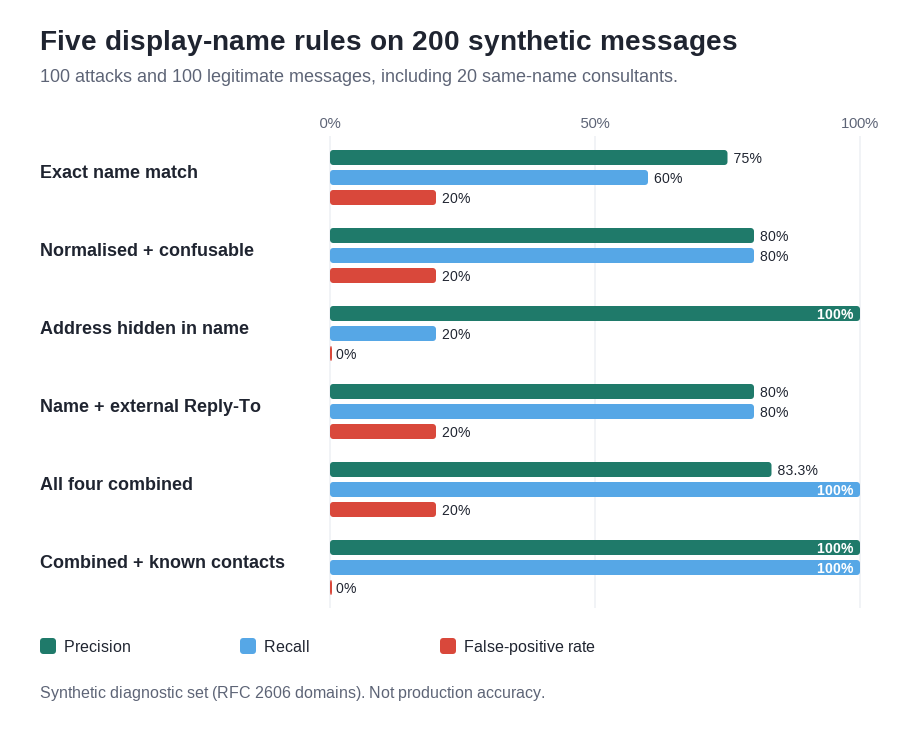
Synthetic diagnostic set, not production traffic. Download the per-rule results.
Adding a known-contacts list removed those false positives and gave a perfect score. Don’t read too much into that: the list was built knowing exactly which hard negatives were in the set. That is the point of publishing a synthetic test. It shows what the test proves and what it can’t.
What Gmail and Microsoft 365 already do
Your provider already does part of this, with data a single inbox app doesn’t have.
Microsoft 365. Every cloud mailbox gets spoof intelligence, the first contact safety tip and unauthenticated-sender indicators. Defender for Office 365 adds user impersonation protection, where you list up to 350 people to protect in each anti-phishing policy, and mailbox intelligence, which learns each person’s frequent contacts. That is the known-contacts idea from Rule 4, built in.
Gmail. Google publishes sender guidelines that say display names shouldn’t be misleading and that misuse “can impact email deliverability.”
Client-side rules are a layer on top, not a replacement for the provider’s filtering.
The test set is reproducible, not representative
The corpus has 20 synthetic protected people, five attack types each and five kinds of legitimate mail: 100 attacks and 100 legitimate messages.
- Attacks: exact name, case and spacing changes, lookalike characters, an address hidden in the name, and a mismatched Reply-To.
- Legitimate mail: authorized senders, aliases, same-name external consultants, unrelated vendors and ticketing systems.
Every address uses .test or .example, reserved by RFC 2606. No customer message, subject or address went into it. The generator, all 200 rows and results are public, and we recomputed the results from the rows on 5 November 2026.
Don’t quote these numbers as real-world accuracy. Real organizations have different names, assistants, languages and mail systems.
What a real evaluation needs
A production test set should include the hard cases:
- Two real people with the same name.
- Executive assistants and delegated senders.
- CRM, ticketing and newsletter Reply-To patterns.
- Transliterated names and legitimate names in more than one script.
- Changed surnames and alternative spellings.
- Personal addresses the recipient already knows.
- Mailing lists that rewrite headers.
Keep each person’s variants in the same split, so near-duplicates don’t leak between training and test. Report false positives per 100,000 messages, not only scores on a balanced set. Targeted attacks are rare, and a detector that interrupts ordinary external contacts every hour won’t stay switched on.
Report error rates by script and language too. Rules that work for English names can unfairly flag Arabic, Cyrillic or accented names.
Parse the header properly
Don’t pull the From name out with one regular expression. RFC 5322 allows quoted strings, comments, groups and multiple addresses. RFC 2047 adds encoded words, and RFC 6532 allows UTF-8 directly in headers.
Parse the structure first, then decode. Keep the raw bytes, the decoded value and the parser version. If two parsers disagree, mark the message as ambiguous instead of guessing.
A malformed From line can be suspicious, but old systems and mailing lists produce broken headers too. Give it its own reason, “From could not be parsed consistently,” rather than hiding it inside an impersonation score.
How to detect display name spoofing: a safe order for the rules
- Parse headers with a library that follows the RFCs, not a regular expression.
- Keep both the raw and the decoded value, so you can show what the reader actually saw.
- Give a malformed From line its own reason instead of folding it into a score.
- Check exact protected names against the addresses each person actually uses.
- Layer the normalized and lookalike checks over that.
- Count a Reply-To mismatch or an authentication result as a hint. On its own it proves nothing.
- Last, let known contacts and delegates clear the people who just share a name.
- Tell the reader why a message was flagged. Never delete it quietly.
Make each rule switchable and logged, so a false positive can be explained and one rule turned down without disabling the rest. Auto-deleting on a name match is the wrong default.
Where MorningZero fits
MorningZero sees sender identity, authentication results and thread history in your inbox. That lets it notice a narrow pattern a provider can miss, such as a familiar name arriving from an address you’ve never seen.
It doesn’t replace Gmail’s or Microsoft 365’s filtering, or a secure email gateway. Providers see sending infrastructure, reputation and campaign-wide patterns that one inbox can’t.
Lookalike domains are a separate problem with their own rules, covered in our IDN homograph attack guide.
Try MorningZero free for 14 days. Cancel anytime.
How we checked
We built the rules from RFC 5322, RFC 6532, RFC 2047, RFC 9989, Microsoft’s anti-phishing documentation and Gmail’s sender guidelines, all reread on 5 November 2026, and recomputed every metric from the published rows.
Sources
- RFC 9989: DMARC
- RFC 5322: Internet Message Format
- RFC 6532: Internationalized email headers
- RFC 2047: MIME encoded words
- Microsoft: Anti-phishing policies in Microsoft 365
- Gmail: Email sender guidelines
Checked on 5 November 2026.
Frequently asked
What is display name spoofing?
It is putting a trusted person's or company's name in the From line while the actual email address belongs to someone else, for example 'Alex Smith
Does DMARC stop display name spoofing?
No. RFC 9989, the current DMARC standard, says DMARC does not address abuse of the display name or visually similar domain names. DMARC can pass for an attacker's domain while the name impersonates your CEO.
How do I protect against display name spoofing in Office 365?
Microsoft Defender for Office 365 anti-phishing policies include user impersonation protection, where you list up to 350 people to protect per policy, plus mailbox intelligence, which uses each person's contact history. All Microsoft 365 mailboxes also get spoof intelligence and the first contact safety tip.
How can I spot display name spoofing myself?
Tap or hover over the sender's name to see the full address, and compare it with the address in earlier threads from that person. If a familiar name asks for money, gift cards or login details from an address you haven't seen before, check with them on another channel before you act.
What is the simplest display name spoofing rule?
Flag mail whose display name exactly matches a protected person but comes from an address not on that person's approved list. It catches crude attacks but also flags real people who share the name, so it needs known-contact context.
Was any customer email used in this test?
No. All 200 messages are synthetic and use RFC 2606 reserved domains such as .test and .example. The generator, rows and per-rule results are downloadable.
Try it on your own inboxes
Fourteen days free, every feature. Cancel anytime. Connect Gmail, Outlook, iCloud or Yahoo and see what lands in Needs you.
Start free trial