
Google CASA vs Microsoft verified publisher: what each email-app security badge proves
Google’s Marketplace security badge means an independent lab assessed the app at CASA Assurance Level 2, and it must be renewed every year. Microsoft’s blue verified-publisher badge means something narrower: Microsoft confirmed who the publisher is. Microsoft says plainly that the badge does not indicate app quality or security practices.
MorningZero is an AI email client that unifies Gmail, Outlook, iCloud, Yahoo and IMAP inboxes. We went through both companies’ programs because we hold both kinds of credential and wanted to be exact about what they mean.
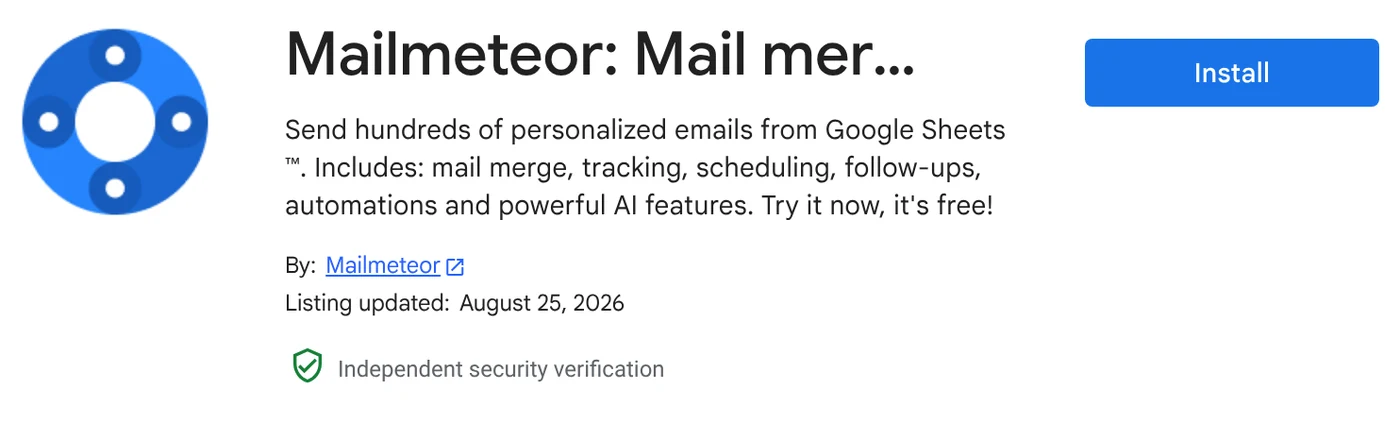
What the badge looks like on a real listing (Mailmeteor), captured 5 November 2026. Source: Google Workspace Marketplace.
The short version
| Badge or check | Who checks | What it proves | What it does not prove |
|---|---|---|---|
| Google OAuth verification | Google reviewed the scopes the app asks for and why | That the app’s systems are secure | |
| Google CASA assessment (AL1 or AL2) | An authorized lab | The app met CASA requirements at that level, this year | Anything about other products from the same company |
| Google Marketplace security badge | An authorized lab, at AL2 | Current AL2 assessment for that listing’s Cloud project | That every listing from the vendor has it |
| Microsoft verified publisher | Microsoft | The publishing organization is real and identified | App quality, certifications or security practices |
| Microsoft publisher attestation | The developer | The developer’s own answers on security and data handling | Independent review |
| Microsoft 365 App Certification | Microsoft | Microsoft reviewed security and compliance evidence | That the permissions fit your organization |
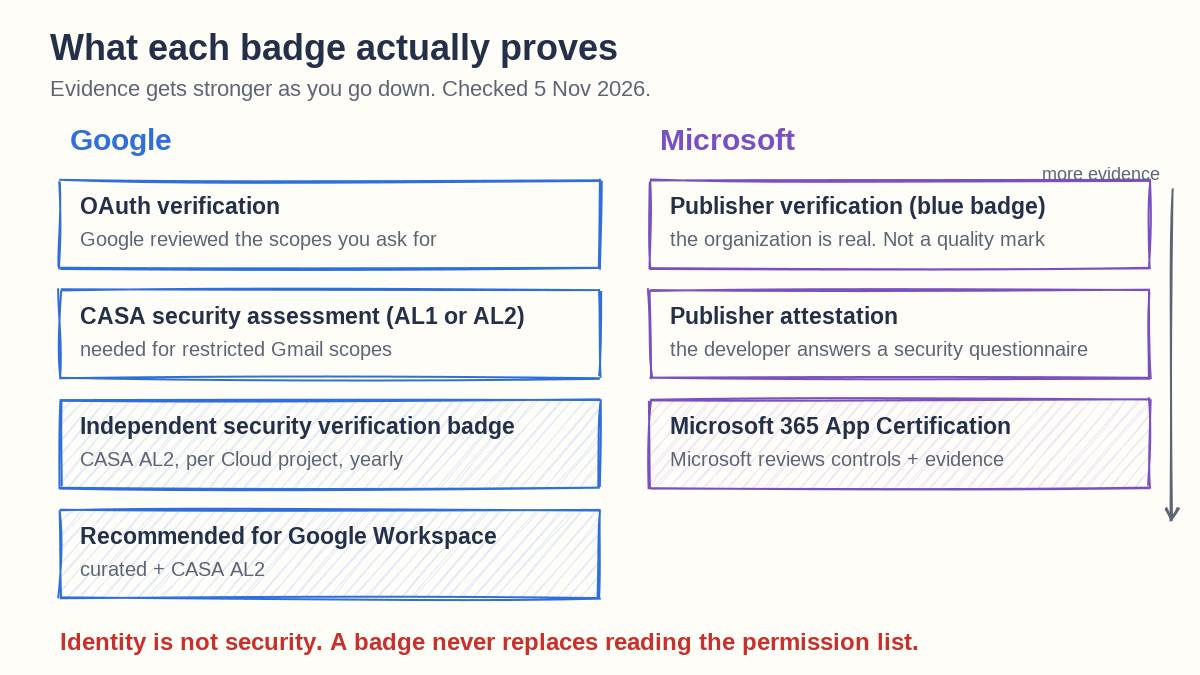
Google’s security badge requires CASA AL2
Google’s developer documentation is specific. To receive the independent security verification badge, “your app must receive Assurance Level 2 (AL2) of the Cloud Application Security Assessment (CASA).”
Three details matter more than the badge itself:
- It is tied to one Google Cloud project. A company with listings in several Cloud projects has to complete the assessment for each one.
- It expires. The developer must revalidate every year to keep the badge.
- It is not instant. Google says the badge can take up to three weeks to appear after a successful assessment.
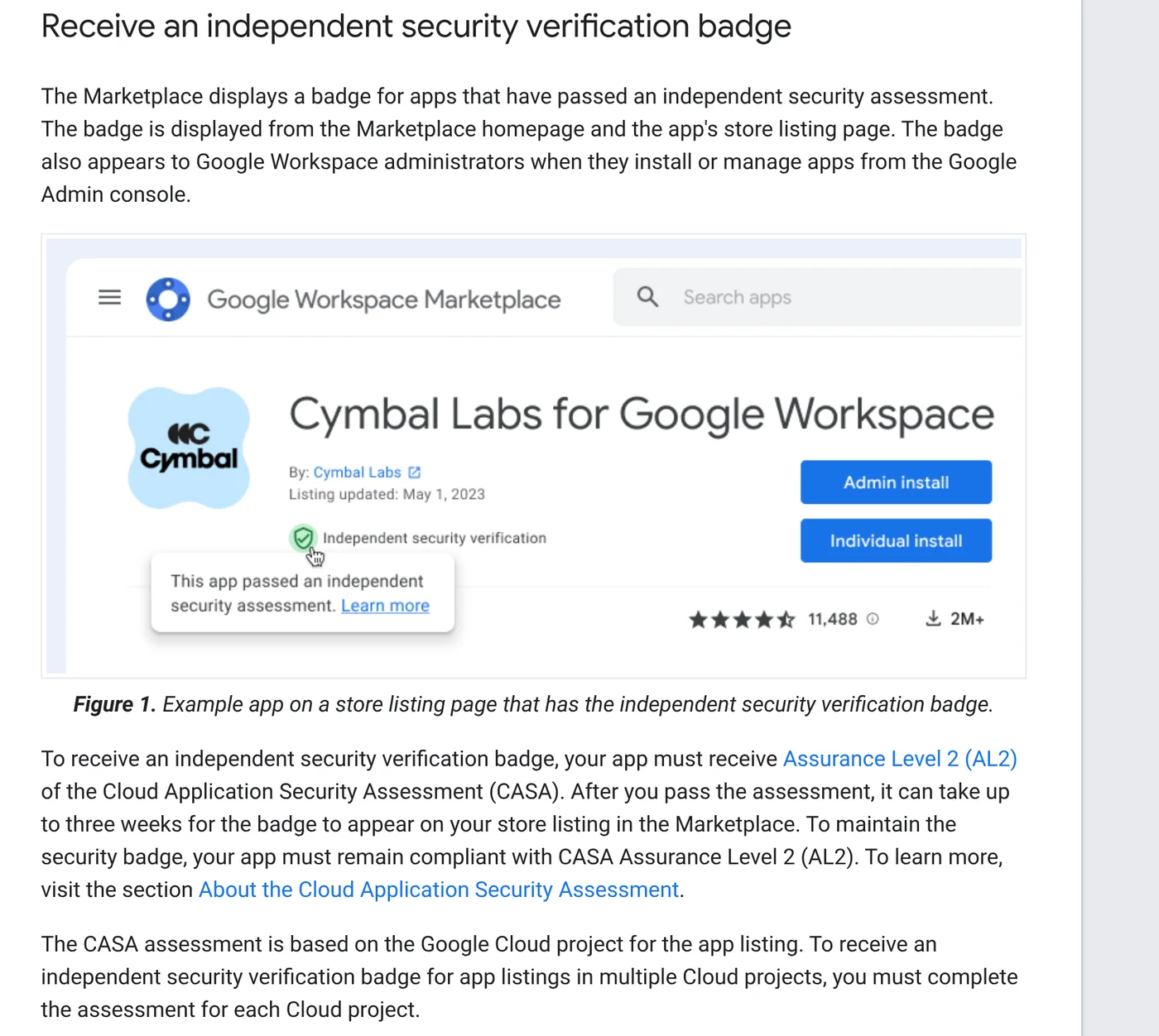
Google’s badge requirements, captured 5 November 2026. Source: Google Workspace Marketplace developer documentation.
“Recommended for Google Workspace” is a separate, curated program. Google picks a few apps each year, and accepted apps must also reach CASA AL2. So every Recommended app has the security badge, but a badged app is not automatically Recommended.
AL1 is a real assessment, but it doesn’t earn the badge
Any app that reads restricted Gmail data through its own servers must pass a CASA security assessment every year, badge or not. Google’s Cloud help says CASA assigns each app to AL1 or AL2 based on risk: user count, requested scopes and other signals. The required level can rise as an app grows.
The App Defense Alliance says every level has to meet the same CASA requirements. What changes between levels is how the lab tests them. Passing gets the developer a Letter of Validation from the assessor.
So an app can hold a valid AL1 assessment, which satisfies Google for Gmail API access, without qualifying for the Marketplace badge. Both are legitimate, but they are not the same claim.
”CASA Tier 2” and other names you’ll still see
Many vendor pages still say “CASA Tier 2” or “Tier 3”. Those names come from earlier App Defense Alliance documents. Google’s current help pages use AL1 and AL2.
Don’t assume one maps neatly to the other. When a vendor names a tier or level, ask for:
- The assurance level on the current Letter of Validation.
- The date it was issued. It has to be renewed every year.
- Which app or Cloud project it covers.
What does a CASA assessment cost? Google doesn’t publish a price. Its documentation says the developer must “cover any associated fees”, and the authorized labs set their own rates.
Microsoft’s blue badge verifies the publisher
Microsoft’s publisher verification links an app registration to an organization whose Microsoft AI Cloud Partner Program account has been verified. Once that’s done, a blue verified badge appears next to the app’s name on the Microsoft Entra consent screen and in admin pages.
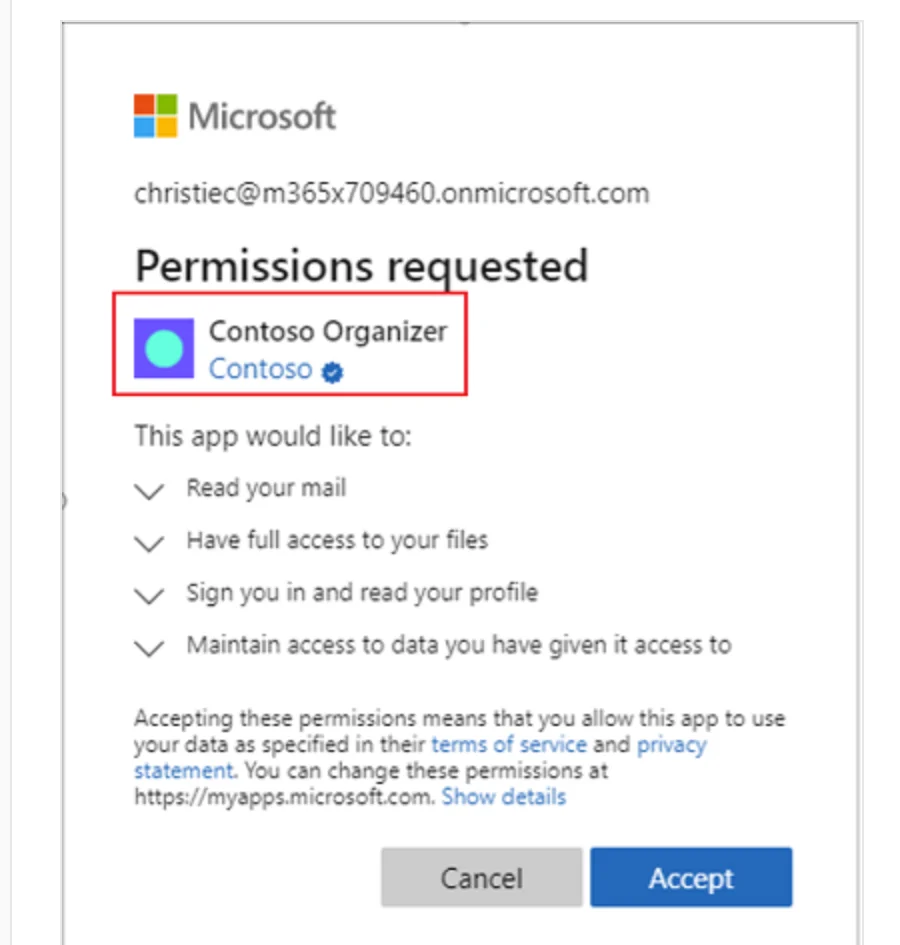
The blue badge sits next to the publisher name, above the permissions. Source: Microsoft Learn, Publisher verification, captured 5 November 2026.
That helps you tell a known company from an anonymous app registration, and admins can make it a condition in their consent policies. Microsoft doesn’t charge for it.
Microsoft says the badge is not a quality mark
Microsoft’s own FAQ says it directly:
“The blue verified badge doesn’t imply or indicate quality criteria you might look for in an app.”
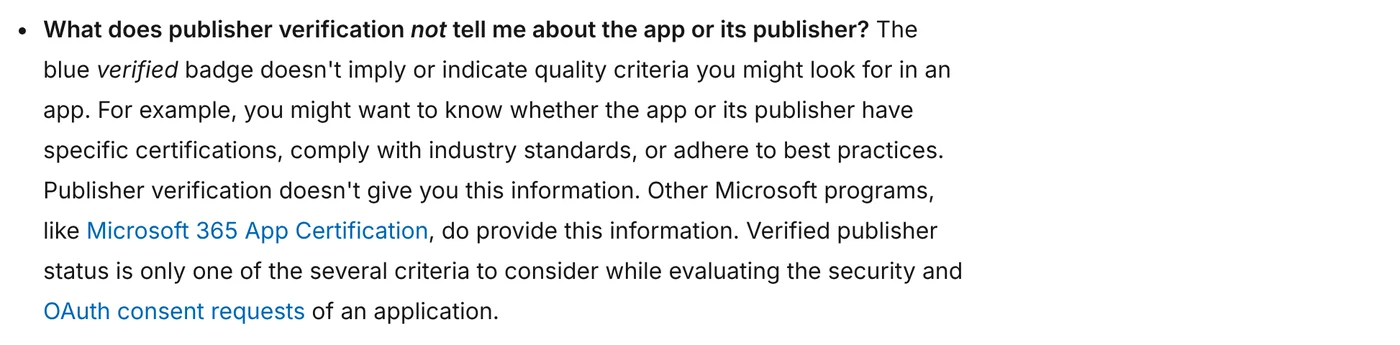
Microsoft’s own description of what the badge leaves out. Source: Microsoft Learn, captured 5 November 2026.
Microsoft points to two separate programs for that:
- Publisher attestation: the developer answers a questionnaire on security, data handling and compliance, and Microsoft publishes the answers. Nobody independently checks them.
- Microsoft 365 App Certification: Microsoft reviews the app’s security and compliance controls against supporting evidence.
A consent screen can show a verified publisher while asking for far more access than the job needs. The company is real. Whether to grant those permissions is still your decision.
A badge never replaces the permission list
The permission list says what an app can do once you click Accept. The badge says something about the publisher or the assessment. They answer different questions.
For email, read the consent text literally. “Read, compose, send and permanently delete all your email” is very different from “view the message you opened the add-on in.”
Before connecting an email app, we’d run through five questions, in roughly this order:
- Permissions. Which Gmail or Microsoft Graph scopes does it ask for, and does the feature you actually want need every one of them?
- Revocation. Can you cut it off from your Google or Microsoft account settings, without emailing the vendor?
- The privacy policy. Does it say anything concrete about AI training, retention and deletion, or only that the vendor “takes privacy seriously”?
- The badge itself. Is it current, and is it for this app and this Cloud project rather than a sibling product?
- The company. Which legal entity is responsible if something goes wrong?
If the vendor can’t answer the first two quickly, the rest rarely matters.
What six Marketplace listings show
We read six email-related Google Workspace Marketplace listings on 26 September 2026 and rechecked three on 5 November 2026. It’s a small illustration, not a survey.
| Listing | Badge on listing | What the description claims | Example permission |
|---|---|---|---|
| Mailmeteor | Yes (rechecked 5 Nov) | Minimal permissions | Run as a Gmail add-on |
| Yet Another Mail Merge | Yes (rechecked 5 Nov) | ISO 27001 | Read, compose and send Gmail messages |
| SafeToOpen | Not found (rechecked 5 Nov) | OAuth verification and a CASA assessment | Read, compose and send; view message when invoked |
| DocHub for Gmail | Not found | OAuth and encryption | Manage drafts and send when invoked |
| Mailtrack | Not found | An annual Google audit | Read, compose, send and permanently delete Gmail mail |
| Harmony Email and Collaboration | Not found | Phishing and data-loss protection | Broad Gmail mail and settings access |
“Not found” means we didn’t find the badge in the listing text. It doesn’t prove the app lacks an assessment. SafeToOpen, for example, describes a CASA assessment, which can be valid for Gmail API access without the Marketplace badge. The raw rows are downloadable as CSV.
Where MorningZero stands
Since this whole article tells you to read badges carefully, here is how ours read, as listed on our security page.
We completed a CASA assessment in August 2026: an authorized independent lab tested us against OWASP ASVS, which Google requires before an app can read Gmail through its own servers. That is the yearly API-access assessment, and we don’t claim the Marketplace security badge on top of it.
We’re a Microsoft verified publisher, so you’ll see the blue badge when you connect Outlook.com or Microsoft 365. By Microsoft’s own description that confirms who we are. It says nothing about how well we protect your data.
Our CSA STAR Level 1 entry went into the Cloud Security Alliance registry on 11 September 2026. It is a self-assessment, and nobody audited the answers.
Gmail and Outlook connect through Google’s and Microsoft’s own consent screens. Providers without OAuth, such as Yahoo or iCloud, use an app password you can revoke at the provider. Your mail isn’t used to train AI models, and drafts never send unless you press Send.
The honest gap is age. MorningZero launched in 2026. An assessment checks a defined set of controls at a point in time. It doesn’t replace a track record or your own review of the permissions.
For how Google’s data rules shape an email app’s design, see our clause-by-clause Limited Use guide.
Try MorningZero free for 14 days. Cancel anytime.
How we checked
We read each program’s official pages from a US connection on 5 November 2026 and saved the screenshots above. Where an earlier draft relied on a page that has since changed, we updated it. Google’s Marketplace page no longer contains a stray reference to “Tier 3” that appeared in September.
This isn’t legal or procurement advice. Programs, levels and badge wording change, so check the linked page before relying on a status.
Sources
- Google: Get your app featured in the Workspace Marketplace (security badge)
- Google Cloud Help: Security assessment for restricted scopes
- Google Workspace Marketplace Help: Evaluate an app
- App Defense Alliance: CASA assurance levels
- Microsoft Learn: Publisher verification
- Microsoft Learn: Microsoft 365 App Compliance Program
- MorningZero security page
Checked on 5 November 2026.
Frequently asked
What does Google's independent security verification badge mean?
It means the app's Google Cloud project passed a Cloud Application Security Assessment (CASA) at Assurance Level 2, carried out by an authorized third-party lab. The badge covers that Cloud project only and has to be revalidated every year. Checked on Google's developer documentation, 5 November 2026.
Is CASA Tier 2 the same as CASA AL2?
Not necessarily. Older App Defense Alliance material and many vendor pages use Tier 1 to Tier 3. Google's current pages assign restricted-scope apps to AL1 or AL2, and the Marketplace badge requires AL2. Ask the vendor for the exact assurance level and the date on its Letter of Validation instead of comparing tier names.
How much does a Google CASA assessment cost?
Google does not publish a price. Its documentation says the developer must cover any associated fees, and the authorized labs that perform the assessment set their own pricing.
What does Microsoft's blue verified-publisher badge mean?
It means Microsoft verified that the organization publishing the app is authentic, through its AI Cloud Partner Program, and linked that verified account to the app registration. Microsoft says the badge does not indicate app quality, certifications, compliance with industry standards or best practices.
Is a security badge enough to trust an email app?
No. Also check which mail permissions the app requests, what its privacy policy says about training, retention and deletion, how to revoke access at Google or Microsoft, and which company is legally responsible. A badge answers only one of those questions.
Try it on your own inboxes
Fourteen days free, every feature. Cancel anytime. Connect Gmail, Outlook, iCloud or Yahoo and see what lands in Needs you.
Start free trial