
Looking for a Spark Email Alternative? We Checked What Each One Actually Caps
Spark Mail is $0 for unlimited accounts, $10 for Plus and $20 for Pro, so price is rarely why people leave. The question about a Spark email alternative is what it caps. We read six on their pricing pages on 4 September 2026: five showed an annual rate first, and every one limits something the plan cards never mention.
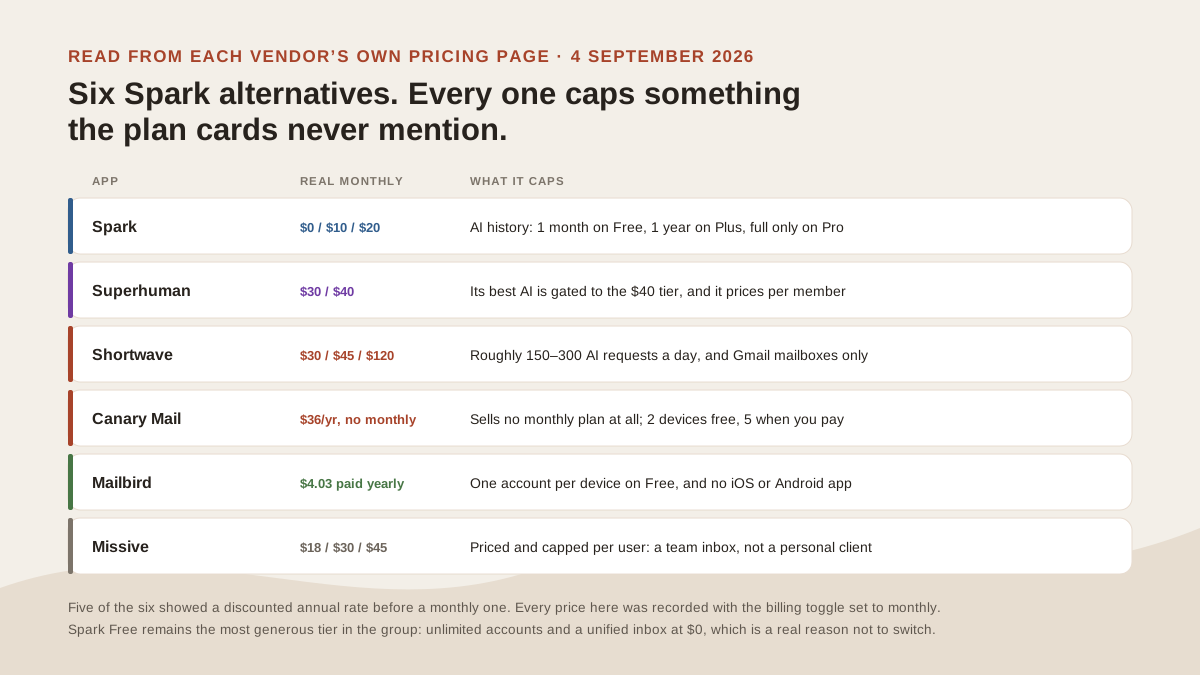
What each app limits, read from its own pricing page on 4 September 2026. Original illustration.
What Spark actually costs, and what its page shows first
Spark’s pricing page opens on the Yearly toggle. The first figures it shows are $8.25 and $16.58 per user per month, which are the annual rates: $99 a year for Plus, $199 for Pro.
Switch the toggle to Monthly and the real monthly prices appear: Plus $10, Pro $20, billed as $120 and $240 a year. Enterprise is quote-only. Free is $0 and, on a desktop browser, does not appear as a plan card at all. It shows up only as a column in the comparison table further down the page.
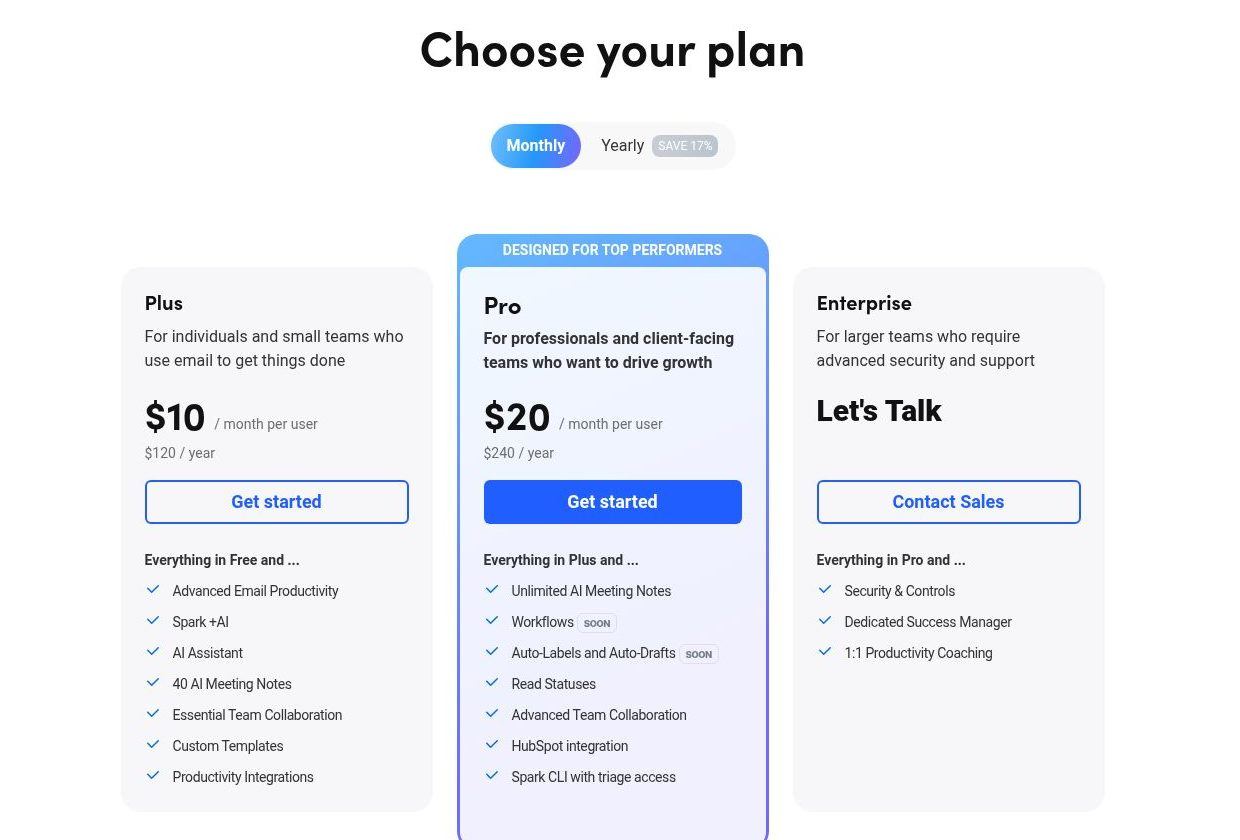
The same page shows $8.25 and $16.58 until you move the toggle off Yearly. Source: Spark pricing page, captured 4 September 2026.
That gap between the sticker and the monthly rate is not unique to Spark. It is the norm in this category, which is why every price in this article was recorded with the billing toggle set to monthly. Where a tool refuses to sell monthly, we say so.
Spark Free is the best free tier here, and that is a real reason to stay
Spark Free includes unlimited email accounts, a unified inbox, Smart Inbox, smart notifications and calendar, for nothing. Spark’s own FAQ puts it plainly: Spark Free “includes all the essential features for managing your inbox and connecting multiple accounts.”
For someone running four or five mailboxes who mainly wants them in one list, that is difficult to beat, and it is worth saying before any of the paid options: a lot of people searching for a replacement do not need one. No tool below gives you more accounts for less than $0.
Spark also has the mobile position nobody else in this group holds. Its own homepage cites an Apple Editors’ Choice award, 19.5 million downloads and a 4.6 rating on the iOS App Store. If your working day is mostly on an iPhone, that is the strongest argument in the whole comparison, and it is Spark’s.
The limit most people actually hit: how far back the AI can see
This is the cap worth knowing about, because it is invisible until you go looking for it. Spark tiers the AI Assistant by email history depth:
| Plan | How far back the AI Assistant can look |
|---|---|
| Free | 1 month of history |
| Plus ($10/mo) | 1 year of history |
| Pro ($20/mo) | Full email history |
| Enterprise | Full email history |
So the assistant on a free account cannot answer a question about a thread from last quarter, and on Plus it cannot reach a contract you signed two years ago. Nothing is broken when that happens, which is exactly why it is confusing.
Spark also meters AI by monthly credits, described on the comparison table as “Extended” on Plus and “High” on Pro, with no figure attached. Spark’s FAQ explains what happens at the ceiling: you “purchase a one-time add-on or wait until it automatically refills the next month,” with a notification when your balance hits 10%. Meeting Notes are capped separately at 5 for the lifetime of a free account, 40 a month on Plus, unlimited on Pro.
Superhuman: faster on one mailbox, and priced per person
Starter is $30 per member per month and Business is $40, billed monthly. Billed annually those drop to $25 and $33. Superhuman’s page also defaults to the annual view, and it discounts a further 15% for teams of five or more.
The split between tiers is the AI. Starter covers email productivity, calendar and collaboration. Business adds what Superhuman calls “our most advanced AI,” plus auto drafts, Ask AI, an MCP integration, custom auto labels and CRM integrations. If the AI is why you are switching, the entry tier is not the one you are comparing.
Superhuman is genuinely the fastest keyboard-driven inbox in this group, and for a single mailbox that speed is the product. The mismatch is structural: it charges per member, so cost scales with people, while a Spark user switching usually has one person and several mailboxes. Our longer look at Superhuman alternatives works through where that pricing model does and does not fit.
Shortwave: the most openly metered option here
Shortwave publishes its limits in more detail than anyone else in this comparison, which is to its credit even though the limits are tighter. Business is $30 per seat per month, Premier $45, Max $120, with a 14-day trial.
What scales across those tiers is almost entirely AI capacity:
| Business $30 | Premier $45 | Max $120 | |
|---|---|---|---|
| Daily AI requests | ~150–300 | 2× more | 6× more |
| Threads per AI search | 50 | 100 | 150 |
| AI search history | 5 years | Unlimited | Unlimited |
| AI filters | 3 | 10 | 50 |
Shortwave names the models behind each level, from Claude Haiku 4.5 at Basic up to Claude Opus 4.6 with adaptive thinking at Expert, and lists CASA Tier 2 compliance. The disqualifying detail for most Spark users is elsewhere: Shortwave is Gmail only. If you moved to Spark because it holds Gmail, Outlook, iCloud and Yahoo together, Shortwave cannot replace it regardless of price.
Canary Mail: the cheapest option, if you can commit for a year
Canary is the cheapest credible alternative here. Growth is $36 a year, about $3 a month, and Pro+ is $100 a year. The free plan includes a unified inbox and unlimited mail accounts on up to 2 devices; paid plans raise that to 5.
The condition is the billing. Canary’s own FAQ is unambiguous: “Canary Mail does not offer monthly subscriptions,” and “any monthly price shown on the pricing page is a monthly equivalent of the yearly plan, not a monthly billing option.” So the $3 figure is real arithmetic but not a real payment option — you pay $36 up front, or buy a lifetime licence.
Pro+ is where the security features sit: PGP encryption, SecureSend for HIPAA, phishing and impersonation detection. Canary states that emails are not used to train AI models and that AI features can be disabled. It covers macOS, iOS, Windows and Android.
Mailbird: cheapest per account on Windows, nothing on your phone
Premium is $4.03 per user per month paid yearly, discounted from a $5.75 list rate, or $99.75 as a one-time purchase against a $399 list price. Free is $0 but allows one email account per device, which makes it useless as a multi-account replacement. The free tier is not the comparison here; Premium is.
Premium lifts that to unlimited accounts across 3 devices per licence, with IMAP and POP3 support, and one licence covers both Windows and Mac on version 3.0 or newer.
The gap is mobile. Mailbird’s own FAQ says the Mac app is “not currently” available for iPads or iPhones and that mobile apps “are part of our future roadmap.” For a Windows-and-desktop worker who wants a tidy multi-account client rather than AI triage, Mailbird is the best value in this table. For anyone who reads mail on a phone, it is not a candidate.
Missive: a different product than the search results suggest
Missive turns up on every Spark alternatives list and is usually the wrong recommendation for the person reading one. Starter is $18 per user per month, Productive $30, Business $45, billed monthly; the page defaults to yearly, where the same tiers read $14, $24 and $36. There is a 30-day trial with no credit card.
Read the units and the mismatch is obvious. Missive prices per user and caps by user, 5 then 50 then unlimited, because it is a shared inbox and team collaboration tool. Its own plan descriptions say “for teams with simple needs,” “workflow needs,” “advanced needs.”
If several people need to work one support@ or hello@ address together, Missive is a strong product and the per-user price is fair. If you are one person with six mailboxes, you would be paying for collaboration you will never open. That is a different problem, and running multiple accounts as one person is the version of it most Spark users have.
The comparison, on the axes that decide it
Six alternatives and one of ours, on the axes that decide a switch: what you pay monthly, how many accounts you get, whether it holds mail from more than one provider, and what each gives up. Every price is the monthly rate wherever a monthly rate exists.
| App | Real monthly price | Accounts | Cross-provider | Platforms | The honest gap |
|---|---|---|---|---|---|
| Spark | Free, or $10 / $20 | Unlimited, even free | Gmail, Outlook, iCloud, Yahoo, Exchange, IMAP | Mac, Win, iOS, Android | AI history capped by plan; no Linux |
| Superhuman | $30 / $40 | Per member | Gmail and Outlook | Mac, Win, iOS, Android | Priced per person, not per mailbox |
| Shortwave | $30 / $45 / $120 | Per seat | Gmail only | Web, Mac, iOS, Android | Cannot hold a non-Gmail mailbox at all |
| Canary Mail | No monthly option | Unlimited, 2–5 devices | Major providers plus IMAP | Mac, Win, iOS, Android | Annual or lifetime billing only |
| Mailbird | $4.03 paid yearly | 1 free, unlimited paid | IMAP and POP3, Exchange | Windows and Mac only | No iOS or Android app |
| Missive | $18 / $30 / $45 | Per user | Email, SMS, social | Web, Mac, Win, iOS, Android | A team helpdesk product, not a personal client |
| MorningZero | $19 / $29 | 5 or 15, then $3 each | Gmail, Workspace, Outlook, M365, plus IMAP for Fastmail, iCloud, Yahoo, AOL, Zoho and more | Web, Mac, Win, Linux, Android | No iOS app; no custom or self-hosted IMAP; no free plan |
Two columns settle most switches. Shortwave’s Gmail-only limit rules it out for anyone holding a non-Gmail mailbox, whatever its AI can do. Mailbird’s missing mobile app rules it out for anyone who reads mail away from a desk, which is why the cheapest row here is not the bargain it looks like.
What to actually pick
Decide on the constraint that is binding you, not on the feature lists:
- You want more accounts for free. Stay on Spark. Nothing here beats unlimited accounts at $0, and switching costs you money for no gain.
- Spark’s AI cannot find your older mail. That is the plan history cap, not a bug. Spark Pro at $20 lifts it to full history; Shortwave Premier at $45 does the same if you are Gmail-only.
- You are on iPhone all day. Spark, or Canary if you want cheaper. Mailbird has no mobile app and we have no iOS app.
- You are on Linux. Spark does not ship a Linux app. Thunderbird is the free answer; a web-based client is the practical one.
- Several people share one address. Missive, and none of the personal clients above.
- One person, mailboxes across different providers, triaged before you open them. That is the case the next section covers.
Where a cross-provider layer fits
MorningZero is built for the last of those: one person whose mail is scattered across providers, sorted before they open it using rules written in plain English. Solo is $19/month for 5 mailboxes, Stack is $29 for 15, and extra mailboxes are $3 each with no cap. Gmail, Workspace, Outlook.com and Microsoft 365 connect through their own consent screens; Fastmail, iCloud, Yahoo, AOL, GMX, Web.de, Zoho, Yandex and Mail.com connect with an app-specific password you can revoke.
What it does is treat several mailboxes across different providers as one working surface, rather than one main account with the others feeding into it.
And where it does not, stated plainly
It is not the answer if you are leaving Spark to save money: Spark Free is $0 and we have no free plan. It is not the answer on an iPhone, because there is no iOS app, and Spark’s mobile experience is better than anything we could claim. Custom or self-hosted IMAP is not supported, and Proton needs Bridge on your own machine, so both are out.
If the shape of your problem is several providers rather than several accounts at one provider, the unified inbox explainer sets out what that pattern solves and what it does not, and the wider ten-tool comparison covers the field this article leaves out.
Pricing read from each vendor’s own page on 4 September 2026, with billing toggles set to monthly wherever a monthly option exists: Spark, Superhuman, Shortwave, Canary Mail, Mailbird, Missive. Spark platform coverage from its privacy policy, dated 20 July 2026. Prices move; click through before deciding anything.
Frequently asked
Is there a free alternative to Spark?
Spark itself has the strongest free tier in this group: $0 for unlimited email accounts and a unified inbox. Canary Mail's free plan also includes unlimited accounts and a unified inbox, capped at 2 devices. Mailbird's free plan allows only one email account per device, which defeats the point if you are switching for multi-account support.
How much does Spark cost per month?
Spark Plus is $10 per user per month and Spark Pro is $20, billed monthly. Billed yearly they work out to $8.25 and $16.58 per month, or $99 and $199 per year. The pricing page opens on the yearly view, so the first number you see is the discounted one.
What is the cheapest Spark alternative?
Canary Mail at $36 per year for its Growth plan, which is roughly $3 per month. The catch is that Canary does not sell monthly billing at all — its own FAQ states that any monthly price shown is a monthly equivalent of the yearly plan, so you commit for a year or buy a lifetime licence.
Why does Spark's AI only find recent emails?
Spark caps how far back the AI Assistant can look by plan. On Free it sees one month of history, on Plus one year, and only on Pro and Enterprise does it see your full email history. If the assistant cannot find something you know exists, plan history depth is the first thing to check.
Does Spark work on Linux?
No. Spark's own privacy policy names Mac, iOS, Android and Windows as the platforms its app covers. If you need Linux, Thunderbird is the established free option, and among paid tools a web-based client is usually the practical route.
Is Spark or Superhuman better for multiple accounts?
Spark, on cost. Spark handles unlimited accounts on its free plan, while Superhuman charges per member and starts at $30 per month billed monthly. Superhuman is faster on a single mailbox and has the stronger keyboard-driven workflow, so the trade is speed on one account against breadth across several.